Title: vue源码简析 · Issue #9 · wython/wython.github.io · GitHub
Open Graph Title: vue源码简析 · Issue #9 · wython/wython.github.io
X Title: vue源码简析 · Issue #9 · wython/wython.github.io
Description: 通常,看源码之前会想,我们使用Vue的时候,究竟发生了什么。我们知道,每一个vue组件就是一个Vue对象。所以,应该从Vue构造函数出发。 new Vue({ el: '#app' }) 构造函数的入口,在源码的src/core/instance/index.js中: import { initMixin } from './init' import { stateMixin } from './state' import { renderMixin } from '....
Open Graph Description: 通常,看源码之前会想,我们使用Vue的时候,究竟发生了什么。我们知道,每一个vue组件就是一个Vue对象。所以,应该从Vue构造函数出发。 new Vue({ el: '#app' }) 构造函数的入口,在源码的src/core/instance/index.js中: import { initMixin } from './init' import { stateMixin } from ...
X Description: 通常,看源码之前会想,我们使用Vue的时候,究竟发生了什么。我们知道,每一个vue组件就是一个Vue对象。所以,应该从Vue构造函数出发。 new Vue({ el: '#app' }) 构造函数的入口,在源码的src/core/instance/index.js中: import { initMixin } from './init' import { st...
Opengraph URL: https://github.com/wython/wython.github.io/issues/9
X: @github
Domain: patch-diff.githubusercontent.com
{"@context":"https://schema.org","@type":"DiscussionForumPosting","headline":"vue源码简析","articleBody":"通常,看源码之前会想,我们使用Vue的时候,究竟发生了什么。我们知道,每一个vue组件就是一个Vue对象。所以,应该从Vue构造函数出发。\r\n``` javascript\r\nnew Vue({\r\n el: '#app'\r\n})\r\n```\r\n\r\n构造函数的入口,在源码的src/core/instance/index.js中:\r\n```javascript\r\n\r\nimport { initMixin } from './init'\r\nimport { stateMixin } from './state'\r\nimport { renderMixin } from './render'\r\nimport { eventsMixin } from './events'\r\nimport { lifecycleMixin } from './lifecycle'\r\nimport { warn } from '../util/index'\r\n\r\nfunction Vue (options) {\r\n if (process.env.NODE_ENV !== 'production' \u0026\u0026\r\n !(this instanceof Vue)\r\n ) {\r\n warn('Vue is a constructor and should be called with the `new` keyword')\r\n }\r\n this._init(options)\r\n}\r\n\r\ninitMixin(Vue)\r\nstateMixin(Vue)\r\neventsMixin(Vue)\r\nlifecycleMixin(Vue)\r\nrenderMixin(Vue)\r\n\r\nexport default Vue\r\n```\r\n\r\n这个函数定义一个简单的vue构造函数,然后通过一系列方法分类注入对应功能模块的方法。其中一开始调用的this._init方法。该方法定义在initMixin之中。也就是src/core/instance/init.js中的_init方法:\r\n\r\n```javascript\r\nexport function initMixin (Vue: Class\u003cComponent\u003e) {\r\n Vue.prototype._init = function (options?: Object) {\r\n const vm: Component = this\r\n // a uid\r\n vm._uid = uid++\r\n\r\n let startTag, endTag\r\n /* istanbul ignore if */\r\n if (process.env.NODE_ENV !== 'production' \u0026\u0026 config.performance \u0026\u0026 mark) {\r\n startTag = `vue-perf-start:${vm._uid}`\r\n endTag = `vue-perf-end:${vm._uid}`\r\n mark(startTag)\r\n }\r\n\r\n // a flag to avoid this being observed\r\n vm._isVue = true\r\n // merge options\r\n if (options \u0026\u0026 options._isComponent) {\r\n // optimize internal component instantiation\r\n // since dynamic options merging is pretty slow, and none of the\r\n // internal component options needs special treatment.\r\n initInternalComponent(vm, options)\r\n } else {\r\n vm.$options = mergeOptions(\r\n resolveConstructorOptions(vm.constructor),\r\n options || {},\r\n vm\r\n )\r\n }\r\n /* istanbul ignore else */\r\n if (process.env.NODE_ENV !== 'production') {\r\n initProxy(vm)\r\n } else {\r\n vm._renderProxy = vm\r\n }\r\n // expose real self\r\n vm._self = vm\r\n initLifecycle(vm)\r\n initEvents(vm)\r\n initRender(vm)\r\n callHook(vm, 'beforeCreate')\r\n initInjections(vm) // resolve injections before data/props\r\n initState(vm)\r\n initProvide(vm) // resolve provide after data/props\r\n callHook(vm, 'created')\r\n\r\n /* istanbul ignore if */\r\n if (process.env.NODE_ENV !== 'production' \u0026\u0026 config.performance \u0026\u0026 mark) {\r\n vm._name = formatComponentName(vm, false)\r\n mark(endTag)\r\n measure(`vue ${vm._name} init`, startTag, endTag)\r\n }\r\n\r\n if (vm.$options.el) {\r\n vm.$mount(vm.$options.el)\r\n }\r\n }\r\n}\r\n```\r\n可以先把重点放在上\r\n```javascript\r\n...\r\n initLifecycle(vm)\r\n initEvents(vm)\r\n initRender(vm)\r\n callHook(vm, 'beforeCreate')\r\n initInjections(vm) // resolve injections before data/props\r\n initState(vm)\r\n initProvide(vm) // resolve provide after data/props\r\n callHook(vm, 'created')\r\n...\r\n\r\nif (vm.$options.el) {\r\n vm.$mount(vm.$options.el)\r\n}\r\n...\r\n```\r\n这里可以探讨一下第一个话题,也就是生命周期,如以上所见,我们看到两个钩子函数,分别是beforeCreate和created。看过官方提供的生命周期图片的同学,应该在这里会有更清晰的感受。那这里就放一下官方给的图片:\r\n\r\n\r\n可以看到,在beforeCreate之前,官方给的描述是初始化事件\u0026生命周期,这个描述对应的源码就是上面的 initLifecycle(vm) --\u003e initEvents(vm) --\u003e initRender(vm)\r\n这几个步骤。\r\n\r\ninitLifecycle方法主要就是给vm实例添加上生命周期的相关属性,其实现如下:\r\n```javascript\r\nexport function initLifecycle (vm: Component) {\r\n const options = vm.$options\r\n\r\n // locate first non-abstract parent\r\n let parent = options.parent\r\n if (parent \u0026\u0026 !options.abstract) {\r\n while (parent.$options.abstract \u0026\u0026 parent.$parent) {\r\n parent = parent.$parent\r\n }\r\n parent.$children.push(vm)\r\n }\r\n\r\n vm.$parent = parent\r\n vm.$root = parent ? parent.$root : vm\r\n\r\n vm.$children = []\r\n vm.$refs = {}\r\n\r\n vm._watcher = null\r\n vm._inactive = null\r\n vm._directInactive = false\r\n vm._isMounted = false\r\n vm._isDestroyed = false\r\n vm._isBeingDestroyed = false\r\n}\r\n```\r\ninitEvent方法是绑定vue提供的事件接口$once, $emit, $on, $off。\r\n\r\n而在beforeCreate钩子之后,才真正执行注入和初始化数据的操作。这个时候,我们可以提出一个疑问:\r\nbeforeCreate钩子里面能拿到prop和data吗?\r\n我想看了上面的图或者代码,可以知道initState是在beforeCreate后面。\r\n同时,也可以提出第二个疑问:\r\nvue依赖收集发生在哪个阶段?\r\n关于依赖收集应该是第二个话题,也就是vue双向绑定和监听的原理。\r\n\r\n### 响应式原理\r\n接着上面的代码走,应该看initState了,initState涉及到响应式。看过文章应该大多数都知道,vue采用Object.defineProperty方式实现响应式。但是要具体搞懂整个流程走向可远不止于此。对于defineProperty的使用不是很了解自行科普。这里不花时间接受这个属性。这一切发生在上面的initState方法里面。\r\n\r\n同时,先不直接看代码流程,先看官方给的图。官方也给了响应式数据流向图。\r\n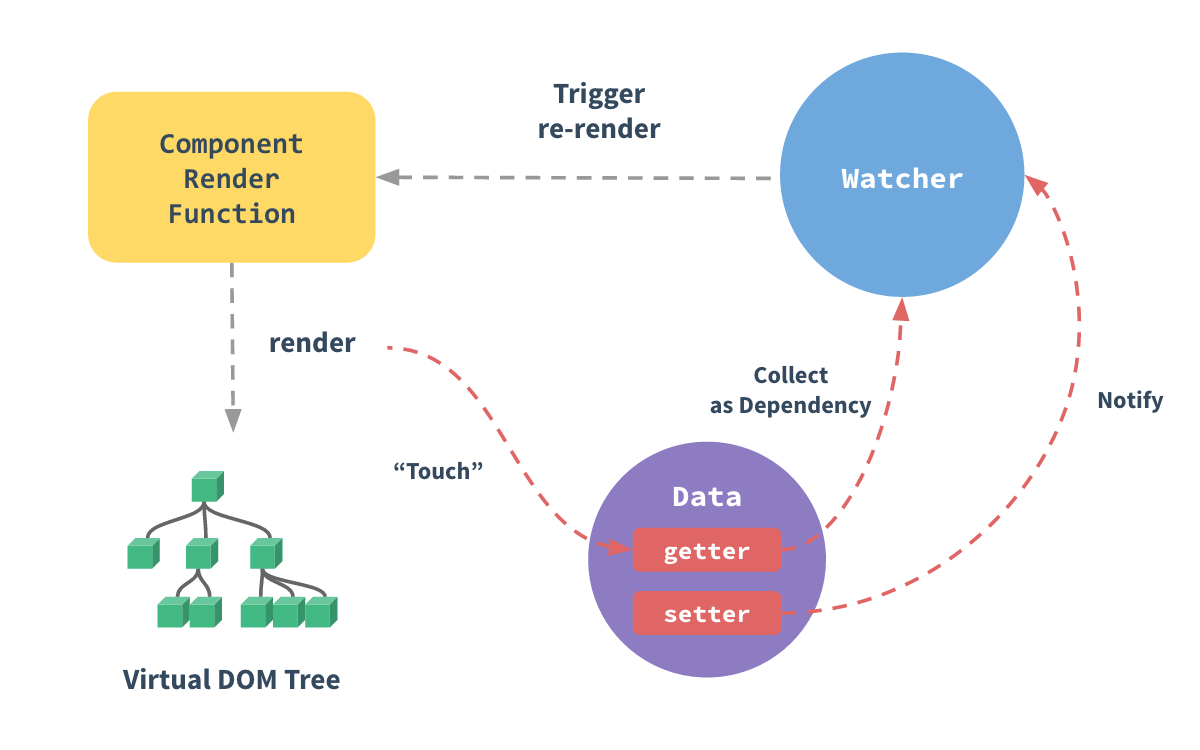\r\n\r\n我自己也整理了响应式结构,先看看大体的结构如图:\r\n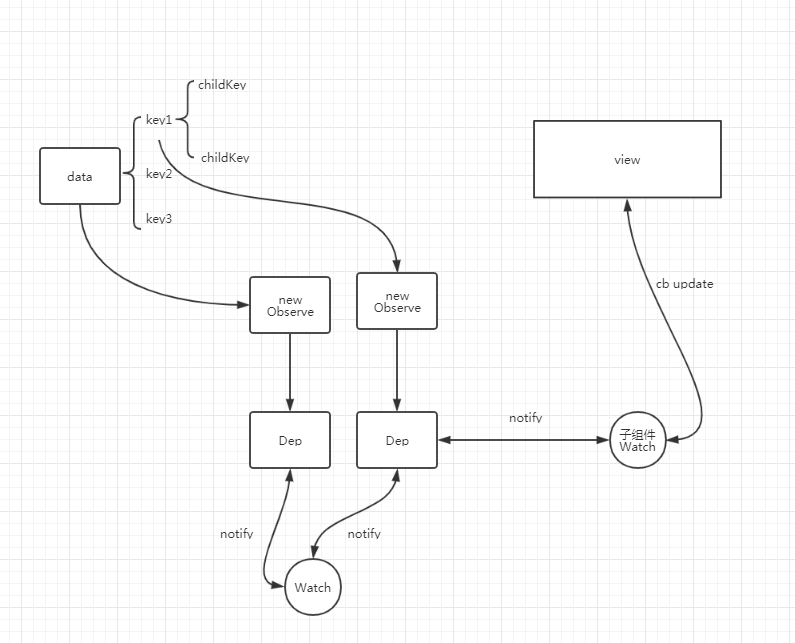\r\n\r\ninitState中的调用步骤如图:\r\n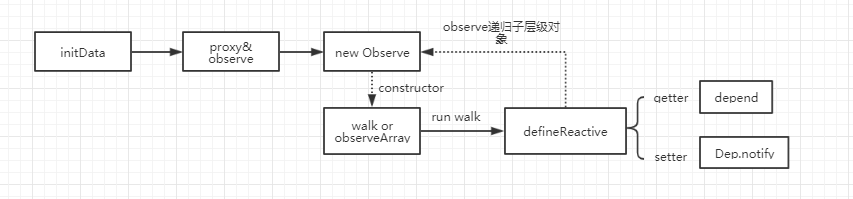\r\n\r\n看上图,也就是说initState中会调用initData初始化用户定义的data数据,\r\n1. 通过proxy方法会给vm对象(new Vue产生的实例)挂上对应data上的所有属性。\r\n2. 之后调用observe(data)监听data上的数据。observe是判断是否有Observe对象,如果没有则创建。\r\n3. Observe构造函数中,会判断data是对象还是数组,如果是对象直接调用walk函数,如果是数组循环调用walk函数。walk函数会循环对象的key对每一个key,value调用defineReactvive函数。\r\n4. defineReactive函数就是调用defineProperty初始化访问器属性getter,setter。\r\n5. 在getter中会定义依赖收集的方法。在setter中会调用dep.notify更新所有watch相应数据。\r\n\r\n这里比较难理解是依赖收集的实现方式,就是收集的时机。收集是在Watch对象构造函数中构造时候收集的,至于什么时候构造Watch对象,有以下几个场景:\r\n1. 组件挂载前,会调用new Watch去执行,并且在Watch中会回调render函数,在render时候会做收集\r\n2. 计算属性在定义时候\r\n3. watch的属性定义时候\r\n\r\n在initData中就是步骤1\r\n\r\n到这里,initData的代码就整理完了,接下来贴上真正的源码验证我上面所说的。\r\n首先initState方法如下:\r\n```typescript\r\nexport function initState (vm: Component) {\r\n vm._watchers = []\r\n const opts = vm.$options\r\n if (opts.props) initProps(vm, opts.props)\r\n if (opts.methods) initMethods(vm, opts.methods)\r\n if (opts.data) {\r\n initData(vm)\r\n } else {\r\n observe(vm._data = {}, true /* asRootData */)\r\n }\r\n if (opts.computed) initComputed(vm, opts.computed)\r\n if (opts.watch \u0026\u0026 opts.watch !== nativeWatch) {\r\n initWatch(vm, opts.watch)\r\n }\r\n}\r\n```\r\n\r\n然后是initData\r\n```typescript\r\nfunction initData (vm: Component) {\r\n let data = vm.$options.data\r\n data = vm._data = typeof data === 'function'\r\n ? getData(data, vm)\r\n : data || {}\r\n if (!isPlainObject(data)) {\r\n data = {}\r\n process.env.NODE_ENV !== 'production' \u0026\u0026 warn(\r\n 'data functions should return an object:\\n' +\r\n 'https://vuejs.org/v2/guide/components.html#data-Must-Be-a-Function',\r\n vm\r\n )\r\n }\r\n // proxy data on instance\r\n const keys = Object.keys(data)\r\n const props = vm.$options.props\r\n const methods = vm.$options.methods\r\n let i = keys.length\r\n while (i--) {\r\n const key = keys[i]\r\n if (process.env.NODE_ENV !== 'production') {\r\n if (methods \u0026\u0026 hasOwn(methods, key)) {\r\n warn(\r\n `Method \"${key}\" has already been defined as a data property.`,\r\n vm\r\n )\r\n }\r\n }\r\n if (props \u0026\u0026 hasOwn(props, key)) {\r\n process.env.NODE_ENV !== 'production' \u0026\u0026 warn(\r\n `The data property \"${key}\" is already declared as a prop. ` +\r\n `Use prop default value instead.`,\r\n vm\r\n )\r\n } else if (!isReserved(key)) {\r\n proxy(vm, `_data`, key)\r\n }\r\n }\r\n // observe data\r\n observe(data, true /* asRootData */)\r\n}\r\n```\r\n其实只需要看proxy和observe其他的只是对做data处理。proxy是循环,这样可以通过this.key的方式在vue中使用data数据。\r\n\r\nobserve代码:\r\n```javascript\r\nexport function observe (value: any, asRootData: ?boolean): Observer | void {\r\n if (!isObject(value) || value instanceof VNode) {\r\n return\r\n }\r\n let ob: Observer | void\r\n if (hasOwn(value, '__ob__') \u0026\u0026 value.__ob__ instanceof Observer) {\r\n ob = value.__ob__\r\n } else if (\r\n shouldObserve \u0026\u0026\r\n !isServerRendering() \u0026\u0026\r\n (Array.isArray(value) || isPlainObject(value)) \u0026\u0026\r\n Object.isExtensible(value) \u0026\u0026\r\n !value._isVue\r\n ) {\r\n ob = new Observer(value)\r\n }\r\n if (asRootData \u0026\u0026 ob) {\r\n ob.vmCount++\r\n }\r\n return ob\r\n}\r\n```\r\n判断是不是有__ob__属性,没有创建Observer对象。\r\n\r\nclass Observer定义如下:\r\n```typescript\r\nexport class Observer {\r\n value: any;\r\n dep: Dep;\r\n vmCount: number; // number of vms that have this object as root $data\r\n\r\n constructor (value: any) {\r\n this.value = value\r\n this.dep = new Dep()\r\n this.vmCount = 0\r\n def(value, '__ob__', this)\r\n if (Array.isArray(value)) {\r\n if (hasProto) {\r\n protoAugment(value, arrayMethods)\r\n } else {\r\n copyAugment(value, arrayMethods, arrayKeys)\r\n }\r\n this.observeArray(value)\r\n } else {\r\n this.walk(value)\r\n }\r\n }\r\n\r\n /**\r\n * Walk through all properties and convert them into\r\n * getter/setters. This method should only be called when\r\n * value type is Object.\r\n */\r\n walk (obj: Object) {\r\n const keys = Object.keys(obj)\r\n for (let i = 0; i \u003c keys.length; i++) {\r\n defineReactive(obj, keys[i])\r\n }\r\n }\r\n\r\n /**\r\n * Observe a list of Array items.\r\n */\r\n observeArray (items: Array\u003cany\u003e) {\r\n for (let i = 0, l = items.length; i \u003c l; i++) {\r\n observe(items[i])\r\n }\r\n }\r\n}\r\n```\r\n判断是数组还是对象数组的话循环调用observe然后在调用walk,对象直接调用walk,总之就是调用walk。walk调用defineReactive。\r\n\r\n接下来看看defineReactive方法定义:\r\n\r\n```typescript\r\nexport function defineReactive (\r\n obj: Object,\r\n key: string,\r\n val: any,\r\n customSetter?: ?Function,\r\n shallow?: boolean\r\n) {\r\n const dep = new Dep()\r\n\r\n const property = Object.getOwnPropertyDescriptor(obj, key)\r\n if (property \u0026\u0026 property.configurable === false) {\r\n return\r\n }\r\n\r\n // cater for pre-defined getter/setters\r\n const getter = property \u0026\u0026 property.get\r\n const setter = property \u0026\u0026 property.set\r\n if ((!getter || setter) \u0026\u0026 arguments.length === 2) {\r\n val = obj[key]\r\n }\r\n\r\n let childOb = !shallow \u0026\u0026 observe(val)\r\n Object.defineProperty(obj, key, {\r\n enumerable: true,\r\n configurable: true,\r\n get: function reactiveGetter () {\r\n const value = getter ? getter.call(obj) : val\r\n if (Dep.target) {\r\n dep.depend()\r\n if (childOb) {\r\n childOb.dep.depend()\r\n if (Array.isArray(value)) {\r\n dependArray(value)\r\n }\r\n }\r\n }\r\n return value\r\n },\r\n set: function reactiveSetter (newVal) {\r\n const value = getter ? getter.call(obj) : val\r\n /* eslint-disable no-self-compare */\r\n if (newVal === value || (newVal !== newVal \u0026\u0026 value !== value)) {\r\n return\r\n }\r\n /* eslint-enable no-self-compare */\r\n if (process.env.NODE_ENV !== 'production' \u0026\u0026 customSetter) {\r\n customSetter()\r\n }\r\n // #7981: for accessor properties without setter\r\n if (getter \u0026\u0026 !setter) return\r\n if (setter) {\r\n setter.call(obj, newVal)\r\n } else {\r\n val = newVal\r\n }\r\n childOb = !shallow \u0026\u0026 observe(newVal)\r\n dep.notify()\r\n }\r\n })\r\n}\r\n```\r\n\r\n关于Dep的定义如下:\r\n\r\n```javascript\r\nexport default class Dep {\r\n static target: ?Watcher;\r\n id: number;\r\n subs: Array\u003cWatcher\u003e;\r\n\r\n constructor () {\r\n this.id = uid++\r\n this.subs = []\r\n }\r\n\r\n addSub (sub: Watcher) {\r\n this.subs.push(sub)\r\n }\r\n\r\n removeSub (sub: Watcher) {\r\n remove(this.subs, sub)\r\n }\r\n\r\n depend () {\r\n if (Dep.target) {\r\n Dep.target.addDep(this)\r\n }\r\n }\r\n\r\n notify () {\r\n // stabilize the subscriber list first\r\n const subs = this.subs.slice()\r\n if (process.env.NODE_ENV !== 'production' \u0026\u0026 !config.async) {\r\n // subs aren't sorted in scheduler if not running async\r\n // we need to sort them now to make sure they fire in correct\r\n // order\r\n subs.sort((a, b) =\u003e a.id - b.id)\r\n }\r\n for (let i = 0, l = subs.length; i \u003c l; i++) {\r\n subs[i].update()\r\n }\r\n }\r\n}\r\n\r\n// The current target watcher being evaluated.\r\n// This is globally unique because only one watcher\r\n// can be evaluated at a time.\r\nDep.target = null\r\nconst targetStack = []\r\n\r\nexport function pushTarget (target: ?Watcher) {\r\n targetStack.push(target)\r\n Dep.target = target\r\n}\r\n\r\nexport function popTarget () {\r\n targetStack.pop()\r\n Dep.target = targetStack[targetStack.length - 1]\r\n}\r\n```\r\n\r\n关于watch的定义是:\r\n```typescript\r\nexport default class Watcher {\r\n vm: Component;\r\n expression: string;\r\n cb: Function;\r\n id: number;\r\n deep: boolean;\r\n user: boolean;\r\n lazy: boolean;\r\n sync: boolean;\r\n dirty: boolean;\r\n active: boolean;\r\n deps: Array\u003cDep\u003e;\r\n newDeps: Array\u003cDep\u003e;\r\n depIds: SimpleSet;\r\n newDepIds: SimpleSet;\r\n before: ?Function;\r\n getter: Function;\r\n value: any;\r\n\r\n constructor (\r\n vm: Component,\r\n expOrFn: string | Function,\r\n cb: Function,\r\n options?: ?Object,\r\n isRenderWatcher?: boolean\r\n ) {\r\n this.vm = vm\r\n if (isRenderWatcher) {\r\n vm._watcher = this\r\n }\r\n vm._watchers.push(this)\r\n // options\r\n if (options) {\r\n this.deep = !!options.deep\r\n this.user = !!options.user\r\n this.lazy = !!options.lazy\r\n this.sync = !!options.sync\r\n this.before = options.before\r\n } else {\r\n this.deep = this.user = this.lazy = this.sync = false\r\n }\r\n this.cb = cb\r\n this.id = ++uid // uid for batching\r\n this.active = true\r\n this.dirty = this.lazy // for lazy watchers\r\n this.deps = []\r\n this.newDeps = []\r\n this.depIds = new Set()\r\n this.newDepIds = new Set()\r\n this.expression = process.env.NODE_ENV !== 'production'\r\n ? expOrFn.toString()\r\n : ''\r\n // parse expression for getter\r\n if (typeof expOrFn === 'function') {\r\n this.getter = expOrFn\r\n } else {\r\n this.getter = parsePath(expOrFn)\r\n if (!this.getter) {\r\n this.getter = noop\r\n process.env.NODE_ENV !== 'production' \u0026\u0026 warn(\r\n `Failed watching path: \"${expOrFn}\" ` +\r\n 'Watcher only accepts simple dot-delimited paths. ' +\r\n 'For full control, use a function instead.',\r\n vm\r\n )\r\n }\r\n }\r\n this.value = this.lazy\r\n ? undefined\r\n : this.get()\r\n }\r\n\r\n /**\r\n * Evaluate the getter, and re-collect dependencies.\r\n */\r\n get () {\r\n pushTarget(this)\r\n let value\r\n const vm = this.vm\r\n try {\r\n value = this.getter.call(vm, vm)\r\n } catch (e) {\r\n if (this.user) {\r\n handleError(e, vm, `getter for watcher \"${this.expression}\"`)\r\n } else {\r\n throw e\r\n }\r\n } finally {\r\n // \"touch\" every property so they are all tracked as\r\n // dependencies for deep watching\r\n if (this.deep) {\r\n traverse(value)\r\n }\r\n popTarget()\r\n this.cleanupDeps()\r\n }\r\n return value\r\n }\r\n\r\n /**\r\n * Add a dependency to this directive.\r\n */\r\n addDep (dep: Dep) {\r\n const id = dep.id\r\n if (!this.newDepIds.has(id)) {\r\n this.newDepIds.add(id)\r\n this.newDeps.push(dep)\r\n if (!this.depIds.has(id)) {\r\n dep.addSub(this)\r\n }\r\n }\r\n }\r\n\r\n /**\r\n * Clean up for dependency collection.\r\n */\r\n cleanupDeps () {\r\n let i = this.deps.length\r\n while (i--) {\r\n const dep = this.deps[i]\r\n if (!this.newDepIds.has(dep.id)) {\r\n dep.removeSub(this)\r\n }\r\n }\r\n let tmp = this.depIds\r\n this.depIds = this.newDepIds\r\n this.newDepIds = tmp\r\n this.newDepIds.clear()\r\n tmp = this.deps\r\n this.deps = this.newDeps\r\n this.newDeps = tmp\r\n this.newDeps.length = 0\r\n }\r\n\r\n /**\r\n * Subscriber interface.\r\n * Will be called when a dependency changes.\r\n */\r\n update () {\r\n /* istanbul ignore else */\r\n if (this.lazy) {\r\n this.dirty = true\r\n } else if (this.sync) {\r\n this.run()\r\n } else {\r\n queueWatcher(this)\r\n }\r\n }\r\n\r\n /**\r\n * Scheduler job interface.\r\n * Will be called by the scheduler.\r\n */\r\n run () {\r\n if (this.active) {\r\n const value = this.get()\r\n if (\r\n value !== this.value ||\r\n // Deep watchers and watchers on Object/Arrays should fire even\r\n // when the value is the same, because the value may\r\n // have mutated.\r\n isObject(value) ||\r\n this.deep\r\n ) {\r\n // set new value\r\n const oldValue = this.value\r\n this.value = value\r\n if (this.user) {\r\n try {\r\n this.cb.call(this.vm, value, oldValue)\r\n } catch (e) {\r\n handleError(e, this.vm, `callback for watcher \"${this.expression}\"`)\r\n }\r\n } else {\r\n this.cb.call(this.vm, value, oldValue)\r\n }\r\n }\r\n }\r\n }\r\n\r\n /**\r\n * Evaluate the value of the watcher.\r\n * This only gets called for lazy watchers.\r\n */\r\n evaluate () {\r\n this.value = this.get()\r\n this.dirty = false\r\n }\r\n\r\n /**\r\n * Depend on all deps collected by this watcher.\r\n */\r\n depend () {\r\n let i = this.deps.length\r\n while (i--) {\r\n this.deps[i].depend()\r\n }\r\n }\r\n\r\n /**\r\n * Remove self from all dependencies' subscriber list.\r\n */\r\n teardown () {\r\n if (this.active) {\r\n // remove self from vm's watcher list\r\n // this is a somewhat expensive operation so we skip it\r\n // if the vm is being destroyed.\r\n if (!this.vm._isBeingDestroyed) {\r\n remove(this.vm._watchers, this)\r\n }\r\n let i = this.deps.length\r\n while (i--) {\r\n this.deps[i].removeSub(this)\r\n }\r\n this.active = false\r\n }\r\n }\r\n}\r\n```\r\n\r\n这个方法比较多,而且确实不好理解,因为定义为访问器属性,真正getter setter会在后面某个时间运行,比如getter是在使用时候执行。setter时候是在修改执行。这里需要重点关注的是,注意是重点关注,是Dep.target的判断这个值默认是null,什么时候会赋值后面继续看。dep.depend就是依赖收集的过程,其包括两个步骤:\r\n1. 调用Dep.target.addDep (也就是当前Watch的dep数组里面会添加上这个dep)\r\n2. watch里面又会回调Dep的addSub方法将当前watch添加到Dep的subs里面\r\n\r\n所以上面图片反映的是,每个Dep对象会有多个watch,每个watch也会对应多个Dep。\r\n\r\n这里需要结合生命周期重新屡一下思路:\r\n\r\n1. 在beforeCreate之后,created之前,执行了initState初始化了数据,\r\n2. 于是走了上面流程定义了data和其访问器属性(即getter setter)。\r\n3. 然后调用created钩子,执行mount函数。\r\n4. 在mount函数里面,调用beforeMount钩子,然后创建Watch,\r\n5. Watch代码在上面。在Watch里面会this.getter.call(vm, vm)执行参数2,该参数就是传入的updateComponent函数。\r\n6. 执行render过程,触发data的getter。getter里面做依赖收集。将依赖的属性添加到subs数组。后续数据更新就会触发cb回调重新渲染视图\r\n7. Watch创建完毕\r\n8. 执行mouted\r\n\r\n至此依赖收集过程就讲完了,后续有空再看render过程。\r\n\r\n\r\n\r\n","author":{"url":"https://github.com/wython","@type":"Person","name":"wython"},"datePublished":"2019-12-06T07:40:27.000Z","interactionStatistic":{"@type":"InteractionCounter","interactionType":"https://schema.org/CommentAction","userInteractionCount":0},"url":"https://github.com/9/wython.github.io/issues/9"}| route-pattern | /_view_fragments/issues/show/:user_id/:repository/:id/issue_layout(.:format) |
| route-controller | voltron_issues_fragments |
| route-action | issue_layout |
| fetch-nonce | v2:4a20bb6d-4ed7-db60-a227-0c3bd2d19c7c |
| current-catalog-service-hash | 81bb79d38c15960b92d99bca9288a9108c7a47b18f2423d0f6438c5b7bcd2114 |
| request-id | 95DA:18DE62:1574A79:1B71971:697561CC |
| html-safe-nonce | 311ceb69a16f6cb25c23a4e7ce07eb79897c62921b61a733b010f2a9cac5986b |
| visitor-payload | eyJyZWZlcnJlciI6IiIsInJlcXVlc3RfaWQiOiI5NURBOjE4REU2MjoxNTc0QTc5OjFCNzE5NzE6Njk3NTYxQ0MiLCJ2aXNpdG9yX2lkIjoiNjgxMjI4ODUyMjMzODUyNTY0NCIsInJlZ2lvbl9lZGdlIjoiaWFkIiwicmVnaW9uX3JlbmRlciI6ImlhZCJ9 |
| visitor-hmac | 3b665b6768554fc93dce05983c9015a588f205e3535d0e8a5a9134cc607898f0 |
| hovercard-subject-tag | issue:533799742 |
| github-keyboard-shortcuts | repository,issues,copilot |
| google-site-verification | Apib7-x98H0j5cPqHWwSMm6dNU4GmODRoqxLiDzdx9I |
| octolytics-url | https://collector.github.com/github/collect |
| analytics-location | / |
| fb:app_id | 1401488693436528 |
| apple-itunes-app | app-id=1477376905, app-argument=https://github.com/_view_fragments/issues/show/wython/wython.github.io/9/issue_layout |
| twitter:image | https://opengraph.githubassets.com/28ebb1648f4592ba390ae073fcd0f009bd64480bbdaa93e7cd86e0efd52e24af/wython/wython.github.io/issues/9 |
| twitter:card | summary_large_image |
| og:image | https://opengraph.githubassets.com/28ebb1648f4592ba390ae073fcd0f009bd64480bbdaa93e7cd86e0efd52e24af/wython/wython.github.io/issues/9 |
| og:image:alt | 通常,看源码之前会想,我们使用Vue的时候,究竟发生了什么。我们知道,每一个vue组件就是一个Vue对象。所以,应该从Vue构造函数出发。 new Vue({ el: '#app' }) 构造函数的入口,在源码的src/core/instance/index.js中: import { initMixin } from './init' import { stateMixin } from ... |
| og:image:width | 1200 |
| og:image:height | 600 |
| og:site_name | GitHub |
| og:type | object |
| og:author:username | wython |
| hostname | github.com |
| expected-hostname | github.com |
| None | 4a4bf5f4e28041a9d2e5c107d7d20b78b4294ba261cab243b28167c16a623a1f |
| turbo-cache-control | no-preview |
| go-import | github.com/wython/wython.github.io git https://github.com/wython/wython.github.io.git |
| octolytics-dimension-user_id | 15258919 |
| octolytics-dimension-user_login | wython |
| octolytics-dimension-repository_id | 142893945 |
| octolytics-dimension-repository_nwo | wython/wython.github.io |
| octolytics-dimension-repository_public | true |
| octolytics-dimension-repository_is_fork | false |
| octolytics-dimension-repository_network_root_id | 142893945 |
| octolytics-dimension-repository_network_root_nwo | wython/wython.github.io |
| turbo-body-classes | logged-out env-production page-responsive |
| disable-turbo | false |
| browser-stats-url | https://api.github.com/_private/browser/stats |
| browser-errors-url | https://api.github.com/_private/browser/errors |
| release | 488b30e96dfd057fbbe44c6665ccbc030b729dde |
| ui-target | full |
| theme-color | #1e2327 |
| color-scheme | light dark |
Links:
Viewport: width=device-width


