Title: 浏览器渲染原理简析 · Issue #7 · wython/wython.github.io · GitHub
Open Graph Title: 浏览器渲染原理简析 · Issue #7 · wython/wython.github.io
X Title: 浏览器渲染原理简析 · Issue #7 · wython/wython.github.io
Description: 对于用户而言,浏览器的使用。往往从url开始,一开始,我们会输入url,如果网络不是很慢的情况下,我们就能看到浏览器呈现的页面。 对于一个前端而言,我们对这个过程似乎有更深层次的认知。我们输入了url域名,然后通过dns将域名转换成ip与端口,然后找到广义网络中的主机,然后才获取到html,浏览器拿到html,紧接着解析html,渲染css,最后呈现给了我们。 实际上,在上面流程中,浏览器做了很多,我们似乎只写了一个html,html中引用了各种静态资源以及脚本。如果想...
Open Graph Description: 对于用户而言,浏览器的使用。往往从url开始,一开始,我们会输入url,如果网络不是很慢的情况下,我们就能看到浏览器呈现的页面。 对于一个前端而言,我们对这个过程似乎有更深层次的认知。我们输入了url域名,然后通过dns将域名转换成ip与端口,然后找到广义网络中的主机,然后才获取到html,浏览器拿到html,紧接着解析html,渲染css,最后呈现给了我们。 实际上,在上面流程中,浏览器做...
X Description: 对于用户而言,浏览器的使用。往往从url开始,一开始,我们会输入url,如果网络不是很慢的情况下,我们就能看到浏览器呈现的页面。 对于一个前端而言,我们对这个过程似乎有更深层次的认知。我们输入了url域名,然后通过dns将域名转换成ip与端口,然后找到广义网络中的主机,然后才获取到html,浏览器拿到html,紧接着解析html,渲染css,最后呈现给了我们。 实际上,在上面流程中,浏览器做...
Opengraph URL: https://github.com/wython/wython.github.io/issues/7
X: @github
Domain: patch-diff.githubusercontent.com
{"@context":"https://schema.org","@type":"DiscussionForumPosting","headline":"浏览器渲染原理简析","articleBody":"\u0026#160; \u0026#160; 对于用户而言,浏览器的使用。往往从url开始,一开始,我们会输入url,如果网络不是很慢的情况下,我们就能看到浏览器呈现的页面。\r\n\r\n\u0026#160; \u0026#160; 对于一个前端而言,我们对这个过程似乎有更深层次的认知。我们输入了url域名,然后通过dns将域名转换成ip与端口,然后找到广义网络中的主机,然后才获取到html,浏览器拿到html,紧接着解析html,渲染css,最后呈现给了我们。\r\n\r\n\u0026#160; \u0026#160; 实际上,在上面流程中,浏览器做了很多,我们似乎只写了一个html,html中引用了各种静态资源以及脚本。如果想要让我们的页面速度更快,了解浏览器变得很有必要。\r\n\r\n浏览器主要架构:\r\n并没有规范定义说一个浏览器必须具备什么样的功能和结构,但是市面上的浏览器大体都是按以下结构运作。这可能是浏览器竞争过程中互相借鉴学习的结果,如图\r\n1. **用户界面**(user interface):用户使用的界面包括标签栏等\r\n2. **浏览器引擎**(browser engine):将用户指令安排给下层组件执行,比如输入url,将告诉网络接口,用户进行了url输入操作,网络接口将进行url解析和获取\r\n3. **渲染引擎**(render engine):完成html解析,和css解析工作,并交由ui层绘制最终展示到用户界面\r\n4. **网络接口**(networking):处理网络相关的工作\r\n5. **后端ui**(ui backend):绘制ui组件\r\n6. **JavaScript解释器**(js interpreter):执行js脚本\r\n7. **数据存储**(data presistence):浏览器的数据存储层,包括cookie,storage以及html5的数据库\r\n\r\n\r\n\r\n浏览器渲染四个大流程:\r\n1. **解析html**( parsing html to dom tree)\r\n2. **构建渲染树**(render tree construction)\r\n3. **渲染树布局**(layout of the render tree)\r\n4. **绘制渲染树**(painting this render tree)\r\n\r\n\r\n\r\n\u0026#160; \u0026#160;这里简要介绍这几个大流程,到目前为止,讨论的都是结构流程上的东西,实际上是比较抽象的。\r\n第一个流程解析html,主要是把对开发者友好的html格式文本转换成对机器友好的机器码,并且暴露一个dom树结构, 在解析html过程中,会根据样式脚本和dom树结构构建一个渲染树(render tree)。\r\n\r\n\u0026#160; \u0026#160;渲染树包含html基本层级结构,以及对应的视觉样式(即不包含position的布局信息)。紧接着,会根据元素布局信息给渲染树(render tree)布局,形成布局以后的渲染树。在所有工作完成之后,会将渲染树交给ui接口去做绘制工作,并最终呈现在用户界面。\r\n\r\n这里需要提下:\r\n\r\n\u0026#160; \u0026#160;**以上流程从视觉上虽然是依次进行,但是浏览器在做这个工作的过程中是渐近式的。也就是说,在比如完成第一个div的解析过程中,就已经形成第一个div的dom元素,并且根据css样式形成渲染树节点render Object,此时解析过程还会继续,但是渲染树的构建也会一起进行,并且会呈现一部分内容到页面上,这样一定程度上让优化过程更快。**\r\n\r\n### 流程细化\r\n\r\nwebkit流程示例:\r\n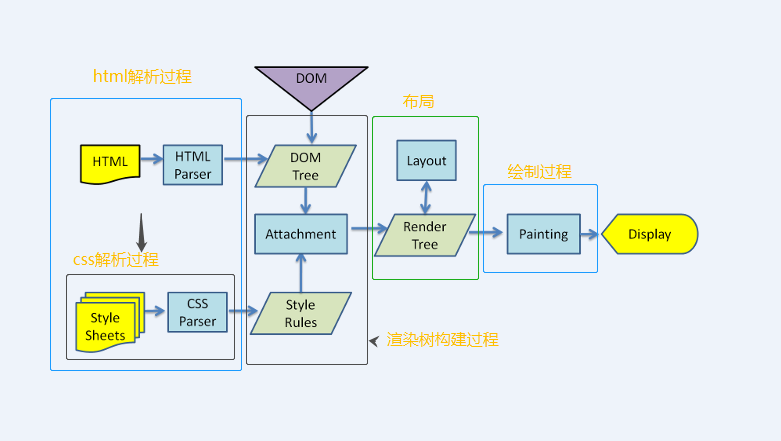\r\n\r\ngecko流程示例:\r\n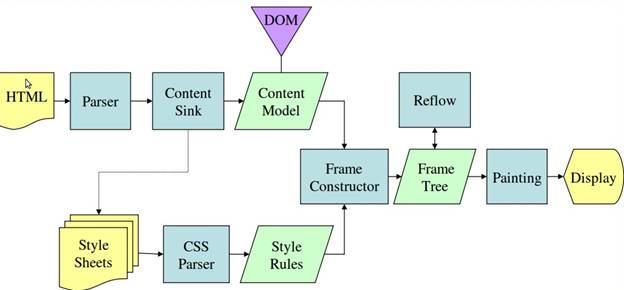\r\n\r\n\u0026#160; \u0026#160;webkit图上我加了一些注释,大体上,两个流程主流程是差不多的,但是在细化流程上有些执行方式的差异,包括对象命名,流程命名,但是其含义实际上是一样的。只是说gecko将render tree定义为frame,gecko会在遇到link时候去加载解析css样式,webkit似乎从一开始就对外部链接进行解析。接下来就细化后的流程在一一讲解。\r\n\r\n### html解析\r\n\u0026#160; \u0026#160;大部分解析器,类似js的解析过程,会从上到下分析语法语句,对一些赋值语句做变量提升。但是这种方式不适合html的解析过程,原因在于:\r\n\r\n1. html允许各种宽松语法,比如不严格封闭标签\u003c/div\u003e并不会造成语法错误等\r\n2. html对自定义名称的标签也能解析\r\n3. 在html解析过程中,自然也会遇到script方式的脚本,脚本中可能会频繁的操作dom对象,这样造成html解析过程是一个重复的过程。\r\n\r\n\u0026#160; \u0026#160;有兴趣的可以在最下方的参考资料,或者查阅相关资料了解更多底层编译原理的细节。浏览器自定义的解析器通过两个步骤完成解析工作 (分词器)tokeniser ---\u003e (树构建器)tree construction\r\n\r\n\u0026#160; \u0026#160;tokeniser的作用是将html中每一个字符转换成对浏览器有意义的标记,tree construction在接收到转义完以后的有效标记如div,之后,创建对应的元素以及工作。\r\n\r\n#### 1. 标记化算法\r\n\r\n\u0026#160; \u0026#160;浏览器标记化这一过程,采用的是有限状态机这样的数学模型。简单的说有限状态机定义了一个有限的状态集合中,每一个状态到另一种状态的变化规律。\r\n\r\n\u0026#160; \u0026#160;比如,对于订单流程,我就讨论未支付,支付中,支付完成,支付取消,退款这样五个状态的流转 支付取消可以变化成未支付状态,但是支付完成是不能变成支付取消状态,它只能走退款流程变成退款中状态。这就是支付流程的流转规律,而且流程中的状态是有限的,不可能有无限个状态的可能。\r\n\r\n\u0026#160; \u0026#160;所以说对于某个状态机,其存在含义就是,我定义了如下(a, b, c .., f)等状态,并且我定义了他们之间能够完成的操作。那么这个状态机的运行,将在这个有限个状态中,按照我定义这种规律运行。\r\n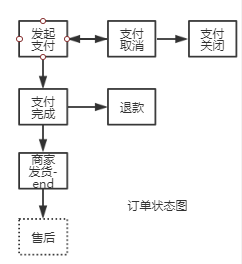\r\n\r\n那浏览器的算法是如何利用这个状态机的呢?\r\n针对这幅图,以及一个文章中的实例来说明这个过程。\r\n简单的HTML结构:\r\n```html\r\n\u003chtml\u003e\r\n \u003cbody\u003e\r\n Hello world\r\n \u003c/body\u003e\r\n\u003c/html\u003e\r\n```\r\n由下图我们知道有四个状态:\r\n+ tag open \r\n+ tag close\r\n+ tag name\r\n+ data\r\n\r\n\u0026#160; \u0026#160;现在,我们假设解释器读取到了上面的html文本,第一个字符是\u003c,我们知道,对于html规范,这是一个标签的开始。所以状态机在遇到\u003c字符时候,会流转成tag open状态,在tag open状态下,在这个状态下如果接收到任何a-z或者其他符合名称定义的字符,状态机流转到tag name。这个状态的意思是,从tag open状态到目前为止所有字符(到下一个\u003e闭标签之前)将用于定义tag标签名称,遇到\u003e字符。结束tag name状态,进入data状态。根据上面html文本,\u003chtml\u003e直接是\u003c(标签开启), h--\u003et --\u003em --\u003el(读取文本), \u003e(结束)。于是,状态机会给解释器输出一个html标记,并且读取下面内容\u003cbody\u003e,重复以上过程,hello world(data状态中的读取)状态到\u003c/body\u003e字符之前,会输出文本节点hello world。知道遇到\u003c(tag open) ---\u003e /(tag close)。通过上面的例子,也能体会到,流程的含义,比如tag close状态只能由tag open抵达,其他状态无法到达。\r\n\r\n标记化算法状态机:\r\n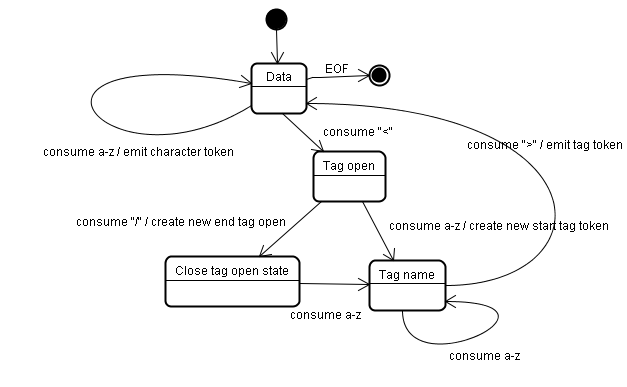\r\n\r\n#### 2. 树构建算法\r\n\u0026#160; \u0026#160;我们知道这个过程是需要前置过程,就是我们前面讨论的标记化算法,标记化能够将html文本标记成解释器能识别的标签,然后交于树构建器完成。树构建器在接收到这个标记之后需要做什么工作呢?可以初略窥探。\r\n\r\n\u0026#160; \u0026#160;树构建的过程也可以按状态流转的方式去解释。(inital mode, before xx, after xx, in xx)四个状态。\r\nxx表示对应的标签变量,来自标记化产生。\r\n\r\n\u0026#160; \u0026#160;树构建器有个顶层节点document, 我们假设树构建器接收到来至标记化完成的html开始标签,状态流转伟before html。然后下一个送过来的标签是body,这里需要提一下的是,因为head是html的必要标签,所以在有送head的情况下会进入before header状态,自动流转到in head --\u003e after head, 但是由于下一个就是body,所以浏览器走一个默认的流程,隐式创建完head之后才够走到in body。知道最后一个after html送来, 结束整个解析流程。每一个in状态中,树构建器都会创建相应的dom元素。最终会形成一整科dom树。同时,在有css解析参与情况下,将形成另一颗渲染树。\r\n\r\n\r\n\r\n### dom树和渲染树\r\n\u0026#160; \u0026#160;到目前为止,以上是对html的解析和处理,我们知道,html文本被读取转义之后,会输出DOM树,并且还会生成一个渲染树,渲染树是最终用于绘制可视化页面,所以说渲染树包含于页面结构类似的层级,并且还包含css的可视化样式。渲染树每个元素本身是根据其在dom树中对应的元素区分类型,如div--block,渲染树强调每个元素的样式,展示细节,对于dom中display为none的元素,不会出现在渲染树中。\r\n\r\n### css解析\r\n\r\ncss解析过程可以用通用的解析器完成。因为,css语法没有上下文关系,比如对于:\r\n```css\r\n#app {\r\n background: red;\r\n}\r\n```\r\n只需要定义严格正则的区分出: #app, background, red 。几个区域的含义即可。\r\n\r\n但是css的和html元素的关联依然不是一个容易的过程,首先,\r\n1. 对于标签的匹配路径(#app),如果处理不好,在面对繁多的元素时候,可能是一个低效率的过程。\r\n2. 复制的渲染树结构每个元素的样式如果量过于庞大,对内存负担很大。\r\n3. 层叠样式的计算\r\n\r\n### 匹配流程的优化\r\n\u0026#160; \u0026#160;到目前为止,回顾之前的流程,我们知道html序列化生成了dom树,dom树创建过程中也会不断就结合css样式规则,生成渲染树。在结合css的规则这个步骤,我们知道对css的解析可以用通用的解析器去完成,解析完的css会输出成一个数组,在webkit中,叫 **CSSStyleSheetList** 。CSSStyleSheetList每一项包含着一个css样式规则的内容,包括选择器部分(#app div), 以及样式声明中的属性(color)和对应的值(red)。\r\n\r\n\u0026#160; \u0026#160;匹配的意思就是对于某个渲染树节点,如div block元素,假若它包含id,类名class,如下:\r\n```html\r\n\u003cp\u003e\r\n \u003cdiv class='box' id='app'\u003e\u003c/div\u003e\r\n\u003c/p\u003e\r\n```\r\n\u0026#160; \u0026#160;他可以声明为p .box#app的样式,却无法匹配table .box。如果他没有table的祖先。\r\n\r\n\u0026#160; \u0026#160;浏览器对这个匹配流程优化,体现在一个突破点。我们以上面的例子,对于一个元素,如果他匹配了一个css规则,那么意味着这个元素包含css 选择器内容里面的最末端的匹配内容,比如上面p .box#app,对于匹配该表达式的元素,它肯定是包含id为app的元素。\r\n\r\n\u0026#160; \u0026#160;所以浏览器在匹配上,都会进行末端匹配,webkit中会存放一个类型哈希表集合(CSSRuleSet)包含四个哈希表,分别是id哈希表(m_idRules),class哈希表(m_classRules),标签哈希表(m_tagRules),通用型哈希表(m_universalRules)。四个哈希表分别存放末端匹配属性的对应规则。\r\n\r\n\u0026#160; \u0026#160;基于以上的数据结构,比如上面的div,他具有id:app,class:box,div: tagName, 所以他会在这个三个哈希表里面查找出所有可能的规则。但是以这种方式匹配出来的规则虽然不一定匹配该元素,但确实一次性过滤掉大量无关元素,而且只需要O(1)复制度,因为只需要哈希表匹配。\r\n\r\n\u0026#160; \u0026#160;接下来对这个可能性样式规则数组通过选择器权值进行循环做selector检测,如果匹配,将加入结果数组。最终得到该元素的样式规则数组,按选择器权值进行排序。\r\n\r\n### webkit共享数据的优化\r\n\u0026#160; \u0026#160;webkit引擎中,对满足一定条件的同级元素,他们将共享样式。共享样式意味着,共享元素的样式只需要计算一次,不需要过滤样式,匹配样式选择器的流程。而且这样满足共享样式元素的比例还挺高。简单的总结就是必须是孪生兄弟,完全相同\r\n1. 同级:很好理解,只有同级的元素他们才有共同的祖先,共同的祖先树结构,这意味着这两个兄弟之间只要满足一下条件就可以共享其只有\r\n\r\n2. 没有id:如果某个兄弟有id,因为id是唯一符号,这意味着这个兄弟可能可以通过这个id拿到属于自己的样式,这种情况下就无法共享他样式,因为这个id样式一定只属于他自己。\r\n举例:\r\n```css\r\n.content {\r\n color: green; \r\n} \r\n#unique-p {\r\n font-weight: bold;\r\n}\r\n```\r\n```html\r\n\u003cspan\u003e\r\n \u003cp class='content'\u003eSame with my brother\u003c/p\u003e\r\n \u003cp class='content' id='unique-p'\u003ei have a id\u003c/p\u003e\r\n\u003c/span\u003e\r\n```\r\n即使没有font-weight样式, 很遗憾这两个p依然无法共享样式,尽管他们都是content,这一切都是id: unique-p害的。所以,在css优化中,不到万不得已,尽量就不加id可以让浏览器更多的共享样式规则。\r\n\r\n3. 标签相同\r\n4. 类名相同\r\n5. 无内联样式\r\n6. 相同属性\r\n7. 焦点状态,即聚焦会有样式变化\r\n8. 链接属性同理\r\n9. 不能使用任何同级选择器\r\n\r\n### Firefox的优化\r\n\u0026#160; \u0026#160;firefox是利用树结构减少重复计算,数据共享问题。其定义两颗树,其中一颗是规则树,规则树每个节点是一个完整的css规则实例,包含选择器,以及块内容。对于已经匹配过的元素,会在规则树上生成节点。比如我们假设一个div有三个匹配样式,这三个样式的具有不同优先级,越往树低端优先级更高。我们再次假设有另一个div需要生成样式,由于之前已经有div生成了三个不同样式路径, 假设是A--\u003eB--\u003eC,挂载树上。所以这个div如果满足和以上div匹配规则的一部分,比如匹配A--\u003eB。那么第二个div只需要使用B节点的样式即可。因为规则树每个节点保存着该样式路径上计算完的端值。\r\n\r\n\u0026#160; \u0026#160;div节点引用了B节点的样式,这样的引用存储在另一个颗树里面,叫上下文树,顾名思\u0026#160; \u0026#160;意,用来存储节点和规则树直接的关系。\r\n\r\n规则树使得不同优先级的样式可以按规律依次计算,并且拥有包含路径的样式得以共享。\r\n\r\n### 层叠样式和样式选择器优先级\r\n\u0026#160; \u0026#160;样式的来源有三个地方,一个是浏览器默认的样式,一个是网站开发者定义的样式,一个是用户在浏览器里设置的样式。这三个样式依次优先级为用户设置的重要样式\u003e网站定义的重要样式\u003e网站样式\u003e用户设置样式\u003e浏览器样式。\r\n\r\n\u0026#160; \u0026#160;上面聊到层叠样式依靠选择器优先级叠加,样式的计算由高优先级到低优先级这样计算。这样可以减少计算量。比如对于有多个不同优先级的color定义,高优先级算出颜色以后,将不会再去取低优先级的color样式。\r\n\r\n\u0026#160; \u0026#160;css选择器有以下类型:\r\n1. 标签选择器(div)\r\n2. class选择器\r\n3. id选择器\r\n4. 属性选择器(a[href])\r\n5. 后代选择器(空格)\r\n6. 子选择器(\u003e)\r\n7. 相邻选择器(+)\r\n8. 伪类(:hover :first-child等)\r\n9. 伪元素(:first-line)\r\n10. 通配符(*)\r\n\r\n\u0026#160; \u0026#160;选择器的优先级按照内联 style,id,类,属性和伪类选择器,标签和伪元素 四种类别个数依次计算计算。其他如相邻选择器不计数。可以用(a, b, c, d)四个数值来表示内联,id,类,标签选择器的个数。\r\n例如以下样式:\r\n```css\r\n#app .content p {\r\n color: red;\r\n}\r\n```\r\n可以表示为: (0, 1, 1, 1)\r\n这样的:\r\n```css\r\n#app .content p div {\r\n color: red;\r\n}\r\n```\r\n可以表示为: (0, 1, 1, 2)\r\n```css\r\nh1 + *[rel=up]\r\n```\r\n表示为:(0, 0, 1, 1)\r\n比较大小依次从左到右比对,左边相同,比右边。\r\n\r\n### 布局和回流\r\n\u0026#160; \u0026#160;以上关于渲染树的样式计算只针对视觉属性,不包含元素的位置信息和大小。渲染树还需要布局信息,计算布局的这个过程叫做layout,布局。\r\n\u0026#160; \u0026#160;基于平时css的布局经验,默认的元素是静态文档流的形式排布。所以可以想象,浏览器对渲染树中每个节点的渲染应该是采用流的方式,也就是至上而下,至左而右。所以,靠后的元素的布局往往不会影响其前面的元素。每一个元素都有一个layout方法,并且会递归调用子元素的layout方法。\r\n\u0026#160; \u0026#160;第一次布局过程,后续js脚本对dom的操作也会引起页面的重新布局,通常将重新布局的过程称为回流(reflow)。这个过程依然是从上到下,遍历布局。所以也是一个非常大的消耗。布局和回流的过程,每个块元素采用的是盒模型方式去计算。盒模型相信都不陌生。每个盒模型定义了渲染器的大小,再通过坐标即可定义每一个元素应该定位的位置。\r\n\r\n### 绘制和重绘\r\n\u0026#160; \u0026#160;绘制就是把元素最终呈现到显示器上的方法,渲染的顺序是 背景颜色-\u003e背景图片-\u003e边框-\u003e子代-\u003e轮廓。所以后面的会覆盖前面的。部分样式的改变,也会引起浏览器重新绘制,即重绘。回流的代价会比重绘更大。所以在优化方面尽量避免重新回流。\r\n\r\n\r\n参考资料:\r\n[浏览器的工作原理:新式网络浏览器幕后揭秘](https://www.html5rocks.com/zh/tutorials/internals/howbrowserswork/#Layered_representation)\r\n\r\n... 待编辑\r\n","author":{"url":"https://github.com/wython","@type":"Person","name":"wython"},"datePublished":"2019-09-01T12:17:27.000Z","interactionStatistic":{"@type":"InteractionCounter","interactionType":"https://schema.org/CommentAction","userInteractionCount":0},"url":"https://github.com/7/wython.github.io/issues/7"}| route-pattern | /_view_fragments/issues/show/:user_id/:repository/:id/issue_layout(.:format) |
| route-controller | voltron_issues_fragments |
| route-action | issue_layout |
| fetch-nonce | v2:afe387ce-2874-d58d-8b41-3a154ddf6a7d |
| current-catalog-service-hash | 81bb79d38c15960b92d99bca9288a9108c7a47b18f2423d0f6438c5b7bcd2114 |
| request-id | B530:2265CE:6B9D5A4:8C3B26C:69757FC8 |
| html-safe-nonce | d373afae26561df7b8fd548b386e63ba64033a4c201afa25966272ef89604e0c |
| visitor-payload | eyJyZWZlcnJlciI6IiIsInJlcXVlc3RfaWQiOiJCNTMwOjIyNjVDRTo2QjlENUE0OjhDM0IyNkM6Njk3NTdGQzgiLCJ2aXNpdG9yX2lkIjoiNDU5NTkyMDY3NzAxNjc5NzEyOCIsInJlZ2lvbl9lZGdlIjoiaWFkIiwicmVnaW9uX3JlbmRlciI6ImlhZCJ9 |
| visitor-hmac | 8e4484876ff36689ef94e29a7b9e4373e1608fc9b496d490d9f2ec2ff31288f5 |
| hovercard-subject-tag | issue:487879094 |
| github-keyboard-shortcuts | repository,issues,copilot |
| google-site-verification | Apib7-x98H0j5cPqHWwSMm6dNU4GmODRoqxLiDzdx9I |
| octolytics-url | https://collector.github.com/github/collect |
| analytics-location | / |
| fb:app_id | 1401488693436528 |
| apple-itunes-app | app-id=1477376905, app-argument=https://github.com/_view_fragments/issues/show/wython/wython.github.io/7/issue_layout |
| twitter:image | https://opengraph.githubassets.com/46896c8a32890a278e8aec7655a1a95222855b67c8c84863b3fe873db2ae0109/wython/wython.github.io/issues/7 |
| twitter:card | summary_large_image |
| og:image | https://opengraph.githubassets.com/46896c8a32890a278e8aec7655a1a95222855b67c8c84863b3fe873db2ae0109/wython/wython.github.io/issues/7 |
| og:image:alt | 对于用户而言,浏览器的使用。往往从url开始,一开始,我们会输入url,如果网络不是很慢的情况下,我们就能看到浏览器呈现的页面。 对于一个前端而言,我们对这个过程似乎有更深层次的认知。我们输入了url域名,然后通过dns将域名转换成ip与端口,然后找到广义网络中的主机,然后才获取到html,浏览器拿到html,紧接着解析html,渲染css,最后呈现给了我们。 实际上,在上面流程中,浏览器做... |
| og:image:width | 1200 |
| og:image:height | 600 |
| og:site_name | GitHub |
| og:type | object |
| og:author:username | wython |
| hostname | github.com |
| expected-hostname | github.com |
| None | 4a4bf5f4e28041a9d2e5c107d7d20b78b4294ba261cab243b28167c16a623a1f |
| turbo-cache-control | no-preview |
| go-import | github.com/wython/wython.github.io git https://github.com/wython/wython.github.io.git |
| octolytics-dimension-user_id | 15258919 |
| octolytics-dimension-user_login | wython |
| octolytics-dimension-repository_id | 142893945 |
| octolytics-dimension-repository_nwo | wython/wython.github.io |
| octolytics-dimension-repository_public | true |
| octolytics-dimension-repository_is_fork | false |
| octolytics-dimension-repository_network_root_id | 142893945 |
| octolytics-dimension-repository_network_root_nwo | wython/wython.github.io |
| turbo-body-classes | logged-out env-production page-responsive |
| disable-turbo | false |
| browser-stats-url | https://api.github.com/_private/browser/stats |
| browser-errors-url | https://api.github.com/_private/browser/errors |
| release | 488b30e96dfd057fbbe44c6665ccbc030b729dde |
| ui-target | full |
| theme-color | #1e2327 |
| color-scheme | light dark |
Links:
Viewport: width=device-width


