Title: JEA session configuration breaks after upgrading past 7.2.1 · Issue #17367 · PowerShell/PowerShell · GitHub
Open Graph Title: JEA session configuration breaks after upgrading past 7.2.1 · Issue #17367 · PowerShell/PowerShell
X Title: JEA session configuration breaks after upgrading past 7.2.1 · Issue #17367 · PowerShell/PowerShell
Description: Prerequisites Write a descriptive title. Make sure you are able to repro it on the latest released version Search the existing issues. Refer to the FAQ. Refer to Differences between Windows PowerShell 5.1 and PowerShell. Steps to reprodu...
Open Graph Description: Prerequisites Write a descriptive title. Make sure you are able to repro it on the latest released version Search the existing issues. Refer to the FAQ. Refer to Differences between Windows PowerSh...
X Description: Prerequisites Write a descriptive title. Make sure you are able to repro it on the latest released version Search the existing issues. Refer to the FAQ. Refer to Differences between Windows PowerSh...
Opengraph URL: https://github.com/PowerShell/PowerShell/issues/17367
X: @github
Domain: patch-diff.githubusercontent.com
{"@context":"https://schema.org","@type":"DiscussionForumPosting","headline":"JEA session configuration breaks after upgrading past 7.2.1","articleBody":"### Prerequisites\n\n- [X] Write a descriptive title.\n- [X] Make sure you are able to repro it on the [latest released version](https://github.com/PowerShell/PowerShell/releases)\n- [X] Search the existing issues.\n- [X] Refer to the [FAQ](https://github.com/PowerShell/PowerShell/blob/master/docs/FAQ.md).\n- [X] Refer to [Differences between Windows PowerShell 5.1 and PowerShell](https://docs.microsoft.com/powershell/scripting/whats-new/differences-from-windows-powershell).\n\n### Steps to reproduce\n\nAfter upgrading to Powershell 7.2.2, 7.2.3 or 7.2.4 when I run the Register-PSSessionConfiguration, it seems to complete with no errors from the command line, but I can no longer connect to the JEA configuration. This is a CI/CD deployment that has worked for months until we upgraded to 7.2.2 on the JEA server. The configuration will still work after the powershell upgrade from 7.2.1 until I reregister the configuration and then it will fail. It seems like something in the registration process. I also can uninstall post 7.2.1 versions, reinstall 7.2.1 and it will work again with no other changes.\r\n\r\nThe only other thing I noticed was that when I would register the configuration I would sometimes see two windows pop up in succession quickly with an error from pwsh.exe saying \"the argument 'icm' is not recognized as the name of a script file\". I'm attaching a screenshot. \r\n\r\nConnection command:\r\netsn cmjea.$env:USERDNSDOMAIN -ConfigurationName ums-cm-jea -UseSSL\n\n### Expected behavior\n\n```console\nJEA session ums-cm-jea would connect. I can connect to the standard WinRM session using \"etsn cmjea.$env:USERDNSDOMAIN -UseSSL\".\n```\n\n\n### Actual behavior\n\n```console\nReceive the following errors when trying to connect to the config:\r\n\r\netsn : Connecting to remote server cmjea.mydomain.com failed with the following error message : \u003cf:WSManFault\r\nxmlns:f=\"http://schemas.microsoft.com/wbem/wsman/1/wsmanfault\" Code=\"2689860592\"\r\nMachine=\"cmjea.mydomain.com\"\u003e\u003cf:Message\u003e\u003cf:ProviderFault provider=\"UMS-CM-JEA\"\r\npath=\"C:\\Windows\\system32\\PowerShell\\7.2.4\\pwrshplugin.dll\"\u003e\u003c/f:ProviderFault\u003e\u003c/f:Message\u003e\u003c/f:WSManFault\u003e For more\r\ninformation, see the about_Remote_Troubleshooting Help topic.\r\nAt line:1 char:1\r\n+ etsn cmjea.$env:USERDNSDOMAIN -ConfigurationName ums-cm-jea -UseSSL\r\n+ ~~~~~~~~~~~~~~~~~~~~~~~~~~~~~~~~~~~~~~~~~~~~~~~~~~~~~~~~~~~~~~~~~~~\r\n + CategoryInfo : InvalidArgument: (cmjea.mydomain.com:String) [Enter-PSSession], PSRemotingTransport\r\n Exception\r\n + FullyQualifiedErrorId : CreateRemoteRunspaceFailed\n```\n\n\n### Error details\n\n```console\nThere are events in the PowerShellCore/Operational log that are generated when registering the configuration indicating there is some problem. One references an issue connecting to localhost. I am able to connect to the default configurations via localhost.\r\n\r\nBelow are ethe events from newest to oldest:\r\n==================================\r\nLog Name: PowerShellCore/Operational\r\nSource: PowerShellCore\r\nDate: 5/17/2022 4:36:36 PM\r\nEvent ID: 4100\r\nTask Category: Executing Pipeline\r\nLevel: Warning\r\nKeywords: None\r\nUser: CONTOSO\\my-adm\r\nComputer: server.mydomain.com\r\nDescription:\r\nError Message = The running command stopped because the preference variable \"ErrorActionPreference\" or common parameter is set to Stop: [localhost] Connecting to remote server localhost failed with the following error message : \u003cf:WSManFault xmlns:f=\"http://schemas.microsoft.com/wbem/wsman/1/wsmanfault\" Code=\"2689860592\" Machine=\"localhost\"\u003e\u003cf:Message\u003e\u003cf:ProviderFault provider=\"UMS-CM-JEA\" path=\"C:\\Windows\\system32\\PowerShell\\7.2.4\\pwrshplugin.dll\"\u003e\u003c/f:ProviderFault\u003e\u003c/f:Message\u003e\u003c/f:WSManFault\u003e For more information, see the about_Remote_Troubleshooting Help topic.\r\nFully Qualified Error ID = -1605106704,PSSessionOpenFailed\r\nRecommended Action = \r\n\r\n\r\nContext:\r\n Severity = Warning\r\n Host Name = ConsoleHost\r\n Host Version = 7.2.4\r\n Host ID = 48dddc3b-232d-4c5f-9d6d-3f1c56b621c1\r\n Host Application = C:\\Program Files\\PowerShell\\7\\pwsh.dll -WorkingDirectory ~\r\n Engine Version = 7.2.4\r\n Runspace ID = eee9a7a6-5768-411f-80b4-06f356a26ba1\r\n Pipeline ID = 115\r\n Command Name = New-PSSession\r\n Command Type = Cmdlet\r\n Script Name = \r\n Command Path = \r\n Sequence Number = 45\r\n User = CONTOSO\\my-adm\r\n Connected User = \r\n Shell ID = Microsoft.PowerShell\r\n\r\n\r\nUser Data:\r\n\r\n\r\nEvent Xml:\r\n\u003cEvent xmlns=\"http://schemas.microsoft.com/win/2004/08/events/event\"\u003e\r\n \u003cSystem\u003e\r\n \u003cProvider Name=\"PowerShellCore\" Guid=\"{f90714a8-5509-434a-bf6d-b1624c8a19a2}\" /\u003e\r\n \u003cEventID\u003e4100\u003c/EventID\u003e\r\n \u003cVersion\u003e1\u003c/Version\u003e\r\n \u003cLevel\u003e3\u003c/Level\u003e\r\n \u003cTask\u003e106\u003c/Task\u003e\r\n \u003cOpcode\u003e19\u003c/Opcode\u003e\r\n \u003cKeywords\u003e0x0\u003c/Keywords\u003e\r\n \u003cTimeCreated SystemTime=\"2022-05-17T20:36:36.9369428Z\" /\u003e\r\n \u003cEventRecordID\u003e428267\u003c/EventRecordID\u003e\r\n \u003cCorrelation ActivityID=\"{e3e592f7-c42e-4002-aff6-f1885ab8923a}\" /\u003e\r\n \u003cExecution ProcessID=\"4056\" ThreadID=\"6764\" /\u003e\r\n \u003cChannel\u003ePowerShellCore/Operational\u003c/Channel\u003e\r\n \u003cComputer\u003eserver.mydomain.com\u003c/Computer\u003e\r\n \u003cSecurity UserID=\"S-1-5-21-2147491999-1103789872-2603493700-327614\" /\u003e\r\n \u003c/System\u003e\r\n \u003cEventData\u003e\r\n \u003cData Name=\"ContextInfo\"\u003e Severity = Warning\r\n Host Name = ConsoleHost\r\n Host Version = 7.2.4\r\n Host ID = 48dddc3b-232d-4c5f-9d6d-3f1c56b621c1\r\n Host Application = C:\\Program Files\\PowerShell\\7\\pwsh.dll -WorkingDirectory ~\r\n Engine Version = 7.2.4\r\n Runspace ID = eee9a7a6-5768-411f-80b4-06f356a26ba1\r\n Pipeline ID = 115\r\n Command Name = New-PSSession\r\n Command Type = Cmdlet\r\n Script Name = \r\n Command Path = \r\n Sequence Number = 45\r\n User = CONTOSO\\my-adm\r\n Connected User = \r\n Shell ID = Microsoft.PowerShell\r\n\u003c/Data\u003e\r\n \u003cData Name=\"UserData\"\u003e\r\n \u003c/Data\u003e\r\n \u003cData Name=\"Payload\"\u003eError Message = The running command stopped because the preference variable \"ErrorActionPreference\" or common parameter is set to Stop: [localhost] Connecting to remote server localhost failed with the following error message : \u0026lt;f:WSManFault xmlns:f=\"http://schemas.microsoft.com/wbem/wsman/1/wsmanfault\" Code=\"2689860592\" Machine=\"localhost\"\u0026gt;\u0026lt;f:Message\u0026gt;\u0026lt;f:ProviderFault provider=\"UMS-CM-JEA\" path=\"C:\\Windows\\system32\\PowerShell\\7.2.4\\pwrshplugin.dll\"\u0026gt;\u0026lt;/f:ProviderFault\u0026gt;\u0026lt;/f:Message\u0026gt;\u0026lt;/f:WSManFault\u0026gt; For more information, see the about_Remote_Troubleshooting Help topic.\r\nFully Qualified Error ID = -1605106704,PSSessionOpenFailed\r\nRecommended Action = \r\n\u003c/Data\u003e\r\n \u003c/EventData\u003e\r\n\u003c/Event\u003e\r\n\r\nLog Name: PowerShellCore/Operational\r\nSource: PowerShellCore\r\nDate: 5/17/2022 4:36:36 PM\r\nEvent ID: 8197\r\nTask Category: Connect\r\nLevel: Verbose\r\nKeywords: None\r\nUser: CONTOSO\\my-adm\r\nComputer: server.mydomain.com\r\nDescription:\r\nRunspace state changed to Broken\r\nEvent Xml:\r\n\u003cEvent xmlns=\"http://schemas.microsoft.com/win/2004/08/events/event\"\u003e\r\n \u003cSystem\u003e\r\n \u003cProvider Name=\"PowerShellCore\" Guid=\"{f90714a8-5509-434a-bf6d-b1624c8a19a2}\" /\u003e\r\n \u003cEventID\u003e8197\u003c/EventID\u003e\r\n \u003cVersion\u003e1\u003c/Version\u003e\r\n \u003cLevel\u003e5\u003c/Level\u003e\r\n \u003cTask\u003e1\u003c/Task\u003e\r\n \u003cOpcode\u003e10\u003c/Opcode\u003e\r\n \u003cKeywords\u003e0x0\u003c/Keywords\u003e\r\n \u003cTimeCreated SystemTime=\"2022-05-17T20:36:36.9366393Z\" /\u003e\r\n \u003cEventRecordID\u003e428266\u003c/EventRecordID\u003e\r\n \u003cCorrelation ActivityID=\"{e3e592f7-c42e-4002-aff6-f1885ab8923a}\" /\u003e\r\n \u003cExecution ProcessID=\"4056\" ThreadID=\"7144\" /\u003e\r\n \u003cChannel\u003ePowerShellCore/Operational\u003c/Channel\u003e\r\n \u003cComputer\u003eserver.mydomain.com\u003c/Computer\u003e\r\n \u003cSecurity UserID=\"S-1-5-21-2147491999-1103789872-2603493700-327614\" /\u003e\r\n \u003c/System\u003e\r\n \u003cEventData\u003e\r\n \u003cData Name=\"param1\"\u003eBroken\u003c/Data\u003e\r\n \u003c/EventData\u003e\r\n\u003c/Event\u003e\r\n\r\nLog Name: PowerShellCore/Operational\r\nSource: PowerShellCore\r\nDate: 5/17/2022 4:36:36 PM\r\nEvent ID: 32784\r\nTask Category: None\r\nLevel: Error\r\nKeywords: None\r\nUser: CONTOSO\\my-adm\r\nComputer: server.mydomain.com\r\nDescription:\r\nRunspace Id: e3e592f7-c42e-4002-aff6-f1885ab8923a Pipeline Id: 00000000-0000-0000-0000-000000000000. WSMan reported an error with error code: -1605106704. \r\n Error message: Connecting to remote server localhost failed with the following error message : \u003cf:WSManFault xmlns:f=\"http://schemas.microsoft.com/wbem/wsman/1/wsmanfault\" Code=\"2689860592\" Machine=\"localhost\"\u003e\u003cf:Message\u003e\u003cf:ProviderFault provider=\"UMS-CM-JEA\" path=\"C:\\Windows\\system32\\PowerShell\\7.2.4\\pwrshplugin.dll\"\u003e\u003c/f:ProviderFault\u003e\u003c/f:Message\u003e\u003c/f:WSManFault\u003e For more information, see the about_Remote_Troubleshooting Help topic. \r\n StackTrace: \r\nEvent Xml:\r\n\u003cEvent xmlns=\"http://schemas.microsoft.com/win/2004/08/events/event\"\u003e\r\n \u003cSystem\u003e\r\n \u003cProvider Name=\"PowerShellCore\" Guid=\"{f90714a8-5509-434a-bf6d-b1624c8a19a2}\" /\u003e\r\n \u003cEventID\u003e32784\u003c/EventID\u003e\r\n \u003cVersion\u003e1\u003c/Version\u003e\r\n \u003cLevel\u003e2\u003c/Level\u003e\r\n \u003cTask\u003e0\u003c/Task\u003e\r\n \u003cOpcode\u003e10\u003c/Opcode\u003e\r\n \u003cKeywords\u003e0x0\u003c/Keywords\u003e\r\n \u003cTimeCreated SystemTime=\"2022-05-17T20:36:36.9365236Z\" /\u003e\r\n \u003cEventRecordID\u003e428265\u003c/EventRecordID\u003e\r\n \u003cCorrelation ActivityID=\"{e3e592f7-c42e-4002-aff6-f1885ab8923a}\" /\u003e\r\n \u003cExecution ProcessID=\"4056\" ThreadID=\"7144\" /\u003e\r\n \u003cChannel\u003ePowerShellCore/Operational\u003c/Channel\u003e\r\n \u003cComputer\u003eserver.mydomain.com\u003c/Computer\u003e\r\n \u003cSecurity UserID=\"S-1-5-21-2147491999-1103789872-2603493700-327614\" /\u003e\r\n \u003c/System\u003e\r\n \u003cEventData\u003e\r\n \u003cData Name=\"SessionId\"\u003ee3e592f7-c42e-4002-aff6-f1885ab8923a\u003c/Data\u003e\r\n \u003cData Name=\"PipelineId\"\u003e00000000-0000-0000-0000-000000000000\u003c/Data\u003e\r\n \u003cData Name=\"ErrorCode\"\u003e-1605106704\u003c/Data\u003e\r\n \u003cData Name=\"ErrorMessage\"\u003eConnecting to remote server localhost failed with the following error message : \u0026lt;f:WSManFault xmlns:f=\"http://schemas.microsoft.com/wbem/wsman/1/wsmanfault\" Code=\"2689860592\" Machine=\"localhost\"\u0026gt;\u0026lt;f:Message\u0026gt;\u0026lt;f:ProviderFault provider=\"UMS-CM-JEA\" path=\"C:\\Windows\\system32\\PowerShell\\7.2.4\\pwrshplugin.dll\"\u0026gt;\u0026lt;/f:ProviderFault\u0026gt;\u0026lt;/f:Message\u0026gt;\u0026lt;/f:WSManFault\u0026gt; For more information, see the about_Remote_Troubleshooting Help topic.\u003c/Data\u003e\r\n \u003cData Name=\"StackTrace\"\u003e\r\n \u003c/Data\u003e\r\n \u003c/EventData\u003e\r\n\u003c/Event\u003e\r\n\r\nLog Name: PowerShellCore/Operational\r\nSource: PowerShellCore\r\nDate: 5/17/2022 4:36:36 PM\r\nEvent ID: 12039\r\nTask Category: None\r\nLevel: Information\r\nKeywords: None\r\nUser: CONTOSO\\my-adm\r\nComputer: server.mydomain.com\r\nDescription:\r\nModifying activity Id and correlating\r\nEvent Xml:\r\n\u003cEvent xmlns=\"http://schemas.microsoft.com/win/2004/08/events/event\"\u003e\r\n \u003cSystem\u003e\r\n \u003cProvider Name=\"PowerShellCore\" Guid=\"{f90714a8-5509-434a-bf6d-b1624c8a19a2}\" /\u003e\r\n \u003cEventID\u003e12039\u003c/EventID\u003e\r\n \u003cVersion\u003e1\u003c/Version\u003e\r\n \u003cLevel\u003e4\u003c/Level\u003e\r\n \u003cTask\u003e0\u003c/Task\u003e\r\n \u003cOpcode\u003e20\u003c/Opcode\u003e\r\n \u003cKeywords\u003e0x0\u003c/Keywords\u003e\r\n \u003cTimeCreated SystemTime=\"2022-05-17T20:36:36.9365143Z\" /\u003e\r\n \u003cEventRecordID\u003e428264\u003c/EventRecordID\u003e\r\n \u003cCorrelation ActivityID=\"{e3e592f7-c42e-4002-aff6-f1885ab8923a}\" /\u003e\r\n \u003cExecution ProcessID=\"4056\" ThreadID=\"7144\" /\u003e\r\n \u003cChannel\u003ePowerShellCore/Operational\u003c/Channel\u003e\r\n \u003cComputer\u003eserver.mydomain.com\u003c/Computer\u003e\r\n \u003cSecurity UserID=\"S-1-5-21-2147491999-1103789872-2603493700-327614\" /\u003e\r\n \u003c/System\u003e\r\n \u003cEventData\u003e\r\n \u003c/EventData\u003e\r\n\u003c/Event\u003e\r\n\r\nLog Name: PowerShellCore/Operational\r\nSource: PowerShellCore\r\nDate: 5/17/2022 4:36:36 PM\r\nEvent ID: 8196\r\nTask Category: None\r\nLevel: Information\r\nKeywords: None\r\nUser: CONTOSO\\my-adm\r\nComputer: server.mydomain.com\r\nDescription:\r\nModifying activity Id and correlating\r\nEvent Xml:\r\n\u003cEvent xmlns=\"http://schemas.microsoft.com/win/2004/08/events/event\"\u003e\r\n \u003cSystem\u003e\r\n \u003cProvider Name=\"PowerShellCore\" Guid=\"{f90714a8-5509-434a-bf6d-b1624c8a19a2}\" /\u003e\r\n \u003cEventID\u003e8196\u003c/EventID\u003e\r\n \u003cVersion\u003e1\u003c/Version\u003e\r\n \u003cLevel\u003e4\u003c/Level\u003e\r\n \u003cTask\u003e0\u003c/Task\u003e\r\n \u003cOpcode\u003e20\u003c/Opcode\u003e\r\n \u003cKeywords\u003e0x0\u003c/Keywords\u003e\r\n \u003cTimeCreated SystemTime=\"2022-05-17T20:36:36.9365122Z\" /\u003e\r\n \u003cEventRecordID\u003e428263\u003c/EventRecordID\u003e\r\n \u003cCorrelation ActivityID=\"{e3e592f7-c42e-4002-aff6-f1885ab8923a}\" /\u003e\r\n \u003cExecution ProcessID=\"4056\" ThreadID=\"7144\" /\u003e\r\n \u003cChannel\u003ePowerShellCore/Operational\u003c/Channel\u003e\r\n \u003cComputer\u003eserver.mydomain.com\u003c/Computer\u003e\r\n \u003cSecurity UserID=\"S-1-5-21-2147491999-1103789872-2603493700-327614\" /\u003e\r\n \u003c/System\u003e\r\n \u003cEventData\u003e\r\n \u003c/EventData\u003e\r\n\u003c/Event\u003e\r\n\r\nLog Name: PowerShellCore/Operational\r\nSource: PowerShellCore\r\nDate: 5/17/2022 4:36:36 PM\r\nEvent ID: 8197\r\nTask Category: Connect\r\nLevel: Verbose\r\nKeywords: None\r\nUser: CONTOSO\\my-adm\r\nComputer: server.mydomain.com\r\nDescription:\r\nRunspace state changed to Opening\r\nEvent Xml:\r\n\u003cEvent xmlns=\"http://schemas.microsoft.com/win/2004/08/events/event\"\u003e\r\n \u003cSystem\u003e\r\n \u003cProvider Name=\"PowerShellCore\" Guid=\"{f90714a8-5509-434a-bf6d-b1624c8a19a2}\" /\u003e\r\n \u003cEventID\u003e8197\u003c/EventID\u003e\r\n \u003cVersion\u003e1\u003c/Version\u003e\r\n \u003cLevel\u003e5\u003c/Level\u003e\r\n \u003cTask\u003e1\u003c/Task\u003e\r\n \u003cOpcode\u003e10\u003c/Opcode\u003e\r\n \u003cKeywords\u003e0x0\u003c/Keywords\u003e\r\n \u003cTimeCreated SystemTime=\"2022-05-17T20:36:36.7011496Z\" /\u003e\r\n \u003cEventRecordID\u003e428262\u003c/EventRecordID\u003e\r\n \u003cCorrelation ActivityID=\"{e3e592f7-c42e-4002-aff6-f1885ab8923a}\" /\u003e\r\n \u003cExecution ProcessID=\"4056\" ThreadID=\"6764\" /\u003e\r\n \u003cChannel\u003ePowerShellCore/Operational\u003c/Channel\u003e\r\n \u003cComputer\u003eserver.mydomain.com\u003c/Computer\u003e\r\n \u003cSecurity UserID=\"S-1-5-21-2147491999-1103789872-2603493700-327614\" /\u003e\r\n \u003c/System\u003e\r\n \u003cEventData\u003e\r\n \u003cData Name=\"param1\"\u003eOpening\u003c/Data\u003e\r\n \u003c/EventData\u003e\r\n\u003c/Event\u003e\r\n\r\nLog Name: PowerShellCore/Operational\r\nSource: PowerShellCore\r\nDate: 5/17/2022 4:36:36 PM\r\nEvent ID: 8195\r\nTask Category: Connect\r\nLevel: Verbose\r\nKeywords: None\r\nUser: CONTOSO\\my-adm\r\nComputer: server.mydomain.com\r\nDescription:\r\nOpening RunspacePool\r\nEvent Xml:\r\n\u003cEvent xmlns=\"http://schemas.microsoft.com/win/2004/08/events/event\"\u003e\r\n \u003cSystem\u003e\r\n \u003cProvider Name=\"PowerShellCore\" Guid=\"{f90714a8-5509-434a-bf6d-b1624c8a19a2}\" /\u003e\r\n \u003cEventID\u003e8195\u003c/EventID\u003e\r\n \u003cVersion\u003e1\u003c/Version\u003e\r\n \u003cLevel\u003e5\u003c/Level\u003e\r\n \u003cTask\u003e1\u003c/Task\u003e\r\n \u003cOpcode\u003e10\u003c/Opcode\u003e\r\n \u003cKeywords\u003e0x0\u003c/Keywords\u003e\r\n \u003cTimeCreated SystemTime=\"2022-05-17T20:36:36.7010924Z\" /\u003e\r\n \u003cEventRecordID\u003e428261\u003c/EventRecordID\u003e\r\n \u003cCorrelation ActivityID=\"{e3e592f7-c42e-4002-aff6-f1885ab8923a}\" /\u003e\r\n \u003cExecution ProcessID=\"4056\" ThreadID=\"6764\" /\u003e\r\n \u003cChannel\u003ePowerShellCore/Operational\u003c/Channel\u003e\r\n \u003cComputer\u003eserver.mydomain.com\u003c/Computer\u003e\r\n \u003cSecurity UserID=\"S-1-5-21-2147491999-1103789872-2603493700-327614\" /\u003e\r\n \u003c/System\u003e\r\n \u003cEventData\u003e\r\n \u003c/EventData\u003e\r\n\u003c/Event\u003e\r\n\r\nLog Name: PowerShellCore/Operational\r\nSource: PowerShellCore\r\nDate: 5/17/2022 4:36:36 PM\r\nEvent ID: 8194\r\nTask Category: Connect\r\nLevel: Verbose\r\nKeywords: None\r\nUser: CONTOSO\\my-adm\r\nComputer: server.mydomain.com\r\nDescription:\r\nCreating RunspacePool object \r\n \t InstanceId e3e592f7-c42e-4002-aff6-f1885ab8923a \r\n \t MinRunspaces 1 \r\n \t MaxRunspaces 1\r\nEvent Xml:\r\n\u003cEvent xmlns=\"http://schemas.microsoft.com/win/2004/08/events/event\"\u003e\r\n \u003cSystem\u003e\r\n \u003cProvider Name=\"PowerShellCore\" Guid=\"{f90714a8-5509-434a-bf6d-b1624c8a19a2}\" /\u003e\r\n \u003cEventID\u003e8194\u003c/EventID\u003e\r\n \u003cVersion\u003e1\u003c/Version\u003e\r\n \u003cLevel\u003e5\u003c/Level\u003e\r\n \u003cTask\u003e1\u003c/Task\u003e\r\n \u003cOpcode\u003e16\u003c/Opcode\u003e\r\n \u003cKeywords\u003e0x0\u003c/Keywords\u003e\r\n \u003cTimeCreated SystemTime=\"2022-05-17T20:36:36.7005569Z\" /\u003e\r\n \u003cEventRecordID\u003e428260\u003c/EventRecordID\u003e\r\n \u003cCorrelation ActivityID=\"{e3e592f7-c42e-4002-aff6-f1885ab8923a}\" /\u003e\r\n \u003cExecution ProcessID=\"4056\" ThreadID=\"6764\" /\u003e\r\n \u003cChannel\u003ePowerShellCore/Operational\u003c/Channel\u003e\r\n \u003cComputer\u003eserver.mydomain.com\u003c/Computer\u003e\r\n \u003cSecurity UserID=\"S-1-5-21-2147491999-1103789872-2603493700-327614\" /\u003e\r\n \u003c/System\u003e\r\n \u003cEventData\u003e\r\n \u003cData Name=\"InstanceId\"\u003ee3e592f7-c42e-4002-aff6-f1885ab8923a\u003c/Data\u003e\r\n \u003cData Name=\"MaxRunspaces\"\u003e1\u003c/Data\u003e\r\n \u003cData Name=\"MinRunspaces\"\u003e1\u003c/Data\u003e\r\n \u003c/EventData\u003e\r\n\u003c/Event\u003e\r\n\r\nLog Name: PowerShellCore/Operational\r\nSource: PowerShellCore\r\nDate: 5/17/2022 4:36:36 PM\r\nEvent ID: 8193\r\nTask Category: Connect\r\nLevel: Verbose\r\nKeywords: None\r\nUser: CONTOSO\\my-adm\r\nComputer: server.mydomain.com\r\nDescription:\r\nCreating Runspace object \r\n \t Instance Id: e3a8b992-3755-491f-85cd-c4425679dd64\r\nEvent Xml:\r\n\u003cEvent xmlns=\"http://schemas.microsoft.com/win/2004/08/events/event\"\u003e\r\n \u003cSystem\u003e\r\n \u003cProvider Name=\"PowerShellCore\" Guid=\"{f90714a8-5509-434a-bf6d-b1624c8a19a2}\" /\u003e\r\n \u003cEventID\u003e8193\u003c/EventID\u003e\r\n \u003cVersion\u003e1\u003c/Version\u003e\r\n \u003cLevel\u003e5\u003c/Level\u003e\r\n \u003cTask\u003e1\u003c/Task\u003e\r\n \u003cOpcode\u003e16\u003c/Opcode\u003e\r\n \u003cKeywords\u003e0x0\u003c/Keywords\u003e\r\n \u003cTimeCreated SystemTime=\"2022-05-17T20:36:36.7005390Z\" /\u003e\r\n \u003cEventRecordID\u003e428259\u003c/EventRecordID\u003e\r\n \u003cCorrelation ActivityID=\"{e3a8b992-3755-491f-85cd-c4425679dd64}\" /\u003e\r\n \u003cExecution ProcessID=\"4056\" ThreadID=\"6764\" /\u003e\r\n \u003cChannel\u003ePowerShellCore/Operational\u003c/Channel\u003e\r\n \u003cComputer\u003eserver.mydomain.com\u003c/Computer\u003e\r\n \u003cSecurity UserID=\"S-1-5-21-2147491999-1103789872-2603493700-327614\" /\u003e\r\n \u003c/System\u003e\r\n \u003cEventData\u003e\r\n \u003cData Name=\"param1\"\u003ee3a8b992-3755-491f-85cd-c4425679dd64\u003c/Data\u003e\r\n \u003c/EventData\u003e\r\n\u003c/Event\u003e\n```\n\n\n### Environment data\n\n```powershell\nName Value\r\n---- -----\r\nPSVersion 7.2.4\r\nPSEdition Core\r\nGitCommitId 7.2.4\r\nOS Microsoft Windows 10.0.20348\r\nPlatform Win32NT\r\nPSCompatibleVersions {1.0, 2.0, 3.0, 4.0…}\r\nPSRemotingProtocolVersion 2.3\r\nSerializationVersion 1.1.0.1\r\nWSManStackVersion 3.0\n```\n\n\n### Visuals\n\n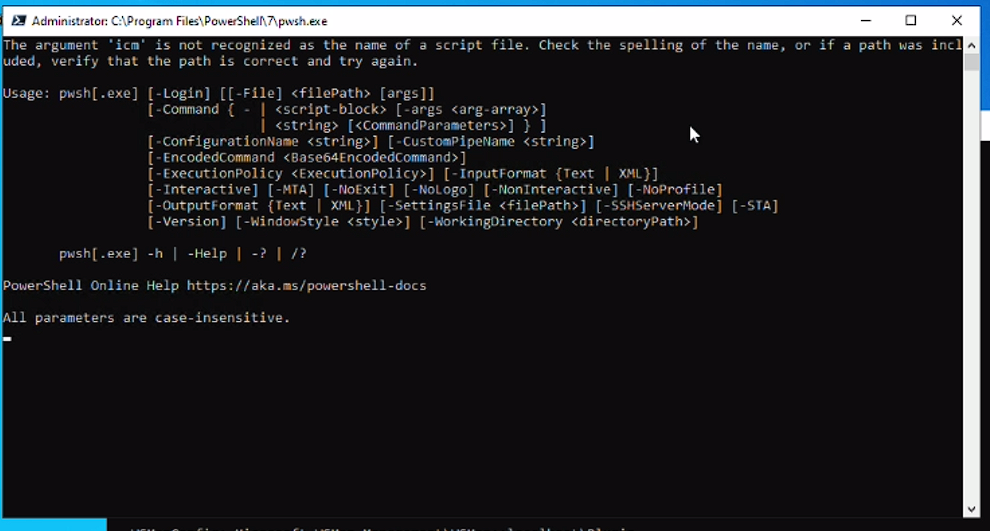\r\n","author":{"url":"https://github.com/marcgoff","@type":"Person","name":"marcgoff"},"datePublished":"2022-05-17T21:19:15.000Z","interactionStatistic":{"@type":"InteractionCounter","interactionType":"https://schema.org/CommentAction","userInteractionCount":24},"url":"https://github.com/17367/PowerShell/issues/17367"}| route-pattern | /_view_fragments/issues/show/:user_id/:repository/:id/issue_layout(.:format) |
| route-controller | voltron_issues_fragments |
| route-action | issue_layout |
| fetch-nonce | v2:b796f218-67fc-1243-dac9-d52373a583df |
| current-catalog-service-hash | 81bb79d38c15960b92d99bca9288a9108c7a47b18f2423d0f6438c5b7bcd2114 |
| request-id | ACAA:2A81D7:73ED9F:A2CF44:696E5C44 |
| html-safe-nonce | 41a4b8600357260acd6027f264132964260737ee0a12c019183d7fb563c20e82 |
| visitor-payload | eyJyZWZlcnJlciI6IiIsInJlcXVlc3RfaWQiOiJBQ0FBOjJBODFENzo3M0VEOUY6QTJDRjQ0OjY5NkU1QzQ0IiwidmlzaXRvcl9pZCI6IjExNTM4NjczNzQxMzgzODM0MjgiLCJyZWdpb25fZWRnZSI6ImlhZCIsInJlZ2lvbl9yZW5kZXIiOiJpYWQifQ== |
| visitor-hmac | b82f2ee40367ea8eca3db5ab797dad4989158ee09a6fa8300a9748b1e0f1e4d7 |
| hovercard-subject-tag | issue:1239168561 |
| github-keyboard-shortcuts | repository,issues,copilot |
| google-site-verification | Apib7-x98H0j5cPqHWwSMm6dNU4GmODRoqxLiDzdx9I |
| octolytics-url | https://collector.github.com/github/collect |
| analytics-location | / |
| fb:app_id | 1401488693436528 |
| apple-itunes-app | app-id=1477376905, app-argument=https://github.com/_view_fragments/issues/show/PowerShell/PowerShell/17367/issue_layout |
| twitter:image | https://opengraph.githubassets.com/89a1be1e61288315fae22ded185d01af67280239aab54ec4dd58b4332d1ba9d8/PowerShell/PowerShell/issues/17367 |
| twitter:card | summary_large_image |
| og:image | https://opengraph.githubassets.com/89a1be1e61288315fae22ded185d01af67280239aab54ec4dd58b4332d1ba9d8/PowerShell/PowerShell/issues/17367 |
| og:image:alt | Prerequisites Write a descriptive title. Make sure you are able to repro it on the latest released version Search the existing issues. Refer to the FAQ. Refer to Differences between Windows PowerSh... |
| og:image:width | 1200 |
| og:image:height | 600 |
| og:site_name | GitHub |
| og:type | object |
| og:author:username | marcgoff |
| hostname | github.com |
| expected-hostname | github.com |
| None | f68b42d371252b0f236260d6234f4304a806fe5ac43d59faa21fb59d80df103b |
| turbo-cache-control | no-preview |
| go-import | github.com/PowerShell/PowerShell git https://github.com/PowerShell/PowerShell.git |
| octolytics-dimension-user_id | 11524380 |
| octolytics-dimension-user_login | PowerShell |
| octolytics-dimension-repository_id | 49609581 |
| octolytics-dimension-repository_nwo | PowerShell/PowerShell |
| octolytics-dimension-repository_public | true |
| octolytics-dimension-repository_is_fork | false |
| octolytics-dimension-repository_network_root_id | 49609581 |
| octolytics-dimension-repository_network_root_nwo | PowerShell/PowerShell |
| turbo-body-classes | logged-out env-production page-responsive |
| disable-turbo | false |
| browser-stats-url | https://api.github.com/_private/browser/stats |
| browser-errors-url | https://api.github.com/_private/browser/errors |
| release | 6b74bc8dbcd10b5d69fd9ee9d2cfdc8b35e18a4c |
| ui-target | full |
| theme-color | #1e2327 |
| color-scheme | light dark |
Links:
Viewport: width=device-width
