Title: 介绍 setTimeout 实现机制与原理,手写一个实现 · Issue #98 · sisterAn/JavaScript-Algorithms · GitHub
Open Graph Title: 介绍 setTimeout 实现机制与原理,手写一个实现 · Issue #98 · sisterAn/JavaScript-Algorithms
X Title: 介绍 setTimeout 实现机制与原理,手写一个实现 · Issue #98 · sisterAn/JavaScript-Algorithms
Description: setTimeout 方法,就是一个定时器,用来指定某个函数在多少毫秒之后执行。它会返回一个整数,表示定时器的编号,同时你还可以通过该编号来取消这个定时器: function showName(){ console.log("Hello") } let timerID = setTimeout(showName, 1000); // 在 1 秒后打印 “Hello” setTimeout 的第一个参数是一个将被延迟执行的函数, setTimeout 的第二个参数是延时(...
Open Graph Description: setTimeout 方法,就是一个定时器,用来指定某个函数在多少毫秒之后执行。它会返回一个整数,表示定时器的编号,同时你还可以通过该编号来取消这个定时器: function showName(){ console.log("Hello") } let timerID = setTimeout(showName, 1000); // 在 1 秒后打印 “Hello” setTimeout 的...
X Description: setTimeout 方法,就是一个定时器,用来指定某个函数在多少毫秒之后执行。它会返回一个整数,表示定时器的编号,同时你还可以通过该编号来取消这个定时器: function showName(){ console.log("Hello") } let timerID = setTimeout(showName, 1000); // 在 1 秒后打印 “Hello” se...
Opengraph URL: https://github.com/sisterAn/JavaScript-Algorithms/issues/98
X: @github
Domain: github.com
{"@context":"https://schema.org","@type":"DiscussionForumPosting","headline":"介绍 setTimeout 实现机制与原理,手写一个实现","articleBody":"`setTimeout` 方法,就是一个定时器,用来指定某个函数在多少毫秒之后执行。它会返回一个整数,表示定时器的编号,同时你还可以通过该编号来取消这个定时器:\r\n\r\n```javascript\r\nfunction showName(){ \r\n console.log(\"Hello\")\r\n}\r\nlet timerID = setTimeout(showName, 1000);\r\n// 在 1 秒后打印 “Hello”\r\n```\r\n\r\n`setTimeout` 的第一个参数是一个将被延迟执行的函数, `setTimeout` 的第二个参数是延时(多少毫秒)。\r\n\r\n如果使用 `setTimeout` 延迟的函数需要携带参数,我们可以把参数放在 `setTimeout` 里(放在已知的两个参数后)来中转参数给需要延迟执行的函数。\r\n\r\n```\r\nvar timeoutID1 = setTimeout(function[, delay, arg1, arg2, ...]);\r\nvar timeoutID2 = setTimeout(function[, delay]);\r\nvar timeoutID3 = setTimeout(code[, delay]);\r\n```\r\n\r\n- 第一个参数为函数或可执行的字符串(比如 `alert('test')` ,此法不建议使用)\r\n- 第二个参数 `为延迟毫秒数` ,可选的,默认值为 0\r\n- 第三个及后面的参数为函数的入参\r\n- `setTimeout` 的返回值是一个数字,这个成为 `timeoutID` ,可以用于取消该定时器\r\n\r\n### 手写一个简单 setTimeout 函数\r\n感谢 @coolliyong 的提醒,这里调整一下\r\n```javascript\r\nlet setTimeout = (fn, timeout, ...args) =\u003e {\r\n // 初始当前时间\r\n const start = +new Date()\r\n let timer, now\r\n const loop = () =\u003e {\r\n timer = window.requestAnimationFrame(loop)\r\n // 再次运行时获取当前时间\r\n now = +new Date()\r\n // 当前运行时间 - 初始当前时间 \u003e= 等待时间 ===\u003e\u003e 跳出\r\n if (now - start \u003e= timeout) {\r\n fn.apply(this, args)\r\n window.cancelAnimationFrame(timer)\r\n }\r\n }\r\n window.requestAnimationFrame(loop)\r\n}\r\n\r\nfunction showName(){ \r\n console.log(\"Hello\")\r\n}\r\nlet timerID = setTimeout(showName, 1000);\r\n// 在 1 秒后打印 “Hello”\r\n```\r\n\r\n\u003e 注意:JavaScript 定时器函数像 `setTimeout` 和 `setInterval` 都不是 ECMAScript 规范或者任何 JavaScript 实现的一部分。 **定时器功能由浏览器实现,它们的实现在不同浏览器之间会有所不同。** 定时器也可以由 Node.js 运行时本身实现。\r\n\u003e\r\n\u003e 在浏览器里主要的定时器函数是作为 `Window` 对象的接口,`Window` 对象同时拥有很多其他方法和对象。该接口使其所有元素在 JavaScript 全局作用域中都可用。这就是为什么你可以直接在浏览器控制台执行 `setTimeout` 。\r\n\u003e\r\n\u003e 在 node 里,定时器是 `global` 对象的一部分,这点很像浏览器中的 `Window` 。你可以在 Node里看到定时器的源码 [这里](https://github.com/nodejs/node/blob/master/lib/timers.js?source=post_page---------------------------) ,在浏览器中定时器的源码在 [这里](https://source.chromium.org/chromium/chromium/src/+/master:third_party/blink/renderer/core/frame/dom_timer.cc) 。\r\n\r\n### setTimeout 在浏览器中的实现\r\n\r\n浏览器渲染进程中所有运行在主线程上的任务都需要先添加到消息队列,然后事件循环系统再按照顺序执行消息队列中的任务。\r\n\r\n在 Chrome 中除了正常使用的消息队列之外,还有另外一个消息队列,这个队列中维护了需要延迟执行的任务列表,包括了定时器和 Chromium 内部一些需要延迟执行的任务。所以当通过 JavaScript 创建一个定时器时,渲染进程会将该定时器的回调任务添加到延迟队列中。\r\n\r\n源码中延迟执行队列的定义如下所示:\r\n\r\n```C\r\nDelayedIncomingQueue delayed_incoming_queue;\r\n```\r\n\r\n当通过 `JavaScript` 调用 `setTimeout` 设置回调函数的时候,渲染进程将会创建一个回调任务,包含了回调函数 `showName` 、当前发起时间、延迟执行时间,其模拟代码如下所示:\r\n\r\n```C\r\nstruct DelayTask{ \r\n int64 id; \r\n CallBackFunction cbf; \r\n int start_time; \r\n int delay_time;\r\n};\r\nDelayTask timerTask;\r\ntimerTask.cbf = showName;\r\ntimerTask.start_time = getCurrentTime(); //获取当前时间\r\ntimerTask.delay_time = 200;//设置延迟执行时间\r\n```\r\n\r\n创建好回调任务之后,再将该任务添加到延迟执行队列中,代码如下所示:\r\n\r\n```C\r\ndelayed_incoming_queue.push(timerTask);\r\n```\r\n\r\n现在通过定时器发起的任务就被保存到延迟队列中了,那接下来我们再来看看消息循环系统是怎么触发延迟队列的。\r\n\r\n```C\r\n\r\nvoid ProcessTimerTask(){\r\n //从delayed_incoming_queue中取出已经到期的定时器任务\r\n //依次执行这些任务\r\n}\r\n\r\nTaskQueue task_queue;\r\nvoid ProcessTask();\r\nbool keep_running = true;\r\nvoid MainTherad(){\r\n for(;;){\r\n //执行消息队列中的任务\r\n Task task = task_queue.takeTask();\r\n ProcessTask(task);\r\n \r\n //执行延迟队列中的任务\r\n ProcessDelayTask()\r\n\r\n if(!keep_running) //如果设置了退出标志,那么直接退出线程循环\r\n break; \r\n }\r\n}\r\n```\r\n\r\n从上面代码可以看出来,我们添加了一个 `ProcessDelayTask` 函数,该函数是专门用来处理延迟执行任务的。这里我们要重点关注它的执行时机,在上段代码中,处理完消息队列中的一个任务之后,就开始执行 `ProcessDelayTask` 函数。`ProcessDelayTask` 函数会根据发起时间和延迟时间计算出到期的任务,然后依次执行这些到期的任务。等到期的任务执行完成之后,再继续下一个循环过程。通过这样的方式,一个完整的定时器就实现了。\r\n\r\n设置一个定时器,`JavaScript` 引擎会返回一个定时器的 `ID`。那通常情况下,当一个定时器的任务还没有被执行的时候,也是可以取消的,具体方法是调用 `clearTimeout` 函数,并传入需要取消的定时器的 `ID` 。如下面代码所示:`clearTimeout(timer_id)` 其实浏览器内部实现取消定时器的操作也是非常简单的,就是直接从 `delayed_incoming_queue` 延迟队列中,通过 `ID` 查找到对应的任务,然后再将其从队列中删除掉就可以了。\r\n\r\n来源:[浏览器工程与实践(极客时间)](https://time.geekbang.org/column/article/134456)\r\n\r\n### setTimeout 在 nodejs 中的实现\r\n\r\n`setTimeout` 是在系统启动的时候挂载的全局函数。代码在 `timer.js` 。\r\n\r\n```JS\r\nfunction setupGlobalTimeouts() {\r\n const timers = NativeModule.require('timers');\r\n global.clearImmediate = timers.clearImmediate;\r\n global.clearInterval = timers.clearInterval;\r\n global.clearTimeout = timers.clearTimeout;\r\n global.setImmediate = timers.setImmediate;\r\n global.setInterval = timers.setInterval;\r\n global.setTimeout = timers.setTimeout;\r\n }\r\n```\r\n\r\n我们先看一下 `setTimeout` 函数的代码。\r\n\r\n```JS\r\nfunction setTimeout(callback, after, arg1, arg2, arg3) {\r\n if (typeof callback !== 'function') {\r\n throw new errors.TypeError('ERR_INVALID_CALLBACK');\r\n }\r\n\r\n var i, args;\r\n switch (arguments.length) {\r\n // fast cases\r\n case 1:\r\n case 2:\r\n break;\r\n case 3:\r\n args = [arg1];\r\n break;\r\n case 4:\r\n args = [arg1, arg2];\r\n break;\r\n default:\r\n args = [arg1, arg2, arg3];\r\n for (i = 5; i \u003c arguments.length; i++) {\r\n // extend array dynamically, makes .apply run much faster in v6.0.0\r\n args[i - 2] = arguments[i];\r\n }\r\n break;\r\n }\r\n // 新建一个对象,保存回调,超时时间等数据,是超时哈希队列的节点\r\n const timeout = new Timeout(callback, after, args, false, false);\r\n // 启动超时器\r\n active(timeout);\r\n // 返回一个对象\r\n return timeout;\r\n}\r\n```\r\n\r\n其中 `Timeout` 函数在 `lib/internal/timer.js` 里定义。\r\n\r\n```JS\r\nfunction Timeout(callback, after, args, isRepeat, isUnrefed) {\r\n after *= 1; // coalesce to number or NaN\r\n this._called = false;\r\n this._idleTimeout = after;\r\n this._idlePrev = this;\r\n this._idleNext = this;\r\n this._idleStart = null;\r\n this._onTimeout = null;\r\n this._onTimeout = callback;\r\n this._timerArgs = args;\r\n this._repeat = isRepeat ? after : null;\r\n this._destroyed = false;\r\n\r\n this[unrefedSymbol] = isUnrefed;\r\n\r\n this[async_id_symbol] = ++async_id_fields[kAsyncIdCounter];\r\n this[trigger_async_id_symbol] = getDefaultTriggerAsyncId();\r\n if (async_hook_fields[kInit] \u003e 0) {\r\n emitInit(this[async_id_symbol],\r\n 'Timeout',\r\n this[trigger_async_id_symbol],\r\n this);\r\n }\r\n}\r\n```\r\n\r\n由代码可知,首先创建一个保存相关信息的对象,然后执行 `active` 函数。\r\n\r\n```javascript\r\nconst active = exports.active = function(item) {\r\n // 插入一个超时对象到超时队列\r\n insert(item, false);\r\n}\r\nfunction insert(item, unrefed, start) {\r\n // 超时时间\r\n const msecs = item._idleTimeout;\r\n if (msecs \u003c 0 || msecs === undefined) return;\r\n // 如果传了start则计算是否超时时以start为起点,否则取当前的时间\r\n if (typeof start === 'number') {\r\n item._idleStart = start;\r\n } else {\r\n item._idleStart = TimerWrap.now();\r\n }\r\n // 哈希队列\r\n const lists = unrefed === true ? unrefedLists : refedLists;\r\n var list = lists[msecs];\r\n // 没有则新建一个队列\r\n if (list === undefined) {\r\n debug('no %d list was found in insert, creating a new one', msecs);\r\n lists[msecs] = list = new TimersList(msecs, unrefed);\r\n }\r\n\r\n ...\r\n // 把超时节点插入超时队列\r\n L.append(list, item);\r\n assert(!L.isEmpty(list)); // list is not empty\r\n}\r\n```\r\n\r\n从上面的代码可知,`active`一个定时器实际上是把新建的 `timeout` 对象挂载到一个哈希队列里。我们看一下这时候的内存视图。\r\n\r\n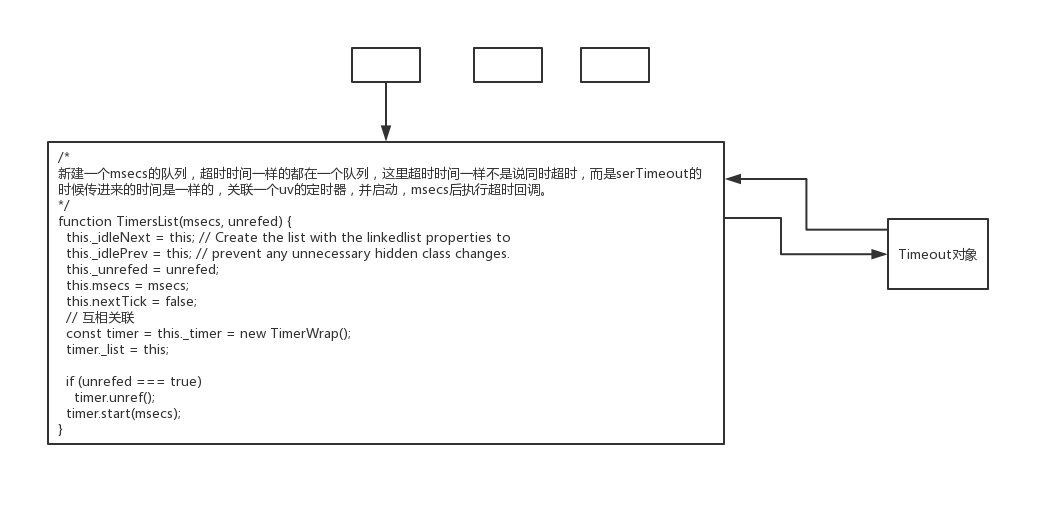\r\n\r\n当我们创建一个 `timerList` 的是时候,就会关联一个底层的定时器,执行 `setTimeout` 时传进来的时间是一样的,都会在一条队列中进行管理,该队列对应一个定时器,当定时器超时的时候,就会在该队列中找出超时节点。下面我们看一下 `new TimeWraper` 的时候发生了什么。\r\n\r\n```javascript\r\nTimerWrap(Environment* env, Local\u003cObject\u003e object) : HandleWrap(env, object,reinterpret_cast\u003cuv_handle_t*\u003e(\u0026handle_),AsyncWrap::PROVIDER_TIMERWRAP) {\r\n int r = uv_timer_init(env-\u003eevent_loop(), \u0026handle_);\r\n CHECK_EQ(r, 0);\r\n }\r\n```\r\n\r\n其实就是初始化了一个 `libuv` 的 `uv_timer_t` 结构体。然后接着 `start` 函数做了什么操作。\r\n\r\n```javascript\r\nstatic void Start(const FunctionCallbackInfo\u003cValue\u003e\u0026 args) {TimerWrap* wrap = Unwrap\u003cTimerWrap\u003e(args.Holder());\r\n\r\n CHECK(HandleWrap::IsAlive(wrap));\r\n\r\n int64_t timeout = args[0]-\u003eIntegerValue();\r\n int err = uv_timer_start(\u0026wrap-\u003ehandle_, OnTimeout, timeout, 0);\r\n args.GetReturnValue().Set(err);\r\n }\r\n```\r\n\r\n就是启动了刚才初始化的定时器。并且设置了超时回调函数是 `OnTimeout` 。这时候,就等定时器超时,然后执行 `OnTimeout` 函数。所以我们继续看该函数的代码。\r\n\r\n```javascript\r\nconst uint32_t kOnTimeout = 0;\r\n static void OnTimeout(uv_timer_t* handle) {\r\n TimerWrap* wrap = static_cast\u003cTimerWrap*\u003e(handle-\u003edata);\r\n Environment* env = wrap-\u003eenv();\r\n HandleScope handle_scope(env-\u003eisolate());\r\n Context::Scope context_scope(env-\u003econtext());\r\n wrap-\u003eMakeCallback(kOnTimeout, 0, nullptr);\r\n }\r\n```\r\n\r\n`OnTimeout` 函数继续调 `kOnTimeout` ,但是该变量在 `time_wrapper.c` 中是一个整形,这是怎么回事呢?这时候需要回 `lib/timer.js` 里找答案。\r\n\r\n```javascript\r\nconst kOnTimeout = TimerWrap.kOnTimeout | 0;\r\n// adds listOnTimeout to the C++ object prototype, as\r\n// V8 would not inline it otherwise.\r\n// 在TimerWrap中是0,给TimerWrap对象挂一个超时回调,每次的超时都会执行该回调\r\nTimerWrap.prototype[kOnTimeout] = function listOnTimeout() {\r\n // 拿到该底层定时器关联的超时队列,看TimersList\r\n var list = this._list;\r\n var msecs = list.msecs;\r\n //\r\n if (list.nextTick) {\r\n list.nextTick = false;\r\n process.nextTick(listOnTimeoutNT, list);\r\n return;\r\n }\r\n\r\n debug('timeout callback %d', msecs);\r\n\r\n var now = TimerWrap.now();\r\n debug('now: %d', now);\r\n\r\n var diff, timer;\r\n // 取出队列的尾节点,即最先插入的节点,最可能超时的,TimeOut对象\r\n while (timer = L.peek(list)) {\r\n diff = now - timer._idleStart;\r\n\r\n // Check if this loop iteration is too early for the next timer.\r\n // This happens if there are more timers scheduled for later in the list.\r\n // 最早的节点的消逝时间小于设置的时间,说明还没超时,并且全部节点都没超时,直接返回\r\n if (diff \u003c msecs) {\r\n // 算出最快超时的节点还需要多长时间超时\r\n var timeRemaining = msecs - (TimerWrap.now() - timer._idleStart);\r\n if (timeRemaining \u003c 0) {\r\n timeRemaining = 1;\r\n }\r\n // 重新设置超时时间\r\n this.start(timeRemaining);\r\n debug('%d list wait because diff is %d', msecs, diff);\r\n return;\r\n }\r\n\r\n // The actual logic for when a timeout happens.\r\n // 当前节点已经超时 \r\n L.remove(timer);\r\n assert(timer !== L.peek(list));\r\n\r\n if (!timer._onTimeout) {\r\n if (async_hook_fields[kDestroy] \u003e 0 \u0026\u0026 !timer._destroyed \u0026\u0026\r\n typeof timer[async_id_symbol] === 'number') {\r\n emitDestroy(timer[async_id_symbol]);\r\n timer._destroyed = true;\r\n }\r\n continue;\r\n }\r\n // 执行超时处理\r\n tryOnTimeout(timer, list);\r\n }\r\n```\r\n\r\n由上可知, `TimeWrapper.c` 里的 `kOnTimeout` 字段已经被改写成一个函数,所以底层的定时器超时时会执行上面的代码,即从定时器队列中找到超时节点执行,直到遇到第一个未超时的节点,然后重新设置超时时间。再次启动定时器。\r\n\r\n来源:[nodejs之setTimeout源码解析](https://zhuanlan.zhihu.com/p/60505970)","author":{"url":"https://github.com/sisterAn","@type":"Person","name":"sisterAn"},"datePublished":"2020-08-23T13:48:20.000Z","interactionStatistic":{"@type":"InteractionCounter","interactionType":"https://schema.org/CommentAction","userInteractionCount":8},"url":"https://github.com/98/JavaScript-Algorithms/issues/98"}| route-pattern | /_view_fragments/issues/show/:user_id/:repository/:id/issue_layout(.:format) |
| route-controller | voltron_issues_fragments |
| route-action | issue_layout |
| fetch-nonce | v2:814a2600-7856-e70c-fc9c-b243114e7830 |
| current-catalog-service-hash | 81bb79d38c15960b92d99bca9288a9108c7a47b18f2423d0f6438c5b7bcd2114 |
| request-id | 9AB6:13C0C7:9416C2:CC390A:696A81E1 |
| html-safe-nonce | 4d605b7e149ae2b869f0b1a29e730d31695d73f3b36df7c548986c17ba7b5eff |
| visitor-payload | eyJyZWZlcnJlciI6IiIsInJlcXVlc3RfaWQiOiI5QUI2OjEzQzBDNzo5NDE2QzI6Q0MzOTBBOjY5NkE4MUUxIiwidmlzaXRvcl9pZCI6IjE3MjE1NzA2MTk0MDU1MzM2NjUiLCJyZWdpb25fZWRnZSI6ImlhZCIsInJlZ2lvbl9yZW5kZXIiOiJpYWQifQ== |
| visitor-hmac | ab51ace9b2f5e253b971cd7ac89c3e635f50eb2c98d29535568e0e1f1db9a751 |
| hovercard-subject-tag | issue:684186851 |
| github-keyboard-shortcuts | repository,issues,copilot |
| google-site-verification | Apib7-x98H0j5cPqHWwSMm6dNU4GmODRoqxLiDzdx9I |
| octolytics-url | https://collector.github.com/github/collect |
| analytics-location | / |
| fb:app_id | 1401488693436528 |
| apple-itunes-app | app-id=1477376905, app-argument=https://github.com/_view_fragments/issues/show/sisterAn/JavaScript-Algorithms/98/issue_layout |
| twitter:image | https://opengraph.githubassets.com/b6ed5774b420026cbadeb726c533f83b5856db675d49ccf5866ded7176b5f1e1/sisterAn/JavaScript-Algorithms/issues/98 |
| twitter:card | summary_large_image |
| og:image | https://opengraph.githubassets.com/b6ed5774b420026cbadeb726c533f83b5856db675d49ccf5866ded7176b5f1e1/sisterAn/JavaScript-Algorithms/issues/98 |
| og:image:alt | setTimeout 方法,就是一个定时器,用来指定某个函数在多少毫秒之后执行。它会返回一个整数,表示定时器的编号,同时你还可以通过该编号来取消这个定时器: function showName(){ console.log("Hello") } let timerID = setTimeout(showName, 1000); // 在 1 秒后打印 “Hello” setTimeout 的... |
| og:image:width | 1200 |
| og:image:height | 600 |
| og:site_name | GitHub |
| og:type | object |
| og:author:username | sisterAn |
| hostname | github.com |
| expected-hostname | github.com |
| None | 913560fa317c3c5a71e34f9b19253c9f09d02b4b958a86c2a56f4c8541116377 |
| turbo-cache-control | no-preview |
| go-import | github.com/sisterAn/JavaScript-Algorithms git https://github.com/sisterAn/JavaScript-Algorithms.git |
| octolytics-dimension-user_id | 19721451 |
| octolytics-dimension-user_login | sisterAn |
| octolytics-dimension-repository_id | 252061924 |
| octolytics-dimension-repository_nwo | sisterAn/JavaScript-Algorithms |
| octolytics-dimension-repository_public | true |
| octolytics-dimension-repository_is_fork | false |
| octolytics-dimension-repository_network_root_id | 252061924 |
| octolytics-dimension-repository_network_root_nwo | sisterAn/JavaScript-Algorithms |
| turbo-body-classes | logged-out env-production page-responsive |
| disable-turbo | false |
| browser-stats-url | https://api.github.com/_private/browser/stats |
| browser-errors-url | https://api.github.com/_private/browser/errors |
| release | 5998c30593994bf2589055aef7b22d368a499367 |
| ui-target | full |
| theme-color | #1e2327 |
| color-scheme | light dark |
Links:
Viewport: width=device-width