Title: Flink on k8s: Checkpoint 的持久化存储 · Issue #57 · nodejh/nodejh.github.io · GitHub
Open Graph Title: Flink on k8s: Checkpoint 的持久化存储 · Issue #57 · nodejh/nodejh.github.io
X Title: Flink on k8s: Checkpoint 的持久化存储 · Issue #57 · nodejh/nodejh.github.io
Description: 将 Flink 应用部署到 k8s 上时,为了实现任务高可用,我们就需要将 checkpoint、savepoint 以及 Job Manager meta data 等数据持久化存储下来,而不是简单地存储在单个 Node 上,这时就需要配置 Pod 的持久化存储。 在传统的 Yarn 部署模式中,我们通常会将 checkpoint 等数据存储在 HDFS 中,HDFS 是 Hadoop 分布式的文件系统。这样只要 HDFS 不出问题,就能保证 Flink 任务出现...
Open Graph Description: 将 Flink 应用部署到 k8s 上时,为了实现任务高可用,我们就需要将 checkpoint、savepoint 以及 Job Manager meta data 等数据持久化存储下来,而不是简单地存储在单个 Node 上,这时就需要配置 Pod 的持久化存储。 在传统的 Yarn 部署模式中,我们通常会将 checkpoint 等数据存储在 HDFS 中,HDFS 是 Hadoop...
X Description: 将 Flink 应用部署到 k8s 上时,为了实现任务高可用,我们就需要将 checkpoint、savepoint 以及 Job Manager meta data 等数据持久化存储下来,而不是简单地存储在单个 Node 上,这时就需要配置 Pod 的持久化存储。 在传统的 Yarn 部署模式中,我们通常会将 checkpoint 等数据存储在 HDFS 中,HDFS 是 Hadoop...
Opengraph URL: https://github.com/nodejh/nodejh.github.io/issues/57
X: @github
Domain: github.com
{"@context":"https://schema.org","@type":"DiscussionForumPosting","headline":"Flink on k8s: Checkpoint 的持久化存储","articleBody":"\n将 Flink 应用部署到 k8s 上时,为了实现任务高可用,我们就需要将 checkpoint、savepoint 以及 Job Manager meta data 等数据持久化存储下来,而不是简单地存储在单个 Node 上,这时就需要配置 Pod 的持久化存储。\n\n\n在传统的 Yarn 部署模式中,我们通常会将 checkpoint 等数据存储在 HDFS 中,HDFS 是 Hadoop 分布式的文件系统。这样只要 HDFS 不出问题,就能保证 Flink 任务出现异常后,checkpoint 数据还在,Flink 任务依旧可以通过 HDFS 中的 checkpoint 进行恢复。\n\n\n在 k8s 中,我们也可以参考使用 HDFS 来持久化存储数据,但相比在 k8s 上部署一个 HDFS,我们还有更好、更简单的方案:直接使用云上的弹性分布式文件系统,比如阿里云的 NAS、AWS 的 EFS。这些文件系统可以直接通过 NFS 协议协议挂载到 Pod 中,使用起来像读写本地文件一样方便。\n\n\n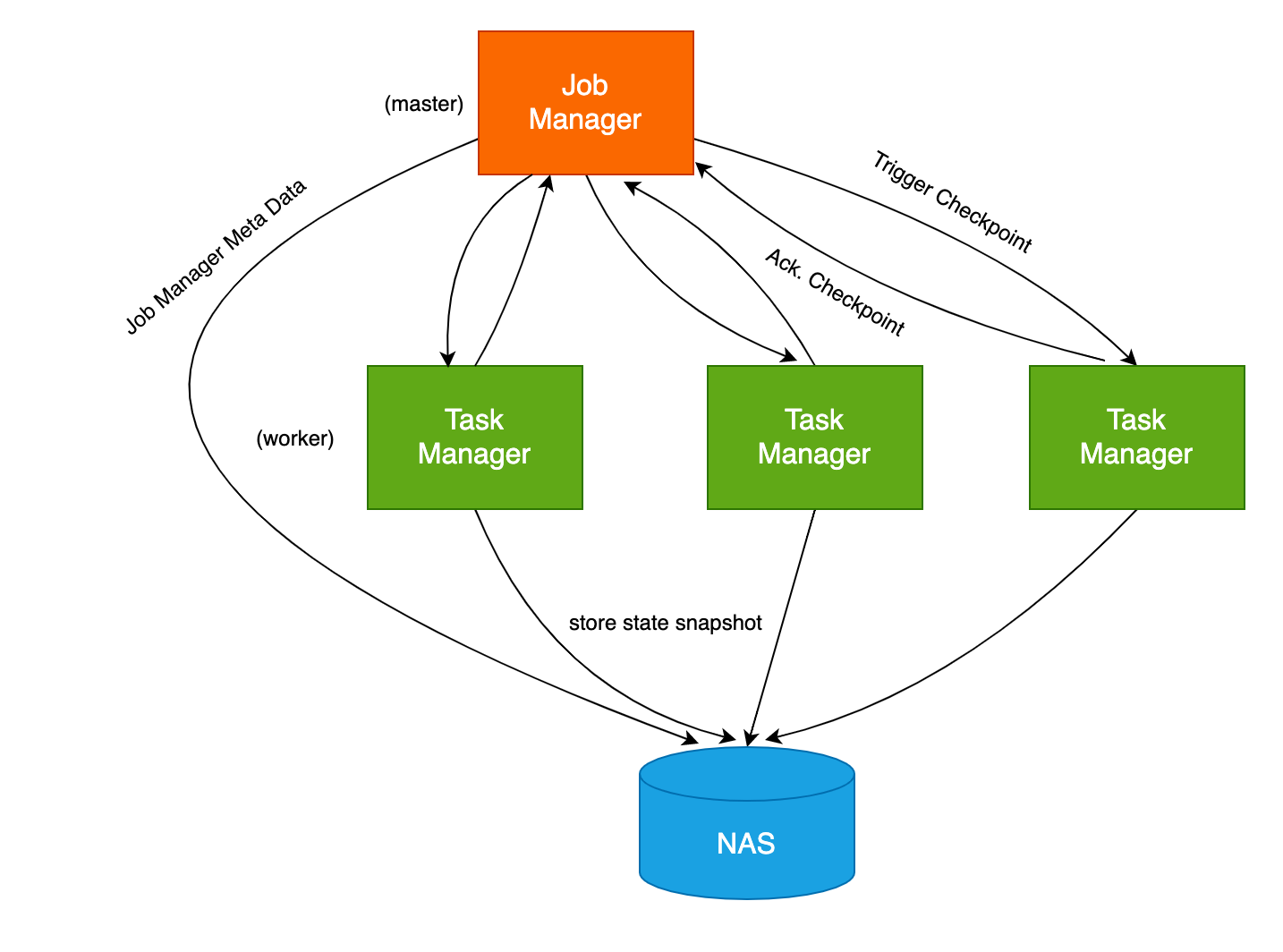\n\n\n## flink-conf.yaml 配置\n\n\n首先让我们来看一下,要实现 flink 任务的高可用,需要在 flink-conf.yaml 中指定的一些配置:\n\n\n```yaml\nstate.backend: rocksdb\nstate.checkpoint-storage: filesystem\nstate.checkpoints.dir: file:///nas/flink/checkpoints\nstate.savepoints.dir: file:///nas/flink/savepoints\nstate.backend.incremental: true\nkubernetes.cluster-id: flink-cluster-001\nhigh-availability: org.apache.flink.kubernetes.highavailability.KubernetesHaServicesFactory\nhigh-availability.storageDir: file:///nas/flink/recovery\n```\n\n\n状态后端使用 rocksdb (RocksDBStateBackend)。RocksDBStateBackend 会将正在运行的数据保存在 RocksDB 数据库中。在进行 checkpoint 时,整个 RocksDB 数据库就会被保存到 `state.checkpoints.dir` 目录中。同时 Job Manager 也会将高可用数据存储到 `state.checkpoints.dir` 中。\n\n\n`kubernetes.cluster-id` 、`high-availability` 和 `high-availability.storageDir` 则是 k8s 的高可用配置。\n\n\n\n- `kubernetes.cluster-id` 是自定义的 Flink 任务集群名称,用来标记当前的 flink 任务;\n- `high-availability`是高可用的类型,由于是部署在 k8s 上,所以需要配置为 `KubernetesHaServicesFactory` ;\n- `high-availability.storageDir` JobManager 元数据的存储位置,用于存储恢复 JobManager 所需的全部元数据。\n\n\n\n在 k8s 中,要实现任务出现异常后能自动恢复,`state.checkpoints.dir` 、 `state.savepoints.dir` 和 `high-availability.storageDir` 这几个目录就非常重要了,就必须持久化存储。\n\n\n所以我们需要在 Pod 中将这些目录挂载到 NAS 上。\n\n\n前面我们也提到了,NAS 可以通过 NFS 协议进行挂载,所以在 `flink-conf.yaml` 可以直接通过 `file://` 前缀来指定 NAS 目录位置,跟使用本地文件一样。如果你使用过 HDFS 来存储 checkpoint 数据,则你应该还有印象,HDFS 的目录前缀是 `hdfs://`。\n\n\n\n\n## 创建 PV / PVC\n\n\n在 Pod 中挂载 NAS 的前提就是先创建 PV、PVC。\n\n\n以下面的 yaml 为例,创建一个名为 `pv-flink` 的通用型 NAS 持久化存储卷,和名为 `pvc-flink` 的存储声明。\n```yaml\napiVersion: v1\nkind: PersistentVolume\nmetadata:\n name: pv-flink\n labels:\n alicloud-pvname: pv-flink\nspec:\n capacity:\n storage: 5Gi\n accessModes:\n - ReadWriteMany\n csi:\n driver: nasplugin.csi.alibabacloud.com\n volumeHandle: pv-dflink\n volumeAttributes:\n server: \"xxx.cn-hangzhou.nas.aliyuncs.com\"\n path: \"/nas/flink\"\n mountOptions:\n - nolock,tcp,noresvport\n - vers=3\n\n---\n\nkind: PersistentVolumeClaim\napiVersion: v1\nmetadata:\n name: pvc-flink\nspec:\n accessModes:\n - ReadWriteMany\n resources:\n requests:\n storage: 5Gi\n selector:\n matchLabels:\n alicloud-pvname: pv-flink\n```\n\n\n在 `pvc-flink` 中,对应的 NAS 挂载点是 `xxx.cn-hangzhou.nas.aliyuncs.com`,挂载的子目录是 `/nas/flink`。\n\n\n这里需要注意的是,NAS 有通用型和极速型两个型号,极速型的 NAS `volumeAttributes.path`需要以 `/share` 为父目录。\n\n\n其他字段详细的含义可以参考 NAS 文档:[使用NAS静态存储卷](https://help.aliyun.com/document_detail/134884.html) ,这里就不细讲了。\n\n\n## 在 Pod 中挂载 NAS\n\n\n下面是一个挂载 NAS 的 Job Manager 的 YAML 示例:\n\n\n```yaml\napiVersion: batch/v1\nkind: Job\nmetadata:\n name: flink-jobmanager\nspec:\n parallelism:\n template:\n metadata:\n labels:\n component: jobmanager\n spec:\n restartPolicy: OnFailure\n containers:\n - name: jobmanager\n imagePullPolicy: Always\n image: my-flink-job:latest\n resources:\n limits:\n cpu: 1\n memory: 4Gi\n requests:\n cpu: 1\n memory: 4Gi\n env:\n - name: POD_IP\n valueFrom:\n fieldRef:\n apiVersion: v1\n fieldPath: status.podIP\n args: [ \"standalone-job\"]\n ports:\n - containerPort: 6123\n name: rpc\n - containerPort: 6124\n name: blob-server\n - containerPort: 8081\n name: webui\n livenessProbe:\n tcpSocket:\n port: 6123\n initialDelaySeconds: 30\n periodSeconds: 60\n volumeMounts:\n - name: volume-pvc-nas-flink\n mountPath: /nas/flink\n securityContext:\n runAsUser: 9999\n serviceAccountName: flink\n volumes:\n - name: volume-pvc-nas-flink\n persistentVolumeClaim:\n claimName: pvc-flink\n```\n\n\n我们使用 `volumeMounts` 将 `/nas/flink` 目录挂载到 `volume-pvc-nas-flink` 卷,该卷对应的是 NAS 持久化存储卷。\n\n\n在该 Pod 中,镜像是基于[ Flink 官方 Docker 镜像](https://github.com/apache/flink-docker) 的 `my-flink-job:latest` 。\n\n\nFlink 官方的 Docker 镜像中创建了 `flink` 用户组以及组内的 `flink` 用户,用户组和用户的 ID 均为 `9999`。 并且在官方镜像中,最终也是使用 `flink` 用户来启动 Job Manager 和 Task Manager。\n\n\n下面是 Flink 官方镜像 [Dockerfile](https://github.com/apache/flink-docker/blob/master/1.13/scala_2.12-java11-debian/Dockerfile) 的相关脚本:\n```shell\n......\n\nENV FLINK_HOME=/opt/flink\nENV PATH=$FLINK_HOME/bin:$PATH\nRUN groupadd --system --gid=9999 flink \u0026\u0026 \\\n useradd --system --home-dir $FLINK_HOME --uid=9999 --gid=flink flink\nWORKDIR $FLINK_HOME\n\n......\n```\n\n\n所以在 `securityContext` 中,我们也指定 runAsUser 为 9999 ,使 Pod 中的所有进程都是用 9999 (也就是 flink 用户)来运行。\n\n\n挂载了 NAS 之后,还有一件非常重要的事情,就是初始化 NAS 目录的权限。\n\n\n因为 NAS 目录默认是使用 `root` 用户挂载的,但 flink 任务是以 ID 为 9999 的用户执行的,所以这时 flink 任务没有权限写 NAS 目录。\n\n\n解决这个问题的方案有两种,一是使用 root 权限运行 flink 任务;二是修改所挂载的 NAS 目录的权限。通常为了安全起见,我们不会使用 root 权限运行 Pod,所以选择方案二。\n\n\n## 初始化 NAS 目录权限\n\n\n要初始化 NAS 目录的权限, 我们可以使用 k8s 的[ Init 容器](https://kubernetes.io/docs/concepts/workloads/pods/init-containers/)。Init 容器是一个特殊的容器,可以在 Pod 内的应用容器启动前运行。所以我们可以基于 Init 容器做一些初始化工作,比如执行初始化脚本、设置目录权限等。\n\n\n要初始化 NAS 目录权限,就需要在 Init 容器中也挂载对应的 NAS 目录,以便 Init 容器能够访问该目录。然后通过 command 来执行 shell 命令,修改目录权限。\n\n\n将 `/nas/flink` 目录的所有者设置为 `flink` 用户的命令为:\n\n\n```shell\n$ chown -R 9999:9999 /nas/flink\n```\n在 Init 容器中, 我们使用了 [alpine 镜像](https://hub.docker.com/_/alpine), 这是一个基于 Alpine Linux 的只有 5MB 的 Docker 镜像。\n\n\n完成的 YAML 文件如下所示:\n\n\n```yaml\napiVersion: batch/v1\nkind: Job\nmetadata:\n name: flink-jobmanager\nspec:\n parallelism:\n template:\n metadata:\n labels:\n component: jobmanager\n spec:\n restartPolicy: OnFailure\n initContainers:\n - name: init-jobmanager\n image: alpine:3\n command:\n - chown\n - -R\n - 9999:9999\n - /nas/flink\n volumeMounts:\n - name: volume-pvc-nas-flink\n mountPath: /nas/flink\n containers:\n - name: jobmanager\n imagePullPolicy: Always\n image: my-flink-job:latest\n resources:\n limits:\n cpu: 1\n memory: 4Gi\n requests:\n cpu: 1\n memory: 4Gi\n env:\n - name: POD_IP\n valueFrom:\n fieldRef:\n apiVersion: v1\n fieldPath: status.podIP\n args: [ \"standalone-job\"]\n ports:\n - containerPort: 6123\n name: rpc\n - containerPort: 6124\n name: blob-server\n - containerPort: 8081\n name: webui\n livenessProbe:\n tcpSocket:\n port: 6123\n initialDelaySeconds: 30\n periodSeconds: 60\n volumeMounts:\n - name: volume-pvc-nas-flink\n mountPath: /nas/flink\n securityContext:\n runAsUser: 9999\n serviceAccountName: flink\n volumes:\n - name: volume-pvc-nas-flink\n persistentVolumeClaim:\n claimName: pvc-flink\n```\n\n\n这样 k8s 在运行 jobmanager 容器前,会先运行 init-jobmanager 容器,init-jobmanager 会将 `/nas/flink` 目录的所有者修改为 ID 为 9999 的用户,即 flink。init-jobmanager 运行完毕后,再运行 jobmanager ,这时 jobmanager 中的 flink 任务就有权限读写 `/nas/flink` 目录了。\n\n\n这里需要注意的是,Job Manager 和 Task Manager 的 NAS 挂载路径 mountPath 必须保持一致。\n\n\n## Checkpoint 文件的清理\n\n\n配置了持久化存储后,Flink 会将 state 数据持久存储在 `state.checkpoints.dir`目录。\n\n\n`state.checkpoints.dir` 目录结构如下:\n```shell\n/user-defined-checkpoint-dir\n /{job-id}\n |\n + --shared/\n + --taskowned/\n + --chk-1/\n + --chk-2/\n + --chk-3/\n ... \n```\n其中 `shared`目录中保持的是可能被多个 checkpoint 引用的文件,`taskowned` 目录保存的是不会被 Job Manager 删除的文件,`chk-{n}` 则是每个 checkpoint 的文件,`n` 为 checkpoint 的 ID。\n\n\ncheckpoint 文件的数量可以在 `flink-config.yaml` 中通过 `state.checkpoints.num-retained` 参数指定。默认为 1,即只保留一个 checkpoint 文件,Flink 会清理多余的 checkpoint 文件。\n\n\n前面提到在 k8s 中 Job Manager 和 Task Manager 的持久化存储路径 mountPath 必须保持一致。如果不一致,则 Job Manager 和 Task Manager 的 checkpoint 文件就会存储到不同的目录中。这时即使设置了 `state.checkpoints.num-retained`, Flink 也无法自动清理多余的 checkpoint 文件,最终会导致 checkpoint 文件堆积、占满磁盘空间。\n\n\n## 常见问题\n\n\n### 目录权限错误\n在进行持久化存储配置的时候,最常见的问题就是没有初始化 NAS 目录的权限,导致应用无法启动。\n\n\n通常 Job Manager 的报错可能如下所示:\n\n\n```shell\n2021-08-02 17:51:23.718 ERROR org.apache.flink.runtime.entrypoint.ClusterEntrypoint [] - Fatal error occurred in the cluster entrypoint.\norg.apache.flink.util.FlinkException: Application failed unexpectedly.\n\tat org.apache.flink.client.deployment.application.ApplicationDispatcherBootstrap.lambda$runApplicationAndShutdownClusterAsync$0(ApplicationDispatcherBootstrap.java:170) ~[flink-dist_2.12-1.13.1.jar:1.13.1]\n\tat java.util.concurrent.CompletableFuture.uniHandle(CompletableFuture.java:836) ~[?:1.8.0_292]\n\tat java.util.concurrent.CompletableFuture$UniHandle.tryFire(CompletableFuture.java:811) ~[?:1.8.0_292]\n\tat java.util.concurrent.CompletableFuture.postComplete(CompletableFuture.java:488) ~[?:1.8.0_292]\n\tat java.util.concurrent.CompletableFuture.completeExceptionally(CompletableFuture.java:1990) ~[?:1.8.0_292]\n\tat org.apache.flink.client.deployment.application.ApplicationDispatcherBootstrap.runApplicationEntryPoint(ApplicationDispatcherBootstrap.java:257) ~[flink-dist_2.12-1.13.1.jar:1.13.1]\n\tat org.apache.flink.client.deployment.application.ApplicationDispatcherBootstrap.lambda$runApplicationAsync$1(ApplicationDispatcherBootstrap.java:212) ~[flink-dist_2.12-1.13.1.jar:1.13.1]\n\tat java.util.concurrent.Executors$RunnableAdapter.call(Executors.java:511) [?:1.8.0_292]\n\tat java.util.concurrent.FutureTask.run(FutureTask.java:266) [?:1.8.0_292]\n\tat org.apache.flink.runtime.concurrent.akka.ActorSystemScheduledExecutorAdapter$ScheduledFutureTask.run(ActorSystemScheduledExecutorAdapter.java:159) [flink-dist_2.12-1.13.1.jar:1.13.1]\n\tat akka.dispatch.TaskInvocation.run(AbstractDispatcher.scala:40) [flink-dist_2.12-1.13.1.jar:1.13.1]\n\tat akka.dispatch.ForkJoinExecutorConfigurator$AkkaForkJoinTask.exec(ForkJoinExecutorConfigurator.scala:44) [flink-dist_2.12-1.13.1.jar:1.13.1]\n\tat akka.dispatch.forkjoin.ForkJoinTask.doExec(ForkJoinTask.java:260) [flink-dist_2.12-1.13.1.jar:1.13.1]\n\tat akka.dispatch.forkjoin.ForkJoinPool$WorkQueue.runTask(ForkJoinPool.java:1339) [flink-dist_2.12-1.13.1.jar:1.13.1]\n\tat akka.dispatch.forkjoin.ForkJoinPool.runWorker(ForkJoinPool.java:1979) [flink-dist_2.12-1.13.1.jar:1.13.1]\n\tat akka.dispatch.forkjoin.ForkJoinWorkerThread.run(ForkJoinWorkerThread.java:107) [flink-dist_2.12-1.13.1.jar:1.13.1]\nCaused by: java.util.concurrent.CompletionException: org.apache.flink.client.deployment.application.ApplicationExecutionException: Could not execute application.\n\tat java.util.concurrent.CompletableFuture.encodeThrowable(CompletableFuture.java:292) ~[?:1.8.0_292]\n\tat java.util.concurrent.CompletableFuture.completeThrowable(CompletableFuture.java:308) ~[?:1.8.0_292]\n\tat java.util.concurrent.CompletableFuture.uniCompose(CompletableFuture.java:957) ~[?:1.8.0_292]\n\tat java.util.concurrent.CompletableFuture$UniCompose.tryFire(CompletableFuture.java:940) ~[?:1.8.0_292]\n\t... 13 more\nCaused by: org.apache.flink.client.deployment.application.ApplicationExecutionException: Could not execute application.\n\t... 11 more\nCaused by: org.apache.flink.client.program.ProgramInvocationException: The main method caused an error: Failed to execute job 'DeliveryOssStream'.\n\tat org.apache.flink.client.program.PackagedProgram.callMainMethod(PackagedProgram.java:372) ~[flink-dist_2.12-1.13.1.jar:1.13.1]\n\tat org.apache.flink.client.program.PackagedProgram.invokeInteractiveModeForExecution(PackagedProgram.java:222) ~[flink-dist_2.12-1.13.1.jar:1.13.1]\n\tat org.apache.flink.client.ClientUtils.executeProgram(ClientUtils.java:114) ~[flink-dist_2.12-1.13.1.jar:1.13.1]\n\tat org.apache.flink.client.deployment.application.ApplicationDispatcherBootstrap.runApplicationEntryPoint(ApplicationDispatcherBootstrap.java:242) ~[flink-dist_2.12-1.13.1.jar:1.13.1]\n\t... 10 more\nCaused by: org.apache.flink.util.FlinkException: Failed to execute job 'DeliveryOssStream'.\n\tat org.apache.flink.streaming.api.environment.StreamExecutionEnvironment.executeAsync(StreamExecutionEnvironment.java:1970) ~[flink-dist_2.12-1.13.1.jar:1.13.1]\n\tat org.apache.flink.client.program.StreamContextEnvironment.executeAsync(StreamContextEnvironment.java:135) ~[flink-dist_2.12-1.13.1.jar:1.13.1]\n\tat org.apache.flink.client.program.StreamContextEnvironment.execute(StreamContextEnvironment.java:76) ~[flink-dist_2.12-1.13.1.jar:1.13.1]\n\tat org.apache.flink.streaming.api.environment.StreamExecutionEnvironment.execute(StreamExecutionEnvironment.java:1834) ~[flink-dist_2.12-1.13.1.jar:1.13.1]\n\tat com.aliyun.actiontrail.delivery.stream.OssStream.start(OssStream.java:59) ~[?:?]\n\tat com.aliyun.actiontrail.delivery.Main.main(Main.java:143) ~[?:?]\n\tat sun.reflect.NativeMethodAccessorImpl.invoke0(Native Method) ~[?:1.8.0_292]\n\tat sun.reflect.NativeMethodAccessorImpl.invoke(NativeMethodAccessorImpl.java:62) ~[?:1.8.0_292]\n\tat sun.reflect.DelegatingMethodAccessorImpl.invoke(DelegatingMethodAccessorImpl.java:43) ~[?:1.8.0_292]\n\tat java.lang.reflect.Method.invoke(Method.java:498) ~[?:1.8.0_292]\n\tat org.apache.flink.client.program.PackagedProgram.callMainMethod(PackagedProgram.java:355) ~[flink-dist_2.12-1.13.1.jar:1.13.1]\n\tat org.apache.flink.client.program.PackagedProgram.invokeInteractiveModeForExecution(PackagedProgram.java:222) ~[flink-dist_2.12-1.13.1.jar:1.13.1]\n\tat org.apache.flink.client.ClientUtils.executeProgram(ClientUtils.java:114) ~[flink-dist_2.12-1.13.1.jar:1.13.1]\n\tat org.apache.flink.client.deployment.application.ApplicationDispatcherBootstrap.runApplicationEntryPoint(ApplicationDispatcherBootstrap.java:242) ~[flink-dist_2.12-1.13.1.jar:1.13.1]\n\t... 10 more\nCaused by: org.apache.flink.runtime.client.JobSubmissionException: Failed to submit job.\n\tat org.apache.flink.runtime.dispatcher.Dispatcher.lambda$internalSubmitJob$2(Dispatcher.java:380) ~[flink-dist_2.12-1.13.1.jar:1.13.1]\n\tat java.util.concurrent.CompletableFuture.uniHandle(CompletableFuture.java:836) ~[?:1.8.0_292]\n\tat java.util.concurrent.CompletableFuture$UniHandle.tryFire(CompletableFuture.java:811) ~[?:1.8.0_292]\n\tat java.util.concurrent.CompletableFuture$Completion.run(CompletableFuture.java:456) ~[?:1.8.0_292]\n\tat java.util.concurrent.ThreadPoolExecutor.runWorker(ThreadPoolExecutor.java:1149) ~[?:1.8.0_292]\n\tat java.util.concurrent.ThreadPoolExecutor$Worker.run(ThreadPoolExecutor.java:624) ~[?:1.8.0_292]\n\tat java.lang.Thread.run(Thread.java:748) ~[?:1.8.0_292]\nCaused by: java.lang.RuntimeException: java.lang.Exception: Could not open output stream for state backend\n\tat org.apache.flink.util.ExceptionUtils.rethrow(ExceptionUtils.java:316) ~[flink-dist_2.12-1.13.1.jar:1.13.1]\n\tat org.apache.flink.util.function.FunctionUtils.lambda$uncheckedConsumer$3(FunctionUtils.java:95) ~[flink-dist_2.12-1.13.1.jar:1.13.1]\n\tat java.util.concurrent.CompletableFuture.uniAccept(CompletableFuture.java:670) ~[?:1.8.0_292]\n\tat java.util.concurrent.CompletableFuture$UniAccept.tryFire(CompletableFuture.java:646) ~[?:1.8.0_292]\n\tat java.util.concurrent.CompletableFuture$Completion.run(CompletableFuture.java:456) ~[?:1.8.0_292]\n\tat org.apache.flink.runtime.rpc.akka.AkkaRpcActor.handleRunAsync(AkkaRpcActor.java:440) ~[flink-dist_2.12-1.13.1.jar:1.13.1]\n\tat org.apache.flink.runtime.rpc.akka.AkkaRpcActor.handleRpcMessage(AkkaRpcActor.java:208) ~[flink-dist_2.12-1.13.1.jar:1.13.1]\n\tat org.apache.flink.runtime.rpc.akka.FencedAkkaRpcActor.handleRpcMessage(FencedAkkaRpcActor.java:77) ~[flink-dist_2.12-1.13.1.jar:1.13.1]\n\tat org.apache.flink.runtime.rpc.akka.AkkaRpcActor.handleMessage(AkkaRpcActor.java:158) ~[flink-dist_2.12-1.13.1.jar:1.13.1]\n\tat akka.japi.pf.UnitCaseStatement.apply(CaseStatements.scala:26) ~[flink-dist_2.12-1.13.1.jar:1.13.1]\n\tat akka.japi.pf.UnitCaseStatement.apply(CaseStatements.scala:21) ~[flink-dist_2.12-1.13.1.jar:1.13.1]\n\tat scala.PartialFunction.applyOrElse(PartialFunction.scala:123) ~[flink-dist_2.12-1.13.1.jar:1.13.1]\n\tat scala.PartialFunction.applyOrElse$(PartialFunction.scala:122) ~[flink-dist_2.12-1.13.1.jar:1.13.1]\n\tat akka.japi.pf.UnitCaseStatement.applyOrElse(CaseStatements.scala:21) ~[flink-dist_2.12-1.13.1.jar:1.13.1]\n\tat scala.PartialFunction$OrElse.applyOrElse(PartialFunction.scala:171) ~[flink-dist_2.12-1.13.1.jar:1.13.1]\n\tat scala.PartialFunction$OrElse.applyOrElse(PartialFunction.scala:172) ~[flink-dist_2.12-1.13.1.jar:1.13.1]\n\tat scala.PartialFunction$OrElse.applyOrElse(PartialFunction.scala:172) ~[flink-dist_2.12-1.13.1.jar:1.13.1]\n\tat akka.actor.Actor.aroundReceive(Actor.scala:517) ~[flink-dist_2.12-1.13.1.jar:1.13.1]\n\tat akka.actor.Actor.aroundReceive$(Actor.scala:515) ~[flink-dist_2.12-1.13.1.jar:1.13.1]\n\tat akka.actor.AbstractActor.aroundReceive(AbstractActor.scala:225) ~[flink-dist_2.12-1.13.1.jar:1.13.1]\n\tat akka.actor.ActorCell.receiveMessage(ActorCell.scala:592) ~[flink-dist_2.12-1.13.1.jar:1.13.1]\n\tat akka.actor.ActorCell.invoke(ActorCell.scala:561) ~[flink-dist_2.12-1.13.1.jar:1.13.1]\n\tat akka.dispatch.Mailbox.processMailbox(Mailbox.scala:258) ~[flink-dist_2.12-1.13.1.jar:1.13.1]\n\tat akka.dispatch.Mailbox.run(Mailbox.scala:225) ~[flink-dist_2.12-1.13.1.jar:1.13.1]\n\tat akka.dispatch.Mailbox.exec(Mailbox.scala:235) ~[flink-dist_2.12-1.13.1.jar:1.13.1]\n\t... 4 more\nCaused by: java.lang.Exception: Could not open output stream for state backend\n\tat org.apache.flink.runtime.persistence.filesystem.FileSystemStateStorageHelper.store(FileSystemStateStorageHelper.java:72) ~[flink-dist_2.12-1.13.1.jar:1.13.1]\n\tat org.apache.flink.kubernetes.highavailability.KubernetesStateHandleStore.addAndLock(KubernetesStateHandleStore.java:131) ~[flink-dist_2.12-1.13.1.jar:1.13.1]\n\tat org.apache.flink.runtime.jobmanager.DefaultJobGraphStore.putJobGraph(DefaultJobGraphStore.java:212) ~[flink-dist_2.12-1.13.1.jar:1.13.1]\n\tat org.apache.flink.runtime.dispatcher.Dispatcher.persistAndRunJob(Dispatcher.java:391) ~[flink-dist_2.12-1.13.1.jar:1.13.1]\n\tat org.apache.flink.runtime.dispatcher.Dispatcher.lambda$waitForTerminatingJob$27(Dispatcher.java:954) ~[flink-dist_2.12-1.13.1.jar:1.13.1]\n\tat org.apache.flink.util.function.FunctionUtils.lambda$uncheckedConsumer$3(FunctionUtils.java:93) ~[flink-dist_2.12-1.13.1.jar:1.13.1]\n\tat java.util.concurrent.CompletableFuture.uniAccept(CompletableFuture.java:670) ~[?:1.8.0_292]\n\tat java.util.concurrent.CompletableFuture$UniAccept.tryFire(CompletableFuture.java:646) ~[?:1.8.0_292]\n\tat java.util.concurrent.CompletableFuture$Completion.run(CompletableFuture.java:456) ~[?:1.8.0_292]\n\tat org.apache.flink.runtime.rpc.akka.AkkaRpcActor.handleRunAsync(AkkaRpcActor.java:440) ~[flink-dist_2.12-1.13.1.jar:1.13.1]\n\tat org.apache.flink.runtime.rpc.akka.AkkaRpcActor.handleRpcMessage(AkkaRpcActor.java:208) ~[flink-dist_2.12-1.13.1.jar:1.13.1]\n\tat org.apache.flink.runtime.rpc.akka.FencedAkkaRpcActor.handleRpcMessage(FencedAkkaRpcActor.java:77) ~[flink-dist_2.12-1.13.1.jar:1.13.1]\n\tat org.apache.flink.runtime.rpc.akka.AkkaRpcActor.handleMessage(AkkaRpcActor.java:158) ~[flink-dist_2.12-1.13.1.jar:1.13.1]\n\tat akka.japi.pf.UnitCaseStatement.apply(CaseStatements.scala:26) ~[flink-dist_2.12-1.13.1.jar:1.13.1]\n\tat akka.japi.pf.UnitCaseStatement.apply(CaseStatements.scala:21) ~[flink-dist_2.12-1.13.1.jar:1.13.1]\n\tat scala.PartialFunction.applyOrElse(PartialFunction.scala:123) ~[flink-dist_2.12-1.13.1.jar:1.13.1]\n\tat scala.PartialFunction.applyOrElse$(PartialFunction.scala:122) ~[flink-dist_2.12-1.13.1.jar:1.13.1]\n\tat akka.japi.pf.UnitCaseStatement.applyOrElse(CaseStatements.scala:21) ~[flink-dist_2.12-1.13.1.jar:1.13.1]\n\tat scala.PartialFunction$OrElse.applyOrElse(PartialFunction.scala:171) ~[flink-dist_2.12-1.13.1.jar:1.13.1]\n\tat scala.PartialFunction$OrElse.applyOrElse(PartialFunction.scala:172) ~[flink-dist_2.12-1.13.1.jar:1.13.1]\n\tat scala.PartialFunction$OrElse.applyOrElse(PartialFunction.scala:172) ~[flink-dist_2.12-1.13.1.jar:1.13.1]\n\tat akka.actor.Actor.aroundReceive(Actor.scala:517) ~[flink-dist_2.12-1.13.1.jar:1.13.1]\n\tat akka.actor.Actor.aroundReceive$(Actor.scala:515) ~[flink-dist_2.12-1.13.1.jar:1.13.1]\n\tat akka.actor.AbstractActor.aroundReceive(AbstractActor.scala:225) ~[flink-dist_2.12-1.13.1.jar:1.13.1]\n\tat akka.actor.ActorCell.receiveMessage(ActorCell.scala:592) ~[flink-dist_2.12-1.13.1.jar:1.13.1]\n\tat akka.actor.ActorCell.invoke(ActorCell.scala:561) ~[flink-dist_2.12-1.13.1.jar:1.13.1]\n\tat akka.dispatch.Mailbox.processMailbox(Mailbox.scala:258) ~[flink-dist_2.12-1.13.1.jar:1.13.1]\n\tat akka.dispatch.Mailbox.run(Mailbox.scala:225) ~[flink-dist_2.12-1.13.1.jar:1.13.1]\n\tat akka.dispatch.Mailbox.exec(Mailbox.scala:235) ~[flink-dist_2.12-1.13.1.jar:1.13.1]\n\t... 4 more\nCaused by: java.io.IOException: Mkdirs failed to create file:/nas/flink/recovery/default\n\tat org.apache.flink.core.fs.local.LocalFileSystem.create(LocalFileSystem.java:262) ~[flink-dist_2.12-1.13.1.jar:1.13.1]\n\tat org.apache.flink.runtime.persistence.filesystem.FileSystemStateStorageHelper.store(FileSystemStateStorageHelper.java:64) ~[flink-dist_2.12-1.13.1.jar:1.13.1]\n\tat org.apache.flink.kubernetes.highavailability.KubernetesStateHandleStore.addAndLock(KubernetesStateHandleStore.java:131) ~[flink-dist_2.12-1.13.1.jar:1.13.1]\n\tat org.apache.flink.runtime.jobmanager.DefaultJobGraphStore.putJobGraph(DefaultJobGraphStore.java:212) ~[flink-dist_2.12-1.13.1.jar:1.13.1]\n\tat org.apache.flink.runtime.dispatcher.Dispatcher.persistAndRunJob(Dispatcher.java:391) ~[flink-dist_2.12-1.13.1.jar:1.13.1]\n\tat org.apache.flink.runtime.dispatcher.Dispatcher.lambda$waitForTerminatingJob$27(Dispatcher.java:954) ~[flink-dist_2.12-1.13.1.jar:1.13.1]\n\tat org.apache.flink.util.function.FunctionUtils.lambda$uncheckedConsumer$3(FunctionUtils.java:93) ~[flink-dist_2.12-1.13.1.jar:1.13.1]\n\tat java.util.concurrent.CompletableFuture.uniAccept(CompletableFuture.java:670) ~[?:1.8.0_292]\n\tat java.util.concurrent.CompletableFuture$UniAccept.tryFire(CompletableFuture.java:646) ~[?:1.8.0_292]\n\tat java.util.concurrent.CompletableFuture$Completion.run(CompletableFuture.java:456) ~[?:1.8.0_292]\n\tat org.apache.flink.runtime.rpc.akka.AkkaRpcActor.handleRunAsync(AkkaRpcActor.java:440) ~[flink-dist_2.12-1.13.1.jar:1.13.1]\n\tat org.apache.flink.runtime.rpc.akka.AkkaRpcActor.handleRpcMessage(AkkaRpcActor.java:208) ~[flink-dist_2.12-1.13.1.jar:1.13.1]\n\tat org.apache.flink.runtime.rpc.akka.FencedAkkaRpcActor.handleRpcMessage(FencedAkkaRpcActor.java:77) ~[flink-dist_2.12-1.13.1.jar:1.13.1]\n\tat org.apache.flink.runtime.rpc.akka.AkkaRpcActor.handleMessage(AkkaRpcActor.java:158) ~[flink-dist_2.12-1.13.1.jar:1.13.1]\n\tat akka.japi.pf.UnitCaseStatement.apply(CaseStatements.scala:26) ~[flink-dist_2.12-1.13.1.jar:1.13.1]\n\tat akka.japi.pf.UnitCaseStatement.apply(CaseStatements.scala:21) ~[flink-dist_2.12-1.13.1.jar:1.13.1]\n\tat scala.PartialFunction.applyOrElse(PartialFunction.scala:123) ~[flink-dist_2.12-1.13.1.jar:1.13.1]\n\tat scala.PartialFunction.applyOrElse$(PartialFunction.scala:122) ~[flink-dist_2.12-1.13.1.jar:1.13.1]\n\tat akka.japi.pf.UnitCaseStatement.applyOrElse(CaseStatements.scala:21) ~[flink-dist_2.12-1.13.1.jar:1.13.1]\n\tat scala.PartialFunction$OrElse.applyOrElse(PartialFunction.scala:171) ~[flink-dist_2.12-1.13.1.jar:1.13.1]\n\tat scala.PartialFunction$OrElse.applyOrElse(PartialFunction.scala:172) ~[flink-dist_2.12-1.13.1.jar:1.13.1]\n\tat scala.PartialFunction$OrElse.applyOrElse(PartialFunction.scala:172) ~[flink-dist_2.12-1.13.1.jar:1.13.1]\n\tat akka.actor.Actor.aroundReceive(Actor.scala:517) ~[flink-dist_2.12-1.13.1.jar:1.13.1]\n\tat akka.actor.Actor.aroundReceive$(Actor.scala:515) ~[flink-dist_2.12-1.13.1.jar:1.13.1]\n\tat akka.actor.AbstractActor.aroundReceive(AbstractActor.scala:225) ~[flink-dist_2.12-1.13.1.jar:1.13.1]\n\tat akka.actor.ActorCell.receiveMessage(ActorCell.scala:592) ~[flink-dist_2.12-1.13.1.jar:1.13.1]\n\tat akka.actor.ActorCell.invoke(ActorCell.scala:561) ~[flink-dist_2.12-1.13.1.jar:1.13.1]\n\tat akka.dispatch.Mailbox.processMailbox(Mailbox.scala:258) ~[flink-dist_2.12-1.13.1.jar:1.13.1]\n\tat akka.dispatch.Mailbox.run(Mailbox.scala:225) ~[flink-dist_2.12-1.13.1.jar:1.13.1]\n\tat akka.dispatch.Mailbox.exec(Mailbox.scala:235) ~[flink-dist_2.12-1.13.1.jar:1.13.1]\n\t... 4 more\n2021-08-02 17:51:23.721 INFO org.apache.flink.runtime.entrypoint.ClusterEntrypoint [] - Shutting StandaloneApplicationClusterEntryPoint down with application status UNKNOWN. Diagnostics Cluster entrypoint has been closed externally..\n```\n\n\n报错信息很多,但一开始可能很难知道原因。其中造成 Job Manager 无法启动的主要报错是:\n\n\n```shell\nCaused by: java.io.IOException: Mkdirs failed to create file:/nas/flink/recovery/default\n```\n其根本原因是 flink 任务进程没有权限写 `file:/nas/flink/recovery/default` 目录。\n\n\n然后 Job Manager 会不断重启,Task Manager 虽然不会重启,但也无法正常工作。\n\n\n这时登录到 Job Manager 或 Task Manager 的任意一个 Pod 上,查看任务启动进程,就可以发现 flink 任务进程是通过 flink 用户启动的,但 `/nas/flink` 目录的所有者是 `root` ,所以 flink 任务进程没有权限写 `/nas/flink` 目录。\n\n\n```shell\n# 查看当前 flink 任务的启动用户\n$ ps -aux\nUSER PID %CPU %MEM VSZ RSS TTY STAT START TIME COMMAND\nflink 1 7.7 2.5 7449300 1655960 ? Ssl 17:54 0:05 /usr/local/openjdk-8/bin/java -Xmx4563402682 -Xms4563402682 -XX:MaxDirectMem\nroot 280 0.0 0.0 5752 3608 pts/0 Ss 17:55 0:00 bash\nroot 331 0.0 0.0 9392 2972 pts/0 R+ 17:56 0:00 ps -aux\n\n# 查看 /nas/flink 目录的权限\n$ ls -l /nas\ntotal 77\n...\ndrwxr-xr-x 2 root root 4096 Aug 2 17:48 flink\n```\n\n\n此外我们还可以通过 `cat /etc/passwd` 查看 flink 用户对应的 ID,即 9999,这也跟前面提到的 Docker 镜像中 flink 用户的 PID 为 9999 相对应。\n\n\n```shell\n$ cat /etc/passwd\nroot:x:0:0:root:/root:/bin/bash\ndaemon:x:1:1:daemon:/usr/sbin:/usr/sbin/nologin\nbin:x:2:2:bin:/bin:/usr/sbin/nologin\nsys:x:3:3:sys:/dev:/usr/sbin/nologin\nsync:x:4:65534:sync:/bin:/bin/sync\n\n......\n\nflink:x:9999:9999::/opt/flink:/bin/sh\n```\n\n\n当然,解决该问题的方法,前面也讲了,就是通过 Init 容器初始化 NAS 目录的权限。\n\n\n### checkpoint 文件堆积占满磁盘空间\n\n\n另一个常见问题是,checkpoint 文件堆积,导致磁盘空间占满。\n\n\n这时有两种情况,一是 `state.checkpoints.num-retained` 过大,不过通常可能不是这个原因。更可能的原因是 Job Manager 和 Task Manager 的持久化存储卷挂载路径 mountPath 不一致,这时就需要检查对应的 YAML 配置。\n\n\n## 总结\n\n\n在 Flink on k8s 中,我们通常会使用 NAS 等持久化存储来保存 checkpoint、savepoint 以及高可用数据。\n\n\n但在使用持久化存储时,最常见的一个问题就是 flink 任务没有权限读写持久化存储,所以我们需要通过 Init 容器来初始化持久化存储的目录权限。\n\n\n\n\n","author":{"url":"https://github.com/nodejh","@type":"Person","name":"nodejh"},"datePublished":"2021-08-02T11:34:43.000Z","interactionStatistic":{"@type":"InteractionCounter","interactionType":"https://schema.org/CommentAction","userInteractionCount":2},"url":"https://github.com/57/nodejh.github.io/issues/57"}| route-pattern | /_view_fragments/issues/show/:user_id/:repository/:id/issue_layout(.:format) |
| route-controller | voltron_issues_fragments |
| route-action | issue_layout |
| fetch-nonce | v2:53b44305-a61c-2c80-3212-6e839e5e7669 |
| current-catalog-service-hash | 81bb79d38c15960b92d99bca9288a9108c7a47b18f2423d0f6438c5b7bcd2114 |
| request-id | D378:23810A:41A1B68:56276AC:6992E8A9 |
| html-safe-nonce | 6d68e780dffcf45a4a186cff05a72718a8b50a4cc83efcf787899f618fd14b46 |
| visitor-payload | eyJyZWZlcnJlciI6IiIsInJlcXVlc3RfaWQiOiJEMzc4OjIzODEwQTo0MUExQjY4OjU2Mjc2QUM6Njk5MkU4QTkiLCJ2aXNpdG9yX2lkIjoiNDQ5NjM1NzEwMzA5OTg5ODAyNSIsInJlZ2lvbl9lZGdlIjoiaWFkIiwicmVnaW9uX3JlbmRlciI6ImlhZCJ9 |
| visitor-hmac | b08247eb611af12300110436e4ca742d9c4f5e8664b5b0e43ec4862dd8e48119 |
| hovercard-subject-tag | issue:958051592 |
| github-keyboard-shortcuts | repository,issues,copilot |
| google-site-verification | Apib7-x98H0j5cPqHWwSMm6dNU4GmODRoqxLiDzdx9I |
| octolytics-url | https://collector.github.com/github/collect |
| analytics-location | / |
| fb:app_id | 1401488693436528 |
| apple-itunes-app | app-id=1477376905, app-argument=https://github.com/_view_fragments/issues/show/nodejh/nodejh.github.io/57/issue_layout |
| twitter:image | https://opengraph.githubassets.com/ce3c762606d2e08d943af44cce8303a5ab1653121db065d296a9f2861788aa0d/nodejh/nodejh.github.io/issues/57 |
| twitter:card | summary_large_image |
| og:image | https://opengraph.githubassets.com/ce3c762606d2e08d943af44cce8303a5ab1653121db065d296a9f2861788aa0d/nodejh/nodejh.github.io/issues/57 |
| og:image:alt | 将 Flink 应用部署到 k8s 上时,为了实现任务高可用,我们就需要将 checkpoint、savepoint 以及 Job Manager meta data 等数据持久化存储下来,而不是简单地存储在单个 Node 上,这时就需要配置 Pod 的持久化存储。 在传统的 Yarn 部署模式中,我们通常会将 checkpoint 等数据存储在 HDFS 中,HDFS 是 Hadoop... |
| og:image:width | 1200 |
| og:image:height | 600 |
| og:site_name | GitHub |
| og:type | object |
| og:author:username | nodejh |
| hostname | github.com |
| expected-hostname | github.com |
| None | 42c603b9d642c4a9065a51770f75e5e27132fef0e858607f5c9cb7e422831a7b |
| turbo-cache-control | no-preview |
| go-import | github.com/nodejh/nodejh.github.io git https://github.com/nodejh/nodejh.github.io.git |
| octolytics-dimension-user_id | 10287125 |
| octolytics-dimension-user_login | nodejh |
| octolytics-dimension-repository_id | 45253813 |
| octolytics-dimension-repository_nwo | nodejh/nodejh.github.io |
| octolytics-dimension-repository_public | true |
| octolytics-dimension-repository_is_fork | false |
| octolytics-dimension-repository_network_root_id | 45253813 |
| octolytics-dimension-repository_network_root_nwo | nodejh/nodejh.github.io |
| turbo-body-classes | logged-out env-production page-responsive |
| disable-turbo | false |
| browser-stats-url | https://api.github.com/_private/browser/stats |
| browser-errors-url | https://api.github.com/_private/browser/errors |
| release | 84dcb133269e3cfe6e0296cc85fbacb92cae92bb |
| ui-target | full |
| theme-color | #1e2327 |
| color-scheme | light dark |
Links:
Viewport: width=device-width
