Title: Jupyter notebook not shown on screen · Issue #4395 · coder/code-server · GitHub
Open Graph Title: Jupyter notebook not shown on screen · Issue #4395 · coder/code-server
X Title: Jupyter notebook not shown on screen · Issue #4395 · coder/code-server
Description: OS/Web Information Web Browser: Firefox 93.0 Local OS: Ubuntu 21.04 Remote OS: same (running locally) Remote Architecture: Installed anaconda (conda version 4.10.3) code-server --version: 3.12.0 Steps to Reproduce Open an existing notebo...
Open Graph Description: OS/Web Information Web Browser: Firefox 93.0 Local OS: Ubuntu 21.04 Remote OS: same (running locally) Remote Architecture: Installed anaconda (conda version 4.10.3) code-server --version: 3.12.0 St...
X Description: OS/Web Information Web Browser: Firefox 93.0 Local OS: Ubuntu 21.04 Remote OS: same (running locally) Remote Architecture: Installed anaconda (conda version 4.10.3) code-server --version: 3.12.0 St...
Opengraph URL: https://github.com/coder/code-server/issues/4395
X: @github
Domain: github.com
{"@context":"https://schema.org","@type":"DiscussionForumPosting","headline":"Jupyter notebook not shown on screen","articleBody":"\u003c!--\r\n\r\nHi there! 👋\r\n\r\nThanks for reporting a bug.\r\n\r\nPlease search for existing issues before filing, as they may contain additional\r\ninformation about the problem and descriptions of workarounds. Provide as much\r\ninformation as you can, so that we can reproduce the issue. Otherwise, we may\r\nnot be able to help diagnose the problem, and may close the issue as\r\nunreproducible or incomplete. For visual defects, please include screenshots to\r\nhelp us understand the issue.\r\n-->\r\n\r\n## OS/Web Information\r\n\r\n- Web Browser: Firefox 93.0\r\n- Local OS: Ubuntu 21.04\r\n- Remote OS: same (running locally)\r\n- Remote Architecture: Installed anaconda (conda version 4.10.3)\r\n- `code-server --version`: 3.12.0\r\n\r\n## Steps to Reproduce\r\n\r\n1. Open an existing notebook\r\n2. The file kind of opens, meaning the contents are not shown, the wait indicator is running but the outline can be shown. It can be run as well but does not recognize the installed python interpreter (ms-python) or jupyter notebook (ms-toolsai). It asks again and again to install a python interpreter.\r\n3. New markdowns can be added, show up in the outline (without text) but not on the screen.\r\n4. The same happens when creating a new notebook\r\n5. Notebooks can be normally created, opened and run in local vscode (1.61.1)\r\n6. code-server has been removed and installed again to see if anything differed. That was not the case.\r\n\r\nPython code runs as expected.\r\n\r\n## Expected\r\nWhen opening an existing notebook, it shows the notebook on the screen that can be run using F5. Also it should be aware of already existing installed python environments.\r\n\r\n\u003c!-- What should happen? -->\r\nI would like to see a jupyter notebook and be able to run the cells like in the local version. \r\n\r\n## Actual\r\n\r\n\u003c!-- What actually happens? -->\r\nNothing.\r\n\r\n## Logs\r\n\r\n\u003c!--\r\nFirst run code-server with at least debug logging (or trace to be really\r\nthorough) by setting the --log flag or the LOG_LEVEL environment variable. -vvv\r\nand --verbose are aliases for --log trace. For example:\r\n\r\ncode-server --log debug\r\n\r\nOnce this is done, replicate the issue you're having then collect logging\r\ninformation from the following places:\r\n\r\n 1. The most recent files from ~/.local/share/code-server/coder-logs.\r\n 2. The browser console.\r\n 3. The browser network tab.\r\n\r\nAdditionally, collecting core dumps (you may need to enable them first) if\r\ncode-server crashes can be helpful.\r\n-->\r\nLog files are added. There is no log activity to be seen on the screen (code-server.log) when I try to open and run a jupyter notebook.\r\n\u003c!--\r\nIf you're having issues with installation please include the installation logs\r\ni.e. the output of `yarn global add code-server` if you installed with `yarn`\r\n -->\r\n\r\n## Screenshot\r\n\r\n\u003c!-- Ideally provide a screenshot, gif, video or screen recording. -->\r\nHas been added. The editor shows a blank screen but the outline shows that a lot is present. The sidebar is identical as that of local vscode.\r\n\r\n## Notes\r\n\r\n\u003c!-- If you can reproduce the issue on vanilla VS Code,\r\nplease file the issue at the VS Code repository instead. -->\r\n\r\nThis issue can be reproduced in VS Code: No\r\n\r\n[code-server.log](https://github.com/cdr/code-server/files/7410197/code-server.log)\r\n[exthost.log](https://github.com/cdr/code-server/files/7410234/exthost.log)\r\n[remoteagent.log](https://github.com/cdr/code-server/files/7410235/remoteagent.log)\r\n[telemetry.log](https://github.com/cdr/code-server/files/7410236/telemetry.log)\r\n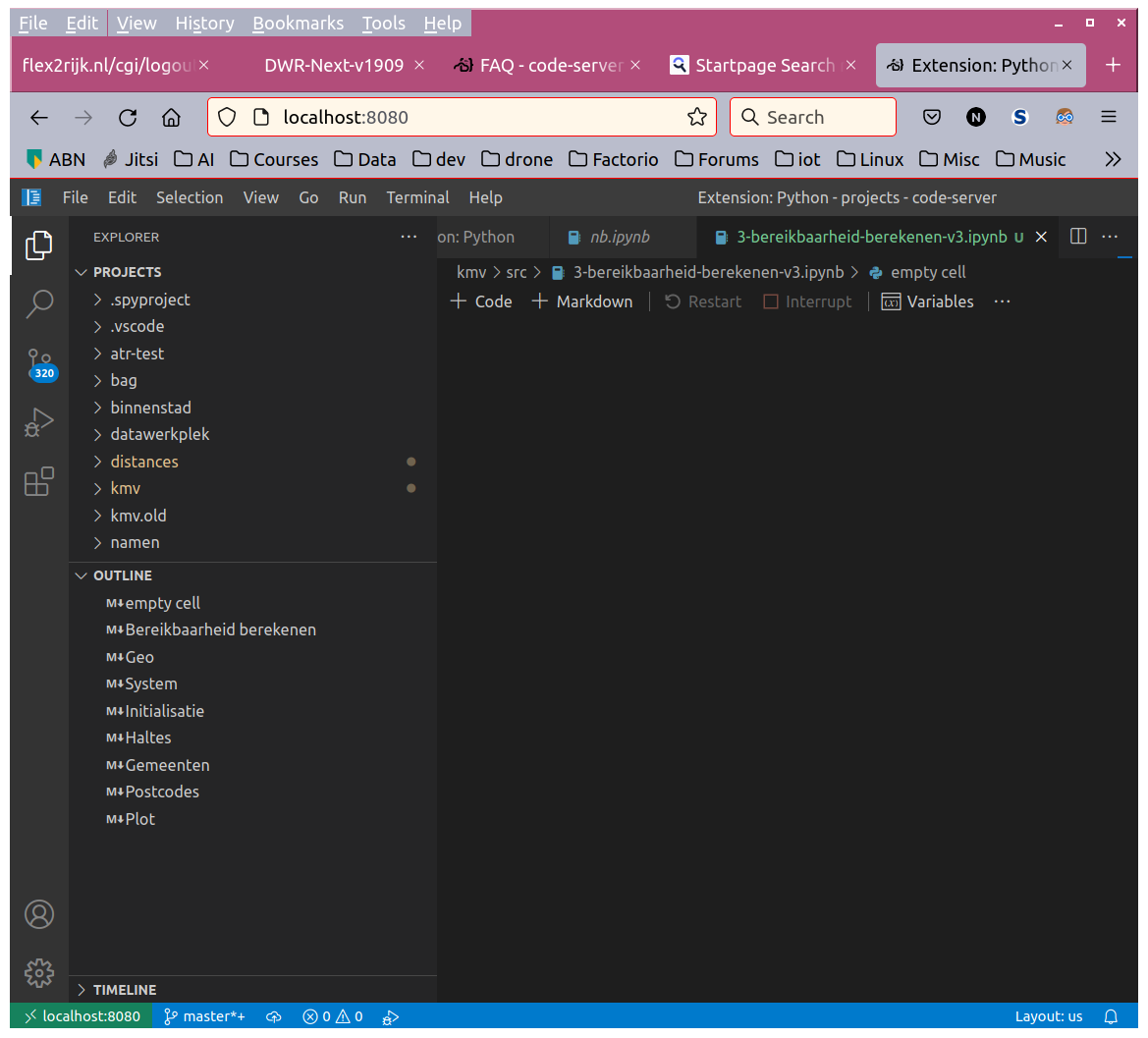\r\n\r\n\r\n","author":{"url":"https://github.com/RnoldR","@type":"Person","name":"RnoldR"},"datePublished":"2021-10-25T13:26:08Z","url":"https://github.com/coder/code-server/issues/4395"}| react-profiling | 0 |
| react-import-map | react,react-dom,react-dom/client,react-dom/profiling,react-is,react/compiler-runtime,react/jsx-dev-runtime,react/jsx-runtime,scheduler@b8488ee2c322 |
| route-pattern | /_view_fragments/issues/show/:user_id/:repository/:id/issue_layout(.:format) |
| route-controller | voltron_issues_fragments |
| route-action | issue_layout |
| fetch-nonce | v2:4dca09d8-2242-b99c-e4e3-9ac9be773277 |
| current-catalog-service-hash | 81bb79d38c15960b92d99bca9288a9108c7a47b18f2423d0f6438c5b7bcd2114 |
| request-id | E4FC:65478:2F8BA94:3F1E150:6B01D6A1 |
| html-safe-nonce | 17730f00c4a5729b09ed791372141d449ee4e1dc152ee0484da5c73adbf18275 |
| visitor-payload | eyJyZWZlcnJlciI6IiIsInJlcXVlc3RfaWQiOiJFNEZDOjY1NDc4OjJGOEJBOTQ6M0YxRTE1MDo2QjAxRDZBMSIsInZpc2l0b3JfaWQiOiIxNjQ1OTE0MTE3Njc4MTU5NTIxIiwicmVnaW9uX2VkZ2UiOiJpYWQiLCJyZWdpb25fcmVuZGVyIjoiaWFkIn0= |
| visitor-hmac | 63948a5b75160bb81bfa788cd7ed22c4597ae572e56c90c1848dc30fd63ba198 |
| hovercard-subject-tag | issue:1035138836 |
| github-keyboard-shortcuts | repository,issues,copilot |
| google-site-verification | Apib7-x98H0j5cPqHWwSMm6dNU4GmODRoqxLiDzdx9I |
| octolytics-url | https://collector.github.com/github/collect |
| analytics-location | / |
| fb:app_id | 1401488693436528 |
| apple-itunes-app | app-id=1477376905, app-argument=https://github.com/_view_fragments/issues/show/coder/code-server/4395/issue_layout |
| twitter:image | https://opengraph.githubassets.com/0433bc3c7c439dc2c191a1b3b20e934dbb9a34693cbaef0c5cb6cca98aa3b696/coder/code-server/issues/4395 |
| twitter:card | summary_large_image |
| og:image | https://opengraph.githubassets.com/0433bc3c7c439dc2c191a1b3b20e934dbb9a34693cbaef0c5cb6cca98aa3b696/coder/code-server/issues/4395 |
| og:image:alt | OS/Web Information Web Browser: Firefox 93.0 Local OS: Ubuntu 21.04 Remote OS: same (running locally) Remote Architecture: Installed anaconda (conda version 4.10.3) code-server --version: 3.12.0 St... |
| og:image:width | 1200 |
| og:image:height | 600 |
| og:site_name | GitHub |
| og:type | object |
| og:author:username | RnoldR |
| hostname | github.com |
| expected-hostname | github.com |
| None | cc5dfdd32f62ebd3223cab3af3aa2b268d3605218237326a48a99d1efd89495c |
| turbo-cache-control | no-preview |
| go-import | github.com/coder/code-server git https://github.com/coder/code-server.git |
| octolytics-dimension-user_id | 95932066 |
| octolytics-dimension-user_login | coder |
| octolytics-dimension-repository_id | 172953845 |
| octolytics-dimension-repository_nwo | coder/code-server |
| octolytics-dimension-repository_public | true |
| octolytics-dimension-repository_is_fork | false |
| octolytics-dimension-repository_network_root_id | 172953845 |
| octolytics-dimension-repository_network_root_nwo | coder/code-server |
| turbo-body-classes | logged-out env-production page-responsive |
| disable-turbo | false |
| browser-stats-url | https://api.github.com/_private/browser/stats |
| browser-errors-url | https://api.github.com/_private/browser/errors |
| release | 8c77c9e8439031ad54c75a250694842892f693e1 |
| ui-target | full |
| theme-color | #1e2327 |
| color-scheme | light dark |
| react-app-name | issues |
Links:
Viewport: width=device-width


