Title: Beta.9 - Install-PowerShellRemoting error while executing. · Issue #5307 · PowerShell/PowerShell · GitHub
Open Graph Title: Beta.9 - Install-PowerShellRemoting error while executing. · Issue #5307 · PowerShell/PowerShell
X Title: Beta.9 - Install-PowerShellRemoting error while executing. · Issue #5307 · PowerShell/PowerShell
Description: Executing Install-PowerShellRemoting.ps1 script gives an error bit seems to complete OK. So, I think the script still valid and need to be fix. Steps to reproduce Open PowerShell Core Beta 9 - pwsh: Execute following script file : .\Inst...
Open Graph Description: Executing Install-PowerShellRemoting.ps1 script gives an error bit seems to complete OK. So, I think the script still valid and need to be fix. Steps to reproduce Open PowerShell Core Beta 9 - pwsh...
X Description: Executing Install-PowerShellRemoting.ps1 script gives an error bit seems to complete OK. So, I think the script still valid and need to be fix. Steps to reproduce Open PowerShell Core Beta 9 - pwsh...
Opengraph URL: https://github.com/PowerShell/PowerShell/issues/5307
X: @github
Domain: github.com
{"@context":"https://schema.org","@type":"DiscussionForumPosting","headline":"Beta.9 - Install-PowerShellRemoting error while executing.","articleBody":"\u003c!--\r\n\r\nFor Windows PowerShell 5.1 issues, suggestions, or feature requests please use the following link instead:\r\n- Windows PowerShell [UserVoice](https://windowsserver.uservoice.com/forums/301869-powershell)\r\n\r\nIf it is a bug report:\r\n- make sure you are able to repro it on the latest released version. \r\nYou can install the latest version from https://github.com/PowerShell/PowerShell/releases\r\n- Search the existing issues.\r\n- Refer to the [FAQ](https://github.com/PowerShell/PowerShell/blob/master/docs/FAQ.md).\r\n- Refer to the [known issues](https://github.com/PowerShell/PowerShell/blob/master/docs/KNOWNISSUES.md).\r\n- Fill out the following repro template:\r\n\r\nIf it's not a bug, please remove the template and elaborate the issue in your own words.\r\n-->\r\n\r\nExecuting Install-PowerShellRemoting.ps1 script gives an error bit seems to complete OK.\r\nSo, I think the script still valid and need to be fix.\r\n\r\nSteps to reproduce\r\n------------------\r\n1. Open PowerShell Core Beta 9 - pwsh:\r\n2. Execute following script file :\r\n```powershell\r\n.\\Install-PowerShellRemoting.ps1\r\n```\r\n\r\nExpected behavior\r\n-----------------\r\nScript to complete with out any errors.\r\n```none\r\n\r\n```\r\n\r\nActual behavior\r\n---------------\r\nShows errors in the begining:\r\n```none\r\nPS C:\\Program Files\\PowerShell\\6.0.0-beta.9> .\\Install-PowerShellRemoting.ps1\r\nGet-Content : Cannot find path 'C:\\Program Files\\PowerShell\\6.0.0-beta.9\\Powershell.Version' because it does not exist.\r\nAt C:\\Program Files\\PowerShell\\6.0.0-beta.9\\Install-PowerShellRemoting.ps1:136 char:23\r\n+ $versionString = (Get-Content $targetPsVersionFilePath).Trim()\r\n+ ~~~~~~~~~~~~~~~~~~~~~~~~~~~~~~~~~~~~\r\n + CategoryInfo : ObjectNotFound: (C:\\Program File...ershell.Version:String) [Get-Content], ItemNotFoundEx\r\n ception\r\n + FullyQualifiedErrorId : PathNotFound,Microsoft.PowerShell.Commands.GetContentCommand\r\n\r\nYou cannot call a method on a null-valued expression.\r\nAt C:\\Program Files\\PowerShell\\6.0.0-beta.9\\Install-PowerShellRemoting.ps1:136 char:5\r\n+ $versionString = (Get-Content $targetPsVersionFilePath).Trim()\r\n+ ~~~~~~~~~~~~~~~~~~~~~~~~~~~~~~~~~~~~~~~~~~~~~~~~~~~~~~~~~~~~~~\r\n + CategoryInfo : InvalidOperation: (:) [], RuntimeException\r\n + FullyQualifiedErrorId : InvokeMethodOnNull\r\n\r\nYou cannot call a method on a null-valued expression.\r\nAt C:\\Program Files\\PowerShell\\6.0.0-beta.9\\Install-PowerShellRemoting.ps1:137 char:8\r\n+ if($versionString.StartsWith(\"v\"))\r\n+ ~~~~~~~~~~~~~~~~~~~~~~~~~~~~~~\r\n + CategoryInfo : InvalidOperation: (:) [], RuntimeException\r\n + FullyQualifiedErrorId : InvokeMethodOnNull\r\n\r\nYou cannot call a method on a null-valued expression.\r\nAt C:\\Program Files\\PowerShell\\6.0.0-beta.9\\Install-PowerShellRemoting.ps1:141 char:5\r\n+ $index = $versionString.LastIndexOf(\".\")\r\n+ ~~~~~~~~~~~~~~~~~~~~~~~~~~~~~~~~~~~~~~~~\r\n + CategoryInfo : InvalidOperation: (:) [], RuntimeException\r\n + FullyQualifiedErrorId : InvokeMethodOnNull\r\n\r\nYou cannot call a method on a null-valued expression.\r\nAt C:\\Program Files\\PowerShell\\6.0.0-beta.9\\Install-PowerShellRemoting.ps1:142 char:5\r\n+ $version = $versionString.Substring(0,$index)\r\n+ ~~~~~~~~~~~~~~~~~~~~~~~~~~~~~~~~~~~~~~~~~~~~~\r\n + CategoryInfo : InvalidOperation: (:) [], RuntimeException\r\n + FullyQualifiedErrorId : InvokeMethodOnNull\r\n\r\nYou cannot call a method on a null-valued expression.\r\nAt C:\\Program Files\\PowerShell\\6.0.0-beta.9\\Install-PowerShellRemoting.ps1:143 char:5\r\n+ $revision = $versionString.Substring($index).split(\"-\")\r\n+ ~~~~~~~~~~~~~~~~~~~~~~~~~~~~~~~~~~~~~~~~~~~~~~~~~~~~~~~\r\n + CategoryInfo : InvalidOperation: (:) [], RuntimeException\r\n + FullyQualifiedErrorId : InvokeMethodOnNull\r\n\r\nCannot index into a null array.\r\nAt C:\\Program Files\\PowerShell\\6.0.0-beta.9\\Install-PowerShellRemoting.ps1:144 char:5\r\n+ $version= $version + $revision[0]\r\n+ ~~~~~~~~~~~~~~~~~~~~~~~~~~~~~~~~~\r\n + CategoryInfo : InvalidOperation: (:) [], RuntimeException\r\n + FullyQualifiedErrorId : NullArray\r\n\r\nVERBOSE: Using PowerShell Version:\r\nVERBOSE: Performing the operation \"Copy File\" on target \"Item: C:\\Program Files\\PowerShell\\6.0.0-beta.9\\pwrshplugin.dll\r\n Destination: C:\\WINDOWS\\System32\\PowerShell\\pwrshplugin.dll\".\r\n```\r\n\r\nEnvironment data\r\n----------------\r\nWindows 10 Insider Edition Build 17025\r\n\r\n\u003c!-- provide the output of $PSVersionTable -->\r\n\r\n```powershell\r\nPS C:\\Program Files\\PowerShell\\6.0.0-beta.9> $PSVersionTable\r\n\r\nName Value\r\n---- -----\r\nPSVersion 6.0.0-beta.9\r\nPSEdition Core\r\nGitCommitId v6.0.0-beta.9\r\nOS Microsoft Windows 10.0.16299\r\nPlatform Win32NT\r\nPSCompatibleVersions {1.0, 2.0, 3.0, 4.0...}\r\nPSRemotingProtocolVersion 2.3\r\nSerializationVersion 1.1.0.1\r\nWSManStackVersion 3.0\r\n\r\n```\r\n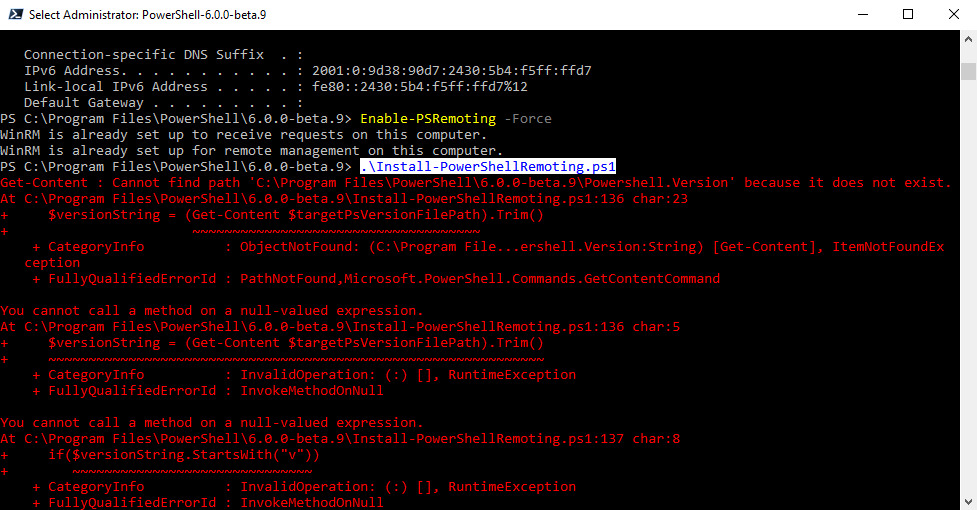\r\n","author":{"url":"https://github.com/MaximoTrinidad","@type":"Person","name":"MaximoTrinidad"},"datePublished":"2017-11-02T13:43:06Z","url":"https://github.com/PowerShell/PowerShell/issues/5307"}| react-profiling | 0 |
| react-import-map | react,react-dom,react-dom/client,react-dom/profiling,react-is,react/compiler-runtime,react/jsx-dev-runtime,react/jsx-runtime,scheduler@b8488ee2c322 |
| route-pattern | /_view_fragments/issues/show/:user_id/:repository/:id/issue_layout(.:format) |
| route-controller | voltron_issues_fragments |
| route-action | issue_layout |
| fetch-nonce | v2:fc6239f2-c0d6-9188-31da-c35acce667c1 |
| current-catalog-service-hash | 81bb79d38c15960b92d99bca9288a9108c7a47b18f2423d0f6438c5b7bcd2114 |
| request-id | BF98:2A802F:44747:5D20C:6AFD87C0 |
| html-safe-nonce | 7d8c152124cf220b86bde4dc297ac66e00ff61195a15967c52a1c1a172a9cb5d |
| visitor-payload | eyJyZWZlcnJlciI6IiIsInJlcXVlc3RfaWQiOiJCRjk4OjJBODAyRjo0NDc0Nzo1RDIwQzo2QUZEODdDMCIsInZpc2l0b3JfaWQiOiI2OTUxNDM5MzcyNDkwOTk5NzQ0IiwicmVnaW9uX2VkZ2UiOiJpYWQiLCJyZWdpb25fcmVuZGVyIjoiaWFkIn0= |
| visitor-hmac | 689150f31bedcd280e0f403d5e1b93f3768307aee591c5cda4d5d6620078281a |
| hovercard-subject-tag | issue:270657505 |
| github-keyboard-shortcuts | repository,issues,copilot |
| google-site-verification | Apib7-x98H0j5cPqHWwSMm6dNU4GmODRoqxLiDzdx9I |
| octolytics-url | https://collector.github.com/github/collect |
| analytics-location | / |
| fb:app_id | 1401488693436528 |
| apple-itunes-app | app-id=1477376905, app-argument=https://github.com/_view_fragments/issues/show/PowerShell/PowerShell/5307/issue_layout |
| twitter:image | https://opengraph.githubassets.com/906266fd84ce43cf4ac745008248e9aa2f70011cbb768ecf2d7a2254042db7ac/PowerShell/PowerShell/issues/5307 |
| twitter:card | summary_large_image |
| og:image | https://opengraph.githubassets.com/906266fd84ce43cf4ac745008248e9aa2f70011cbb768ecf2d7a2254042db7ac/PowerShell/PowerShell/issues/5307 |
| og:image:alt | Executing Install-PowerShellRemoting.ps1 script gives an error bit seems to complete OK. So, I think the script still valid and need to be fix. Steps to reproduce Open PowerShell Core Beta 9 - pwsh... |
| og:image:width | 1200 |
| og:image:height | 600 |
| og:site_name | GitHub |
| og:type | object |
| og:author:username | MaximoTrinidad |
| hostname | github.com |
| expected-hostname | github.com |
| None | bc86424ef34a73b386237872800e922d149d65ba907f63d6f150a2dcb8433bea |
| turbo-cache-control | no-preview |
| go-import | github.com/PowerShell/PowerShell git https://github.com/PowerShell/PowerShell.git |
| octolytics-dimension-user_id | 11524380 |
| octolytics-dimension-user_login | PowerShell |
| octolytics-dimension-repository_id | 49609581 |
| octolytics-dimension-repository_nwo | PowerShell/PowerShell |
| octolytics-dimension-repository_public | true |
| octolytics-dimension-repository_is_fork | false |
| octolytics-dimension-repository_network_root_id | 49609581 |
| octolytics-dimension-repository_network_root_nwo | PowerShell/PowerShell |
| turbo-body-classes | logged-out env-production page-responsive |
| disable-turbo | false |
| browser-stats-url | https://api.github.com/_private/browser/stats |
| browser-errors-url | https://api.github.com/_private/browser/errors |
| release | 927a6c5ab1c32b38830f1b9d3050c0b9e9aa92e1 |
| ui-target | canary-2 |
| theme-color | #1e2327 |
| color-scheme | light dark |
| react-app-name | issues |
Links:
Viewport: width=device-width
