Title: Failed to generate proxies for remote module 'AzureAD' using the latest PowerShell SDK 7.0.11 · Issue #17662 · PowerShell/PowerShell · GitHub
Open Graph Title: Failed to generate proxies for remote module 'AzureAD' using the latest PowerShell SDK 7.0.11 · Issue #17662 · PowerShell/PowerShell
X Title: Failed to generate proxies for remote module 'AzureAD' using the latest PowerShell SDK 7.0.11 · Issue #17662 · PowerShell/PowerShell
Description: Prerequisites Write a descriptive title. Make sure you are able to repro it on the latest released version Search the existing issues. Refer to the FAQ. Refer to Differences between Windows PowerShell 5.1 and PowerShell. Steps to reprodu...
Open Graph Description: Prerequisites Write a descriptive title. Make sure you are able to repro it on the latest released version Search the existing issues. Refer to the FAQ. Refer to Differences between Windows PowerSh...
X Description: Prerequisites Write a descriptive title. Make sure you are able to repro it on the latest released version Search the existing issues. Refer to the FAQ. Refer to Differences between Windows PowerSh...
Opengraph URL: https://github.com/PowerShell/PowerShell/issues/17662
X: @github
Domain: github.com
{"@context":"https://schema.org","@type":"DiscussionForumPosting","headline":"Failed to generate proxies for remote module 'AzureAD' using the latest PowerShell SDK 7.0.11","articleBody":"### Prerequisites\n\n- [X] Write a descriptive title.\n- [X] Make sure you are able to repro it on the [latest released version](https://github.com/PowerShell/PowerShell/releases)\n- [X] Search the existing issues.\n- [X] Refer to the [FAQ](https://github.com/PowerShell/PowerShell/blob/master/docs/FAQ.md).\n- [X] Refer to [Differences between Windows PowerShell 5.1 and PowerShell](https://docs.microsoft.com/powershell/scripting/whats-new/differences-from-windows-powershell).\n\n### Steps to reproduce\n\nFailed to generate proxies for remote module 'AzureAD' using the latest PowerShell SDK 7.0.11\r\n\r\n\r\nRepro:\r\n1) Install AzureAD module version 2.0.2.135\r\n2) Create a PowerShell session using the PowerShell SDK 7.0.11\r\n3) Run the line of code below\r\n```\r\nImport-Module -Name 'AzureAD' -UseWindowsPowershell -ErrorAction Stop\r\n```\r\n\r\n\r\n\n\n### Expected behavior\n\n```console\nProxy module is generated\n```\n\n\n### Actual behavior\n\n```console\n2022-07-11T18:26:08.570 [Error] EXCEPTION: Failed to generate proxies for remote module 'AzureAD'. The -OutputModule parameter does not resolve to a path, and a user module path cannot be found for the provided name.Exception :Type : System.InvalidOperationExceptionMessage : Failed to generate proxies for remote module 'AzureAD'. The -OutputModule parameter does not resolve to a path, and a user module path cannot be found for the provided name.InnerException :Type : System.Management.Automation.CmdletInvocationExceptionErrorRecord :Exception :Type : System.ArgumentExceptionMessage : The -OutputModule parameter does not resolve to a path, and a user module path cannot be found for the provided name.TargetSite :Name : ThrowTerminatingErrorDeclaringType : System.Management.Automation.MshCommandRuntime, System.Management.Automation, Version=7.0.11.0, Culture=neutral, PublicKeyToken=31bf3856ad364e35MemberType : MethodModule : System.Management.Automation.dllStackTrace :at System.Management.Automation.MshCommandRuntime.ThrowTerminatingError(ErrorRecord errorRecord)Source : System.Management.AutomationHResult : -2147024809TargetObject : Microsoft.PowerShell.Commands.ExportPSSessionCommandCategoryInfo : InvalidArgument: (Microsoft.PowerShel…ortPSSessionCommand:ExportPSSessionCommand) [Export-PSSession], ArgumentExceptionFullyQualifiedErrorId : ExportPSSession_ErrorModuleNameOrPath,Microsoft.PowerShell.Commands.ExportPSSessionCommandInvocationInfo :MyCommand : Export-PSSessionHistoryId : 1InvocationName : Export-PSSessionCommandOrigin : InternalScriptStackTrace : at \u003cScriptBlock\u003e, C:\\home\\site\\wwwroot\\HttpTrigger1\\run.ps1: line 9TargetSite :Name : InvokeDeclaringType : System.Management.Automation.Runspaces.PipelineBase, System.Management.Automation, Version=7.0.11.0, Culture=neutral, PublicKeyToken=31bf3856ad364e35MemberType : MethodModule : System.Management.Automation.dllStackTrace :at System.Management.Automation.Runspaces.PipelineBase.Invoke(IEnumerable input)at System.Management.Automation.Runspaces.Pipeline.Invoke()at System.Management.Automation.PowerShell.Worker.ConstructPipelineAndDoWork(Runspace rs, Boolean performSyncInvoke)at System.Management.Automation.PowerShell.CoreInvokeHelper[TInput,TOutput](PSDataCollection`1 input, PSDataCollection`1 output, PSInvocationSettings settings)at System.Management.Automation.PowerShell.CoreInvoke[TInput,TOutput](PSDataCollection`1 input, PSDataCollection`1 output, PSInvocationSettings settings)at System.Management.Automation.PowerShell.Invoke[T](IEnumerable input, IList`1 output, PSInvocationSettings settings)at System.Management.Automation.RemoteDiscoveryHelper.InvokeNestedPowerShell(PowerShell powerShell, CancellationToken cancellationToken, PSCmdlet cmdlet, PSInvocationSettings invocationSettings, String errorMessageTemplate)+MoveNext()at System.Management.Automation.RemoteDiscoveryHelper.EnumerateWithCatch[T](IEnumerable`1 enumerable, Action`1 exceptionHandler)+MoveNext()Message : The -OutputModule parameter does not resolve to a path, and a user module path cannot be found for the provided name.InnerException :Type : System.ArgumentExceptionMessage : The -OutputModule parameter does not resolve to a path, and a user module path cannot be found for the provided name.TargetSite :Name : ThrowTerminatingErrorDeclaringType : System.Management.Automation.MshCommandRuntime, System.Management.Automation, Version=7.0.11.0, Culture=neutral, PublicKeyToken=31bf3856ad364e35MemberType : MethodModule : System.Management.Automation.dllStackTrace :at System.Management.Automation.MshCommandRuntime.ThrowTerminatingError(ErrorRecord errorRecord)Source : System.Management.AutomationHResult : -2147024809Source : System.Management.AutomationHResult : -2146233087HResult : -2146233079CategoryInfo : NotSpecified: (:) [Import-Module], InvalidOperationExceptionFullyQualifiedErrorId : CmdletInvocationException,Microsoft.PowerShell.Commands.ImportModuleCommandInvocationInfo :MyCommand : Import-ModuleScriptLineNumber : 9OffsetInLine : 1HistoryId : 1ScriptName : C:\\home\\site\\wwwroot\\HttpTrigger1\\run.ps1Line : Import-Module -Name 'AzureAD' -UseWindowsPowershell -ErrorAction StopPositionMessage : At C:\\home\\site\\wwwroot\\HttpTrigger1\\run.ps1:9 char:1+ Import-Module -Name 'AzureAD' -UseWindowsPowershell -ErrorAction Stop+ ~~~~~~~~~~~~~~~~~~~~~~~~~~~~~~~~~~~~~~~~~~~~~~~~~~~~~~~~~~~~~~~~~~~~~\r\n```\n```\n\n\n### Error details\n\n```console\n2022-07-11T19:40:07.119 [Information] OUTPUT: Get-Error ouput:\r\n2022-07-11T19:40:07.120 [Information] OUTPUT:\r\n2022-07-11T19:40:07.120 [Information] OUTPUT: Exception :\r\n2022-07-11T19:40:07.120 [Information] OUTPUT: Type : System.InvalidOperationException\r\n2022-07-11T19:40:07.126 [Information] OUTPUT: Message : Failed to generate proxies for remote module 'AzureAD'. The -OutputModule parameter does not resolve to a path, and a user module path cannot be found for the provided name.\r\n2022-07-11T19:40:07.126 [Information] OUTPUT: InnerException :\r\n2022-07-11T19:40:07.126 [Information] OUTPUT: Type : System.Management.Automation.CmdletInvocationException\r\n2022-07-11T19:40:07.127 [Information] OUTPUT: ErrorRecord :\r\n2022-07-11T19:40:07.127 [Information] OUTPUT: Exception :\r\n2022-07-11T19:40:07.127 [Information] OUTPUT: Type : System.ArgumentException\r\n2022-07-11T19:40:07.127 [Information] OUTPUT: Message : The -OutputModule parameter does not resolve to a path, and a user module path cannot be found for the provided name.\r\n2022-07-11T19:40:07.127 [Information] OUTPUT: TargetSite :\r\n2022-07-11T19:40:07.127 [Information] OUTPUT: Name : ThrowTerminatingError\r\n2022-07-11T19:40:07.128 [Information] OUTPUT: DeclaringType : System.Management.Automation.MshCommandRuntime, System.Management.Automation, Version=7.0.11.0, Culture=neutral, PublicKeyToken=31bf3856ad364e35\r\n2022-07-11T19:40:07.128 [Information] OUTPUT: MemberType : Method\r\n2022-07-11T19:40:07.128 [Information] OUTPUT: Module : System.Management.Automation.dll\r\n2022-07-11T19:40:07.128 [Information] OUTPUT: StackTrace :\r\n2022-07-11T19:40:07.129 [Information] OUTPUT: at System.Management.Automation.MshCommandRuntime.ThrowTerminatingError(ErrorRecord errorRecord)\r\n2022-07-11T19:40:07.129 [Information] OUTPUT: Source : System.Management.Automation\r\n2022-07-11T19:40:07.129 [Information] OUTPUT: HResult : -2147024809\r\n2022-07-11T19:40:07.130 [Information] OUTPUT: TargetObject : Microsoft.PowerShell.Commands.ExportPSSessionCommand\r\n2022-07-11T19:40:07.130 [Information] OUTPUT: CategoryInfo : InvalidArgument: (Microsoft.PowerShel…ortPSSessionCommand:ExportPSSessionCommand) [Export-PSSession], ArgumentException\r\n2022-07-11T19:40:07.130 [Information] OUTPUT: FullyQualifiedErrorId : ExportPSSession_ErrorModuleNameOrPath,Microsoft.PowerShell.Commands.ExportPSSessionCommand\r\n2022-07-11T19:40:07.130 [Information] OUTPUT: InvocationInfo :\r\n2022-07-11T19:40:07.186 [Information] OUTPUT: MyCommand : Export-PSSession\r\n2022-07-11T19:40:07.186 [Information] OUTPUT: HistoryId : 1\r\n2022-07-11T19:40:07.186 [Information] OUTPUT: InvocationName : Export-PSSession\r\n2022-07-11T19:40:07.186 [Information] OUTPUT: CommandOrigin : Internal\r\n2022-07-11T19:40:07.186 [Information] OUTPUT: ScriptStackTrace : at \u003cScriptBlock\u003e, C:\\home\\site\\wwwroot\\HttpTrigger1\\run.ps1: line 9\r\n2022-07-11T19:40:07.206 [Information] OUTPUT: TargetSite :\r\n2022-07-11T19:40:07.206 [Information] OUTPUT: Name : Invoke\r\n2022-07-11T19:40:07.206 [Information] OUTPUT: DeclaringType : System.Management.Automation.Runspaces.PipelineBase, System.Management.Automation, Version=7.0.11.0, Culture=neutral, PublicKeyToken=31bf3856ad364e35\r\n2022-07-11T19:40:07.206 [Information] OUTPUT: MemberType : Method\r\n2022-07-11T19:40:07.206 [Information] OUTPUT: Module : System.Management.Automation.dll\r\n2022-07-11T19:40:07.207 [Information] OUTPUT: StackTrace :\r\n2022-07-11T19:40:07.207 [Information] OUTPUT: at System.Management.Automation.Runspaces.PipelineBase.Invoke(IEnumerable input)\r\n2022-07-11T19:40:07.207 [Information] OUTPUT: at System.Management.Automation.Runspaces.Pipeline.Invoke()\r\n2022-07-11T19:40:07.207 [Information] OUTPUT: at System.Management.Automation.PowerShell.Worker.ConstructPipelineAndDoWork(Runspace rs, Boolean performSyncInvoke)\r\n2022-07-11T19:40:07.207 [Information] OUTPUT: at System.Management.Automation.PowerShell.CoreInvokeHelper[TInput,TOutput](PSDataCollection`1 input, PSDataCollection`1 output, PSInvocationSettings settings)\r\n2022-07-11T19:40:07.207 [Information] OUTPUT: at System.Management.Automation.PowerShell.CoreInvoke[TInput,TOutput](PSDataCollection`1 input, PSDataCollection`1 output, PSInvocationSettings settings)\r\n2022-07-11T19:40:07.207 [Information] OUTPUT: at System.Management.Automation.PowerShell.Invoke[T](IEnumerable input, IList`1 output, PSInvocationSettings settings)\r\n2022-07-11T19:40:07.207 [Information] OUTPUT: at System.Management.Automation.RemoteDiscoveryHelper.InvokeNestedPowerShell(PowerShell powerShell, CancellationToken cancellationToken, PSCmdlet cmdlet, PSInvocationSettings invocationSettings, String errorMessageTemplate)+MoveNext()\r\n2022-07-11T19:40:07.207 [Information] OUTPUT: at System.Management.Automation.RemoteDiscoveryHelper.EnumerateWithCatch[T](IEnumerable`1 enumerable, Action`1 exceptionHandler)+MoveNext()\r\n2022-07-11T19:40:07.208 [Information] OUTPUT: Message : The -OutputModule parameter does not resolve to a path, and a user module path cannot be found for the provided name.\r\n2022-07-11T19:40:07.208 [Information] OUTPUT: InnerException :\r\n2022-07-11T19:40:07.208 [Information] OUTPUT: Type : System.ArgumentException\r\n2022-07-11T19:40:07.208 [Information] OUTPUT: Message : The -OutputModule parameter does not resolve to a path, and a user module path cannot be found for the provided name.\r\n2022-07-11T19:40:07.208 [Information] OUTPUT: TargetSite :\r\n2022-07-11T19:40:07.208 [Information] OUTPUT: Name : ThrowTerminatingError\r\n2022-07-11T19:40:07.208 [Information] OUTPUT: DeclaringType : System.Management.Automation.MshCommandRuntime, System.Management.Automation, Version=7.0.11.0, Culture=neutral, PublicKeyToken=31bf3856ad364e35\r\n2022-07-11T19:40:07.208 [Information] OUTPUT: MemberType : Method\r\n2022-07-11T19:40:07.208 [Information] OUTPUT: Module : System.Management.Automation.dll\r\n2022-07-11T19:40:07.208 [Information] OUTPUT: StackTrace :\r\n2022-07-11T19:40:07.209 [Information] OUTPUT: at System.Management.Automation.MshCommandRuntime.ThrowTerminatingError(ErrorRecord errorRecord)\r\n2022-07-11T19:40:07.209 [Information] OUTPUT: Source : System.Management.Automation\r\n2022-07-11T19:40:07.209 [Information] OUTPUT: HResult : -2147024809\r\n2022-07-11T19:40:07.209 [Information] OUTPUT: Source : System.Management.Automation\r\n2022-07-11T19:40:07.209 [Information] OUTPUT: HResult : -2146233087\r\n2022-07-11T19:40:07.209 [Information] OUTPUT: HResult : -2146233079\r\n2022-07-11T19:40:07.215 [Information] OUTPUT: CategoryInfo : NotSpecified: (:) [Import-Module], InvalidOperationException\r\n2022-07-11T19:40:07.215 [Information] OUTPUT: FullyQualifiedErrorId : CmdletInvocationException,Microsoft.PowerShell.Commands.ImportModuleCommand\r\n2022-07-11T19:40:07.215 [Information] OUTPUT: InvocationInfo :\r\n2022-07-11T19:40:07.216 [Information] OUTPUT: MyCommand : Import-Module\r\n2022-07-11T19:40:07.216 [Information] OUTPUT: ScriptLineNumber : 9\r\n2022-07-11T19:40:07.216 [Information] OUTPUT: OffsetInLine : 1\r\n2022-07-11T19:40:07.216 [Information] OUTPUT: HistoryId : 1\r\n2022-07-11T19:40:07.216 [Information] OUTPUT: ScriptName : C:\\home\\site\\wwwroot\\HttpTrigger1\\run.ps1\r\n2022-07-11T19:40:07.216 [Information] OUTPUT: Line : Import-Module -Name 'AzureAD' -UseWindowsPowershell # -ErrorAction Stop\r\n2022-07-11T19:40:07.216 [Information] OUTPUT:\r\n2022-07-11T19:40:07.216 [Information] OUTPUT: PositionMessage : At C:\\home\\site\\wwwroot\\HttpTrigger1\\run.ps1:9 char:1\r\n2022-07-11T19:40:07.216 [Information] OUTPUT: + Import-Module -Name 'AzureAD' -UseWindowsPowershell # -ErrorAction St …\r\n2022-07-11T19:40:07.217 [Information] OUTPUT: + ~~~~~~~~~~~~~~~~~~~~~~~~~~~~~~~~~~~~~~~~~~~~~~~~~~~\r\n2022-07-11T19:40:07.217 [Information] OUTPUT: PSScriptRoot : C:\\home\\site\\wwwroot\\HttpTrigger1\r\n2022-07-11T19:40:07.217 [Information] OUTPUT: PSCommandPath : C:\\home\\site\\wwwroot\\HttpTrigger1\\run.ps1\r\n2022-07-11T19:40:07.217 [Information] OUTPUT: InvocationName : Import-Module\r\n2022-07-11T19:40:07.217 [Information] OUTPUT: CommandOrigin : Internal\r\n2022-07-11T19:40:07.217 [Information] OUTPUT: ScriptStackTrace : at \u003cScriptBlock\u003e, C:\\home\\site\\wwwroot\\HttpTrigger1\\run.ps1: line 9\r\n2022-07-11T19:40:07.217 [Information] OUTPUT: PipelineIterationInfo :\r\n```\n```\n\n\n### Environment data\n\n```powershell\nThis is the output of $PSVersionTable:\r\n\r\n\r\n2022-07-11T19:42:16.583 [Information] OUTPUT: Name Value\r\n2022-07-11T19:42:19.050 [Information] OUTPUT: ---- -----\r\n2022-07-11T19:42:19.050 [Information] OUTPUT: PSVersion 7.0.11\r\n2022-07-11T19:42:19.050 [Information] OUTPUT: PSEdition Core\r\n2022-07-11T19:42:19.050 [Information] OUTPUT: GitCommitId 7.0.11\r\n2022-07-11T19:42:19.050 [Information] OUTPUT: OS Microsoft Windows 10.0.14393\r\n2022-07-11T19:42:19.050 [Information] OUTPUT: Platform Win32NT\r\n2022-07-11T19:42:19.050 [Information] OUTPUT: PSCompatibleVersions {1.0, 2.0, 3.0, 4.0…}\r\n2022-07-11T19:42:19.051 [Information] OUTPUT: PSRemotingProtocolVersion 2.3\r\n2022-07-11T19:42:19.051 [Information] OUTPUT: SerializationVersion 1.1.0.1\r\n2022-07-11T19:42:19.051 [Information] OUTPUT: WSManStackVersion 3.0\r\n```\n```\n\n\n### Visuals\n\nTo repro this issue, you will have to build an app that uses the PowerShell SDK version 7.0.11. Alternatively, you can create a PowerShell 7.0 function app running on Functions V3 or V4. \r\n\r\nCreate an HttpTrigger function with the following code snippet \r\n\r\n```\r\nusing namespace System.Net\r\n\r\n# Input bindings are passed in via param block.\r\nparam($Request, $TriggerMetadata)\r\n\r\n# Write to the Azure Functions log stream.\r\nWrite-Host \"PowerShell HTTP trigger function processed a request.\"\r\n\r\nImport-Module -Name 'AzureAD' -UseWindowsPowershell -ErrorAction Stop\r\n$cmdlets = Get-Command -Module AzureAD | % name\r\n$body = \"Cmdlet list for AzureAD: $($cmdlets -join \", \")\"\r\n\r\n# Associate values to output bindings by calling 'Push-OutputBinding'.\r\nPush-OutputBinding -Name Response -Value ([HttpResponseContext]@{\r\n StatusCode = [HttpStatusCode]::OK\r\n Body = $body\r\n})\r\n```\r\nAfter this, invoke the http trigger function. \r\n\r\n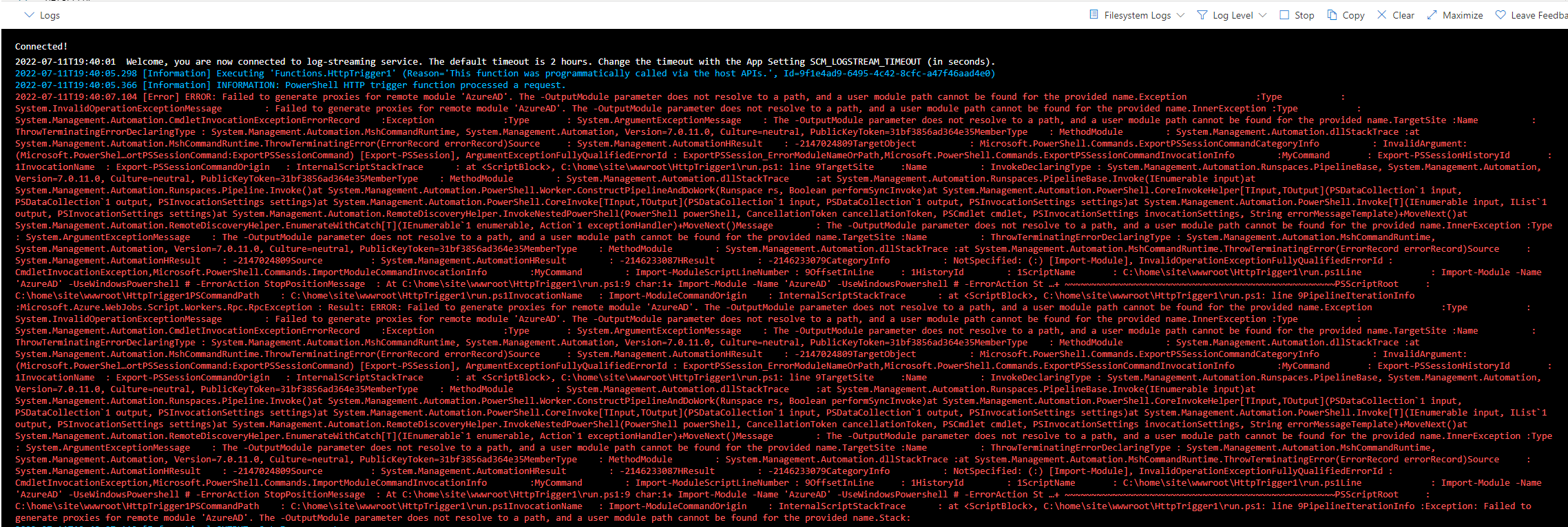\r\n\r\n","author":{"url":"https://github.com/Francisco-Gamino","@type":"Person","name":"Francisco-Gamino"},"datePublished":"2022-07-11T19:46:49.000Z","interactionStatistic":{"@type":"InteractionCounter","interactionType":"https://schema.org/CommentAction","userInteractionCount":1},"url":"https://github.com/17662/PowerShell/issues/17662"}| route-pattern | /_view_fragments/issues/show/:user_id/:repository/:id/issue_layout(.:format) |
| route-controller | voltron_issues_fragments |
| route-action | issue_layout |
| fetch-nonce | v2:597c62a5-b1e5-36fd-34cb-abdb45df5fc7 |
| current-catalog-service-hash | 81bb79d38c15960b92d99bca9288a9108c7a47b18f2423d0f6438c5b7bcd2114 |
| request-id | B3EE:24571B:183EDE5:20C07B3:6A5977BB |
| html-safe-nonce | 25f3721220f62d5c3a082e8b796d816a36dced61f619baedfef4b4c00ef65aab |
| visitor-payload | eyJyZWZlcnJlciI6IiIsInJlcXVlc3RfaWQiOiJCM0VFOjI0NTcxQjoxODNFREU1OjIwQzA3QjM6NkE1OTc3QkIiLCJ2aXNpdG9yX2lkIjoiNDk2MjQzMTU0MzczMjE3MjczMSIsInJlZ2lvbl9lZGdlIjoiaWFkIiwicmVnaW9uX3JlbmRlciI6ImlhZCJ9 |
| visitor-hmac | 44600e7f6ac12f3a7bb89e5f32d178892648e502ca334d19faa76b98ea25ce86 |
| hovercard-subject-tag | issue:1301145720 |
| github-keyboard-shortcuts | repository,issues,copilot |
| google-site-verification | Apib7-x98H0j5cPqHWwSMm6dNU4GmODRoqxLiDzdx9I |
| octolytics-url | https://collector.github.com/github/collect |
| analytics-location | / |
| fb:app_id | 1401488693436528 |
| apple-itunes-app | app-id=1477376905, app-argument=https://github.com/_view_fragments/issues/show/PowerShell/PowerShell/17662/issue_layout |
| twitter:image | https://opengraph.githubassets.com/8dd9ba30820c5f83ec04c7ff168636c8637abf6f5828d5e3575a4879bc9b666e/PowerShell/PowerShell/issues/17662 |
| twitter:card | summary_large_image |
| og:image | https://opengraph.githubassets.com/8dd9ba30820c5f83ec04c7ff168636c8637abf6f5828d5e3575a4879bc9b666e/PowerShell/PowerShell/issues/17662 |
| og:image:alt | Prerequisites Write a descriptive title. Make sure you are able to repro it on the latest released version Search the existing issues. Refer to the FAQ. Refer to Differences between Windows PowerSh... |
| og:image:width | 1200 |
| og:image:height | 600 |
| og:site_name | GitHub |
| og:type | object |
| og:author:username | Francisco-Gamino |
| hostname | github.com |
| expected-hostname | github.com |
| None | a540949572872b935b393b36db38922db390ae71c859537d741b8f3eb7e545b5 |
| turbo-cache-control | no-preview |
| go-import | github.com/PowerShell/PowerShell git https://github.com/PowerShell/PowerShell.git |
| octolytics-dimension-user_id | 11524380 |
| octolytics-dimension-user_login | PowerShell |
| octolytics-dimension-repository_id | 49609581 |
| octolytics-dimension-repository_nwo | PowerShell/PowerShell |
| octolytics-dimension-repository_public | true |
| octolytics-dimension-repository_is_fork | false |
| octolytics-dimension-repository_network_root_id | 49609581 |
| octolytics-dimension-repository_network_root_nwo | PowerShell/PowerShell |
| turbo-body-classes | logged-out env-production page-responsive |
| disable-turbo | false |
| browser-stats-url | https://api.github.com/_private/browser/stats |
| browser-errors-url | https://api.github.com/_private/browser/errors |
| release | 624bb50a7497aa346bef8cc3743af408a9ea10ca |
| ui-target | full |
| theme-color | #1e2327 |
| color-scheme | light dark |
Links:
Viewport: width=device-width