Title: PSNativePSPathResolution is causing weirdness on Linux when trying to specify X server port number · Issue #17278 · PowerShell/PowerShell · GitHub
Open Graph Title: PSNativePSPathResolution is causing weirdness on Linux when trying to specify X server port number · Issue #17278 · PowerShell/PowerShell
X Title: PSNativePSPathResolution is causing weirdness on Linux when trying to specify X server port number · Issue #17278 · PowerShell/PowerShell
Description: Prerequisites Write a descriptive title. Make sure you are able to repro it on the latest released version Search the existing issues. Refer to the FAQ. Refer to Differences between Windows PowerShell 5.1 and PowerShell. Steps to reprodu...
Open Graph Description: Prerequisites Write a descriptive title. Make sure you are able to repro it on the latest released version Search the existing issues. Refer to the FAQ. Refer to Differences between Windows PowerSh...
X Description: Prerequisites Write a descriptive title. Make sure you are able to repro it on the latest released version Search the existing issues. Refer to the FAQ. Refer to Differences between Windows PowerSh...
Opengraph URL: https://github.com/PowerShell/PowerShell/issues/17278
X: @github
Domain: github.com
{"@context":"https://schema.org","@type":"DiscussionForumPosting","headline":"PSNativePSPathResolution is causing weirdness on Linux when trying to specify X server port number","articleBody":"### Prerequisites\r\n\r\n- [X] Write a descriptive title.\r\n- [X] Make sure you are able to repro it on the [latest released version](https://github.com/PowerShell/PowerShell/releases)\r\n- [X] Search the existing issues.\r\n- [X] Refer to the [FAQ](https://github.com/PowerShell/PowerShell/blob/master/docs/FAQ.md).\r\n- [X] Refer to [Differences between Windows PowerShell 5.1 and PowerShell](https://docs.microsoft.com/powershell/scripting/whats-new/differences-from-windows-powershell).\r\n\r\n### Steps to reproduce\r\n\r\nRun this on Linux - if you don't have Xvfb then use echoargs or something like that:\r\n```\r\n~> Xvfb :99\r\n```\r\n\r\n### Expected behavior\r\n\r\n```console\r\nA headless X server starts up.\r\n```\r\n\r\n\r\n### Actual behavior\r\nYou get an unrecognized option error:\r\n\r\n```console\r\n Xvfb :99\r\nUnrecognized option: /home/mctcbld/:99\r\nuse: X [:\u003cdisplay>] [option]\r\n```\r\n\r\n\r\n### Error details\r\nIt seems that `PSNativePSPathResolution` is transforming `:99` to `\u003chome-dir>/:99` e.g.:\r\n\r\n```console\r\n05-05 08:34:45 12> Trace-Command -Name ParameterBinding -Expression { Xvfb :99 } -PSHost\r\nDEBUG: 2022-05-05 08:35:01.4643 ParameterBinding Information: 0 : BIND NAMED native application line args [/usr/bin/Xvfb]\r\nDEBUG: 2022-05-05 08:35:01.4644 ParameterBinding Information: 0 : BIND argument [/home/mctcbld/:99]\r\nDEBUG: 2022-05-05 08:35:01.4648 ParameterBinding Information: 0 : CALLING BeginProcessing\r\nUnrecognized option: /home/mctcbld/:99\r\nuse: X [:\u003cdisplay>] [option]\r\n```\r\nAlso note that while quoting the arg works `Xvfb ':99'`, it DOES NOT work if you background the process `Xvfb ':99' &` see the visual below for a screenshot that shows that.\r\n\r\nBTW this also repos on the latest 7.3 preview on Windows if you have `PSNativePSPathResolution` enabled:\r\n```\r\n05-06 11:24:27 2> echoargs :99\r\nArg 0 is \u003cC:\\Users\\Keith\\:99>\r\n\r\nCommand line:\r\n\"C:\\Users\\Keith\\Documents\\PowerShell\\Modules\\pscx\\4.0.0\\Apps\\EchoArgs.exe\" C:\\Users\\Keith\\:99\r\n```\r\n\r\n### Environment data\r\n\r\n```powershell\r\nName Value\r\n---- -----\r\nPSVersion 7.2.0\r\nPSEdition Core\r\nGitCommitId 7.2.0\r\nOS Linux 3.10.0-229.el7.x86_64 #1 SMP Thu Jan 29 18:37:38 EST 2015\r\nPlatform Unix\r\nPSCompatibleVersions {1.0, 2.0, 3.0, 4.0…}\r\nPSRemotingProtocolVersion 2.3\r\nSerializationVersion 1.1.0.1\r\nWSManStackVersion 3.0\r\n```\r\n\r\n\r\n### Visuals\r\n\r\n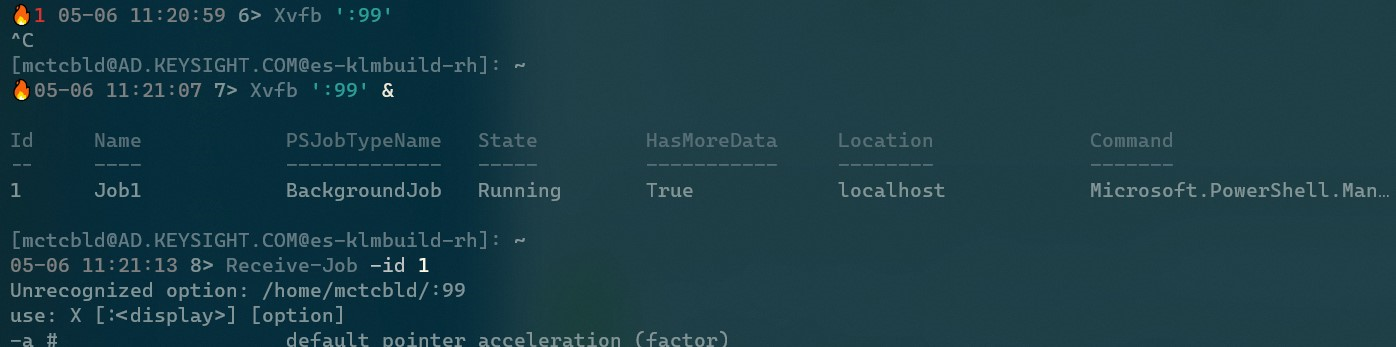\r\n","author":{"url":"https://github.com/rkeithhill","@type":"Person","name":"rkeithhill"},"datePublished":"2022-05-06T17:25:17Z","url":"https://github.com/PowerShell/PowerShell/issues/17278"}| react-profiling | 0 |
| react-import-map | react,react-dom,react-dom/client,react-dom/profiling,react-is,react/compiler-runtime,react/jsx-dev-runtime,react/jsx-runtime,scheduler@b8488ee2c322 |
| route-pattern | /_view_fragments/issues/show/:user_id/:repository/:id/issue_layout(.:format) |
| route-controller | voltron_issues_fragments |
| route-action | issue_layout |
| fetch-nonce | v2:1c6f106e-f1b0-f8f2-ba6f-ca437e9f76de |
| current-catalog-service-hash | 81bb79d38c15960b92d99bca9288a9108c7a47b18f2423d0f6438c5b7bcd2114 |
| request-id | CE3A:3EA4:CE17B:11B160:6AFD8C03 |
| html-safe-nonce | afcc1d3fa59a674a0fc7463da254116edf3878b0517f644d2ad2d9f0dbfeee86 |
| visitor-payload | eyJyZWZlcnJlciI6IiIsInJlcXVlc3RfaWQiOiJDRTNBOjNFQTQ6Q0UxN0I6MTFCMTYwOjZBRkQ4QzAzIiwidmlzaXRvcl9pZCI6IjE3NjIzODg0NjM4OTk3NDExODciLCJyZWdpb25fZWRnZSI6ImlhZCIsInJlZ2lvbl9yZW5kZXIiOiJpYWQifQ== |
| visitor-hmac | 55dc29520b53e83394f374692a1a60d291fd05ddd8398954449e49fa1e6949be |
| hovercard-subject-tag | issue:1228114364 |
| github-keyboard-shortcuts | repository,issues,copilot |
| google-site-verification | Apib7-x98H0j5cPqHWwSMm6dNU4GmODRoqxLiDzdx9I |
| octolytics-url | https://collector.github.com/github/collect |
| analytics-location | / |
| fb:app_id | 1401488693436528 |
| apple-itunes-app | app-id=1477376905, app-argument=https://github.com/_view_fragments/issues/show/PowerShell/PowerShell/17278/issue_layout |
| twitter:image | https://opengraph.githubassets.com/a94b35d0b9e807109fce39a8d15f09afe2c34a1c60280c31c8a253c8a58ef1ac/PowerShell/PowerShell/issues/17278 |
| twitter:card | summary_large_image |
| og:image | https://opengraph.githubassets.com/a94b35d0b9e807109fce39a8d15f09afe2c34a1c60280c31c8a253c8a58ef1ac/PowerShell/PowerShell/issues/17278 |
| og:image:alt | Prerequisites Write a descriptive title. Make sure you are able to repro it on the latest released version Search the existing issues. Refer to the FAQ. Refer to Differences between Windows PowerSh... |
| og:image:width | 1200 |
| og:image:height | 600 |
| og:site_name | GitHub |
| og:type | object |
| og:author:username | rkeithhill |
| hostname | github.com |
| expected-hostname | github.com |
| None | bc86424ef34a73b386237872800e922d149d65ba907f63d6f150a2dcb8433bea |
| turbo-cache-control | no-preview |
| go-import | github.com/PowerShell/PowerShell git https://github.com/PowerShell/PowerShell.git |
| octolytics-dimension-user_id | 11524380 |
| octolytics-dimension-user_login | PowerShell |
| octolytics-dimension-repository_id | 49609581 |
| octolytics-dimension-repository_nwo | PowerShell/PowerShell |
| octolytics-dimension-repository_public | true |
| octolytics-dimension-repository_is_fork | false |
| octolytics-dimension-repository_network_root_id | 49609581 |
| octolytics-dimension-repository_network_root_nwo | PowerShell/PowerShell |
| turbo-body-classes | logged-out env-production page-responsive |
| disable-turbo | false |
| browser-stats-url | https://api.github.com/_private/browser/stats |
| browser-errors-url | https://api.github.com/_private/browser/errors |
| release | 927a6c5ab1c32b38830f1b9d3050c0b9e9aa92e1 |
| ui-target | full |
| theme-color | #1e2327 |
| color-scheme | light dark |
| react-app-name | issues |
Links:
Viewport: width=device-width
