Title: Get-Counter corrupts/disables PerfLib or returns invalid data · Issue #17147 · PowerShell/PowerShell · GitHub
Open Graph Title: Get-Counter corrupts/disables PerfLib or returns invalid data · Issue #17147 · PowerShell/PowerShell
X Title: Get-Counter corrupts/disables PerfLib or returns invalid data · Issue #17147 · PowerShell/PowerShell
Description: Prerequisites Write a descriptive title. Make sure you are able to repro it on the latest released version Search the existing issues. Refer to the FAQ. Refer to Differences between Windows PowerShell 5.1 and PowerShell. Steps to reprodu...
Open Graph Description: Prerequisites Write a descriptive title. Make sure you are able to repro it on the latest released version Search the existing issues. Refer to the FAQ. Refer to Differences between Windows PowerSh...
X Description: Prerequisites Write a descriptive title. Make sure you are able to repro it on the latest released version Search the existing issues. Refer to the FAQ. Refer to Differences between Windows PowerSh...
Opengraph URL: https://github.com/PowerShell/PowerShell/issues/17147
X: @github
Domain: github.com
{"@context":"https://schema.org","@type":"DiscussionForumPosting","headline":"Get-Counter corrupts/disables PerfLib or returns invalid data","articleBody":"### Prerequisites\r\n\r\n- [X] Write a descriptive title.\r\n- [X] Make sure you are able to repro it on the [latest released version](https://github.com/PowerShell/PowerShell/releases)\r\n- [X] Search the existing issues.\r\n- [X] Refer to the [FAQ](https://github.com/PowerShell/PowerShell/blob/master/docs/FAQ.md).\r\n- [X] Refer to [Differences between Windows PowerShell 5.1 and PowerShell](https://docs.microsoft.com/powershell/scripting/whats-new/differences-from-windows-powershell).\r\n\r\n### Steps to reproduce\r\n\r\nWhen querying more counters at once and one of them is [User Input Delay Per Session] counterset, it fails with breaking the perfmon functionality (corrupted/disabled PerfLib, etc...).\r\nIt happens in some specific combinations like [User Input Delay Per Session] and [Memory] or [System] countersets. In such combinations invoking Get-Counter will terminate powershell process or returns non-zero Status property for the CounterSamples.\r\n[User Input Delay Per Session] counterset works with .e.g. [SMB Server] counterset so not all are affected.\r\nWhen two different get-counter cmdlets are invoked ([User Input Delay Per Session] separately), all counters are returned without issues.\r\nTested on Windows 2019, Powershell 5.1 and 7.2.2, same behavior.\r\n\r\n### Expected behavior\r\nWhen querying array of counters in one \"dataset\" and [User Input Delay per Session] is used, valid data should be returned without needing to read [User Input Delay per Session] separately.\r\nSo this should work:\r\n```console\r\n(Get-Counter -Counter @('\\smb server\\receive bytes/sec','\\memory\\page faults/sec','\\user input delay per session(max)\\max input delay') -SampleInterval 1 -MaxSamples 1).CounterSamples|Select InstanceName,Path,CookedValue,Status\r\n```\r\n\r\n### Actual behavior\r\nWhen querying array of counters in one dataset and [User Input Delay per Session] is used, it starts to return invalid data or terminates powershell completely.\r\nIssuing command:\r\n```console\r\n(Get-Counter -Counter @('\\smb server\\receive bytes/sec','\\memory\\page faults/sec','\\user input delay per session(max)\\max input delay') -SampleInterval 1 -MaxSamples 1).CounterSamples|Select InstanceName,Path,CookedValue,Status\r\n```\r\nReturns error and non-zero STATUS for MEMORY Counters:\r\n```console\r\nGet-Counter: The data in one of the performance counter samples is not valid. View the Status property for each PerformanceCounterSample object to make sure it contains valid data.\r\nInstanceName Path CookedValue Status\r\n------------ ---- ----------- ------\r\n \\\\ov2p2194\\smb server\\receive bytes/sec 0 0\r\n \\\\ov2p2194\\memory\\page faults/sec 0 3221228472\r\nmax \\\\ov2p2194\\user input delay per session(max)\\max input delay 0 0\r\n```\r\n\r\n### Error details\r\n\r\n```console\r\nException :\r\n Type : System.Exception\r\n Message : The data in one of the performance counter samples is not valid. View the Status property for each\r\nPerformanceCounterSample object to make sure it contains valid data.\r\n HResult : -2146233088\r\nCategoryInfo : InvalidResult: (:) [Get-Counter], Exception\r\nFullyQualifiedErrorId : CounterApiError,Microsoft.PowerShell.Commands.GetCounterCommand\r\nInvocationInfo :\r\n MyCommand : Get-Counter\r\n ScriptLineNumber : 1\r\n OffsetInLine : 2\r\n HistoryId : 36\r\n Line : (Get-Counter -Counter @('\\smb server\\receive bytes/sec','\\memory\\page faults/sec','\\user input\r\ndelay per session(max)\\max input delay') -SampleInterval 1 -MaxSamples 1).CounterSamples|Select\r\nInstanceName,Path,CookedValue,Status\r\n PositionMessage : At line:1 char:2\r\n + (Get-Counter -Counter @('\\smb server\\receive bytes/sec','\\memory\\page …\r\n + ~~~~~~~~~~~~~~~~~~~~~~~~~~~~~~~~~~~~~~~~~~~~~~~~~~~~~~~~~~~~~~~~~~~~\r\n InvocationName : Get-Counter\r\n CommandOrigin : Internal\r\nScriptStackTrace : at \u003cScriptBlock>, \u003cNo file>: line 1\r\nPipelineIterationInfo :\r\n```\r\n\r\n\r\n### Environment data\r\n\r\n```powershell\r\nName Value\r\n---- -----\r\nPSVersion 7.2.2\r\nPSEdition Core\r\nGitCommitId 7.2.2\r\nOS Microsoft Windows 10.0.17763\r\nPlatform Win32NT\r\nPSCompatibleVersions {1.0, 2.0, 3.0, 4.0…}\r\nPSRemotingProtocolVersion 2.3\r\nSerializationVersion 1.1.0.1\r\nWSManStackVersion 3.0\r\n```\r\n\r\n\r\n### Visuals\r\n\r\n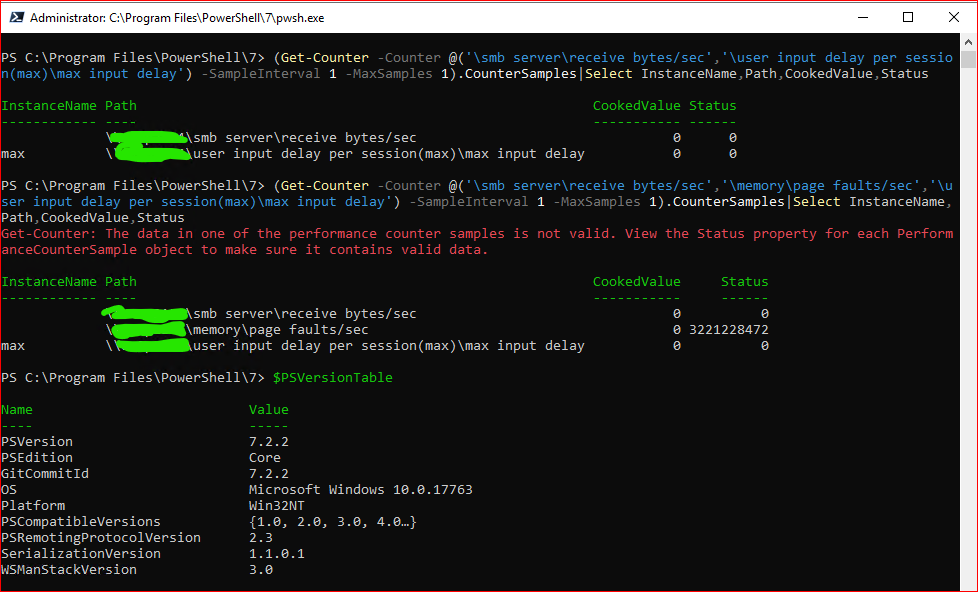\r\n\r\nWhen [user input delay per session] removed, returned values are OK:\r\n\r\n\r\n","author":{"url":"https://github.com/ExSport","@type":"Person","name":"ExSport"},"datePublished":"2022-04-13T14:44:19Z","url":"https://github.com/PowerShell/PowerShell/issues/17147"}| react-profiling | 0 |
| react-import-map | react,react-dom,react-dom/client,react-dom/profiling,react-is,react/compiler-runtime,react/jsx-dev-runtime,react/jsx-runtime,scheduler@b8488ee2c322 |
| route-pattern | /_view_fragments/issues/show/:user_id/:repository/:id/issue_layout(.:format) |
| route-controller | voltron_issues_fragments |
| route-action | issue_layout |
| fetch-nonce | v2:ca1a590a-2674-7769-e75f-a323a45d6004 |
| current-catalog-service-hash | 81bb79d38c15960b92d99bca9288a9108c7a47b18f2423d0f6438c5b7bcd2114 |
| request-id | C904:22F6E6:241A98:31B144:6AFDA19E |
| html-safe-nonce | d109ed6cdbe3abd8a9e54b7d88ecba8623ddfd291951ea49ac85cffe47649f24 |
| visitor-payload | eyJyZWZlcnJlciI6IiIsInJlcXVlc3RfaWQiOiJDOTA0OjIyRjZFNjoyNDFBOTg6MzFCMTQ0OjZBRkRBMTlFIiwidmlzaXRvcl9pZCI6IjMzMTQ0NDk0MDU0MDE5OTc3MjYiLCJyZWdpb25fZWRnZSI6ImlhZCIsInJlZ2lvbl9yZW5kZXIiOiJpYWQifQ== |
| visitor-hmac | 81ea2993b9de8c168bd4f42627c0cff6ae7f4ad9f444a7d6628c250000039b61 |
| hovercard-subject-tag | issue:1203404898 |
| github-keyboard-shortcuts | repository,issues,copilot |
| google-site-verification | Apib7-x98H0j5cPqHWwSMm6dNU4GmODRoqxLiDzdx9I |
| octolytics-url | https://collector.github.com/github/collect |
| analytics-location | / |
| fb:app_id | 1401488693436528 |
| apple-itunes-app | app-id=1477376905, app-argument=https://github.com/_view_fragments/issues/show/PowerShell/PowerShell/17147/issue_layout |
| twitter:image | https://opengraph.githubassets.com/af2eb282faa43250bb12e4df736c7e71dd685e6bbfd6880054ea33b94ffbc04f/PowerShell/PowerShell/issues/17147 |
| twitter:card | summary_large_image |
| og:image | https://opengraph.githubassets.com/af2eb282faa43250bb12e4df736c7e71dd685e6bbfd6880054ea33b94ffbc04f/PowerShell/PowerShell/issues/17147 |
| og:image:alt | Prerequisites Write a descriptive title. Make sure you are able to repro it on the latest released version Search the existing issues. Refer to the FAQ. Refer to Differences between Windows PowerSh... |
| og:image:width | 1200 |
| og:image:height | 600 |
| og:site_name | GitHub |
| og:type | object |
| og:author:username | ExSport |
| hostname | github.com |
| expected-hostname | github.com |
| None | bc86424ef34a73b386237872800e922d149d65ba907f63d6f150a2dcb8433bea |
| turbo-cache-control | no-preview |
| go-import | github.com/PowerShell/PowerShell git https://github.com/PowerShell/PowerShell.git |
| octolytics-dimension-user_id | 11524380 |
| octolytics-dimension-user_login | PowerShell |
| octolytics-dimension-repository_id | 49609581 |
| octolytics-dimension-repository_nwo | PowerShell/PowerShell |
| octolytics-dimension-repository_public | true |
| octolytics-dimension-repository_is_fork | false |
| octolytics-dimension-repository_network_root_id | 49609581 |
| octolytics-dimension-repository_network_root_nwo | PowerShell/PowerShell |
| turbo-body-classes | logged-out env-production page-responsive |
| disable-turbo | false |
| browser-stats-url | https://api.github.com/_private/browser/stats |
| browser-errors-url | https://api.github.com/_private/browser/errors |
| release | 927a6c5ab1c32b38830f1b9d3050c0b9e9aa92e1 |
| ui-target | full |
| theme-color | #1e2327 |
| color-scheme | light dark |
| react-app-name | issues |
Links:
Viewport: width=device-width


