Title: 'Run With PowerShell 7' Right-Click Context Menu is Not Available if Default Program Is Not Notepad · Issue #14216 · PowerShell/PowerShell · GitHub
Open Graph Title: 'Run With PowerShell 7' Right-Click Context Menu is Not Available if Default Program Is Not Notepad · Issue #14216 · PowerShell/PowerShell
X Title: 'Run With PowerShell 7' Right-Click Context Menu is Not Available if Default Program Is Not Notepad · Issue #14216 · PowerShell/PowerShell
Description: Steps to reproduce When installing PowerShell 7 (MSI Version), the installer allows the following option: Add 'Run with PowerShell 7' context menu for PowerShell files Screenshot A: However, this option is only available if .ps1 files ar...
Open Graph Description: Steps to reproduce When installing PowerShell 7 (MSI Version), the installer allows the following option: Add 'Run with PowerShell 7' context menu for PowerShell files Screenshot A: However, this o...
X Description: Steps to reproduce When installing PowerShell 7 (MSI Version), the installer allows the following option: Add 'Run with PowerShell 7' context menu for PowerShell files Screenshot A: However...
Opengraph URL: https://github.com/PowerShell/PowerShell/issues/14216
X: @github
Domain: github.com
{"@context":"https://schema.org","@type":"DiscussionForumPosting","headline":"'Run With PowerShell 7' Right-Click Context Menu is Not Available if Default Program Is Not Notepad","articleBody":"\u003c!--\r\n\r\nFor Windows PowerShell 5.1 issues, suggestions, or feature requests please use the following link instead:\r\nWindows PowerShell [UserVoice](https://windowsserver.uservoice.com/forums/301869-powershell)\r\n\r\nThis repository is **ONLY** for PowerShell Core 6 and PowerShell 7+ issues.\r\n\r\n- Make sure you are able to repro it on the [latest released version](https://github.com/PowerShell/PowerShell/releases)\r\n- Search the existing issues.\r\n- Refer to the [FAQ](https://github.com/PowerShell/PowerShell/blob/master/docs/FAQ.md).\r\n- Refer to the [known issues](https://docs.microsoft.com/powershell/scripting/whats-new/known-issues-ps6).\r\n\r\n-->\r\n\r\n## Steps to reproduce\r\n\r\nWhen installing PowerShell 7 (MSI Version), the installer allows the following option:\r\n\r\n`Add 'Run with PowerShell 7' context menu for PowerShell files`\r\n\r\n**Screenshot A:**\r\n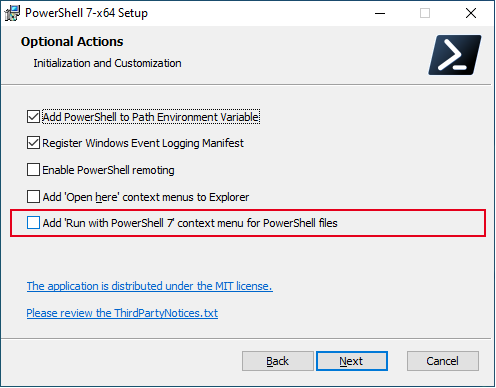\r\n\r\n\r\nHowever, this option is only available if .ps1 files are set to open in Notepad (the default). If .ps1 files are set to open in Visual Studio Code by default, then this option disappears from the context menu.\r\n\r\n**Screenshot B ('Run with PowerShell 7' available):**\r\n\r\n\r\n\r\n**Screenshot C ('Run with PowerShell 7' not available):**\r\n\r\n\r\n\r\nMost of the time I want .ps1 files to open in Visual Studio Code and therefore want to keep that as the default program for opening .ps1 files. However, doing so means I loose the right-click context menu for when I want to run certain .ps1 files directly in PowerShell 7 from their location. It would be better if it was always possible to right-click a .ps1 file and select 'Run with PowerShell 7', even when another application – such as Visual Studio Code – is the default program for that file type.\r\n\r\nFor PowerShell 7 (MSI Version), it's possible to work around this to an extent by using the [Right-click > Open with] menu item, selecting the PowerShell 7 pwsh.exe and then use that in conjunction with using $PSScriptRoot as the path in the script. However, for PowerShell 7 (Microsoft Store Version) it's a bit more complicated. Not only does the store version not have the 'Run with PowerShell 7' context menu option at all, but using the 'Open with' menu work-a-round is more burdensome as the file path contains the version number in it. I.E.\r\n\r\n`C:\\Program Files\\WindowsApps\\Microsoft.PowerShell_7.1.0.0_x64__8wekyb3d8bbwe\\pwsh.exe`\r\n\r\nThis means the file path will keep changing every time PowerShell is updated and will therefore need to be manually set again every time PowerShell is updated.\r\n\r\n## Expected behavior\r\n\r\nAs long as PowerShell 7 is installed on the machine, the 'Run with PowerShell 7' context menu should always be available in the right-click menu for PowerShell .ps1 files, regardless of whether another application – such as Visual Studio Code – is the default program for that file type.\r\n\r\nThe 'Run with PowerShell 7' context menu should also be available to people who are using the Microsoft Store version of PowerShell 7.\r\n\r\n## Environment data\r\n\r\n\u003c!-- provide the output of $PSVersionTable -->\r\n\r\n```\r\nName Value\r\n---- -----\r\nPSVersion 7.1.0\r\nPSEdition Core\r\nGitCommitId 7.1.0\r\nOS Microsoft Windows 10.0.19042\r\nPlatform Win32NT\r\nPSCompatibleVersions {1.0, 2.0, 3.0, 4.0…}\r\nPSRemotingProtocolVersion 2.3\r\nSerializationVersion 1.1.0.1\r\nWSManStackVersion 3.0\r\n\r\n```\r\n","author":{"url":"https://github.com/DesertBear","@type":"Person","name":"DesertBear"},"datePublished":"2020-11-21T23:26:39Z","url":"https://github.com/PowerShell/PowerShell/issues/14216"}| react-profiling | 0 |
| react-import-map | react,react-dom,react-dom/client,react-dom/profiling,react-is,react/compiler-runtime,react/jsx-dev-runtime,react/jsx-runtime,scheduler@b8488ee2c322 |
| route-pattern | /_view_fragments/issues/show/:user_id/:repository/:id/issue_layout(.:format) |
| route-controller | voltron_issues_fragments |
| route-action | issue_layout |
| fetch-nonce | v2:f9fd68c0-3cb9-9757-08af-38d7346e7957 |
| current-catalog-service-hash | 81bb79d38c15960b92d99bca9288a9108c7a47b18f2423d0f6438c5b7bcd2114 |
| request-id | 8076:1D72AC:1DCB10:27CB03:6AFD12C6 |
| html-safe-nonce | 3f6cebe16c0195d08e688a380e7a5186f0286aea0dc0db124e1f0cf9ebe6bf0c |
| visitor-payload | eyJyZWZlcnJlciI6IiIsInJlcXVlc3RfaWQiOiI4MDc2OjFENzJBQzoxRENCMTA6MjdDQjAzOjZBRkQxMkM2IiwidmlzaXRvcl9pZCI6IjQ3OTAxNTI5NDg0MTE5NzI1NCIsInJlZ2lvbl9lZGdlIjoiaWFkIiwicmVnaW9uX3JlbmRlciI6ImlhZCJ9 |
| visitor-hmac | d8482e9396b4d8e74f1a75f5374a865bbabf2340743eb259973ff9ddb3cc39e1 |
| hovercard-subject-tag | issue:748123628 |
| github-keyboard-shortcuts | repository,issues,copilot |
| google-site-verification | Apib7-x98H0j5cPqHWwSMm6dNU4GmODRoqxLiDzdx9I |
| octolytics-url | https://collector.github.com/github/collect |
| analytics-location | / |
| fb:app_id | 1401488693436528 |
| apple-itunes-app | app-id=1477376905, app-argument=https://github.com/_view_fragments/issues/show/PowerShell/PowerShell/14216/issue_layout |
| twitter:image | https://opengraph.githubassets.com/f0e1b7f5fef92029e90bd0b4a763902c3b1944cef61780171d5b531b63ddd100/PowerShell/PowerShell/issues/14216 |
| twitter:card | summary_large_image |
| og:image | https://opengraph.githubassets.com/f0e1b7f5fef92029e90bd0b4a763902c3b1944cef61780171d5b531b63ddd100/PowerShell/PowerShell/issues/14216 |
| og:image:alt | Steps to reproduce When installing PowerShell 7 (MSI Version), the installer allows the following option: Add 'Run with PowerShell 7' context menu for PowerShell files Screenshot A: However, this o... |
| og:image:width | 1200 |
| og:image:height | 600 |
| og:site_name | GitHub |
| og:type | object |
| og:author:username | DesertBear |
| hostname | github.com |
| expected-hostname | github.com |
| None | 7c34e25df4e46e972c8f0225e63410231bdeb9ea5634597c712796bbcdb2e627 |
| turbo-cache-control | no-preview |
| go-import | github.com/PowerShell/PowerShell git https://github.com/PowerShell/PowerShell.git |
| octolytics-dimension-user_id | 11524380 |
| octolytics-dimension-user_login | PowerShell |
| octolytics-dimension-repository_id | 49609581 |
| octolytics-dimension-repository_nwo | PowerShell/PowerShell |
| octolytics-dimension-repository_public | true |
| octolytics-dimension-repository_is_fork | false |
| octolytics-dimension-repository_network_root_id | 49609581 |
| octolytics-dimension-repository_network_root_nwo | PowerShell/PowerShell |
| turbo-body-classes | logged-out env-production page-responsive |
| disable-turbo | false |
| browser-stats-url | https://api.github.com/_private/browser/stats |
| browser-errors-url | https://api.github.com/_private/browser/errors |
| release | 8fa571ebaa95e4e6bf872197c0e84b7dc48e6785 |
| ui-target | full |
| theme-color | #1e2327 |
| color-scheme | light dark |
| react-app-name | issues |
Links:
Viewport: width=device-width


