Title: IO流 · Issue #1 · FiveColors/JavaSE · GitHub
Open Graph Title: IO流 · Issue #1 · FiveColors/JavaSE
X Title: IO流 · Issue #1 · FiveColors/JavaSE
Description: IO流 IO流概述 IO流就是文件的输入和输出 I : Input O : Output 通过IO可以完成硬盘文件的读和写。 IO流分类 有多种分类方式: 一种方式是按照流的方向进行分类:以内存作为参照物,往内存中去,叫做输入(Input)。或者叫做读(Read)。从内存中出来,叫做输出(Output)。或者叫做写(Write)。 另一种方式是按照读取数据方式不同进行分类:有的流是按照字节的方式读取数据,一次读取1个字节byte,等同于一次读取8个二进制位。这种流是万能...
Open Graph Description: IO流 IO流概述 IO流就是文件的输入和输出 I : Input O : Output 通过IO可以完成硬盘文件的读和写。 IO流分类 有多种分类方式: 一种方式是按照流的方向进行分类:以内存作为参照物,往内存中去,叫做输入(Input)。或者叫做读(Read)。从内存中出来,叫做输出(Output)。或者叫做写(Write)。 另一种方式是按照读取数据方式不同进行分类:有的流是按照字节的...
X Description: IO流 IO流概述 IO流就是文件的输入和输出 I : Input O : Output 通过IO可以完成硬盘文件的读和写。 IO流分类 有多种分类方式: 一种方式是按照流的方向进行分类:以内存作为参照物,往内存中去,叫做输入(Input)。或者叫做读(Read)。从内存中出来,叫做输出(Output)。或者叫做写(Write)。 另一种方式是按照读取数据方式不同进行分类:有的流是按照字节的...
Opengraph URL: https://github.com/FiveColors/JavaSE/issues/1
X: @github
Domain: github.com
{"@context":"https://schema.org","@type":"DiscussionForumPosting","headline":"IO流","articleBody":"## IO流\r\n### IO流概述\r\nIO流就是文件的输入和输出\r\nI : Input\r\nO : Output\r\n通过IO可以完成硬盘文件的读和写。\r\n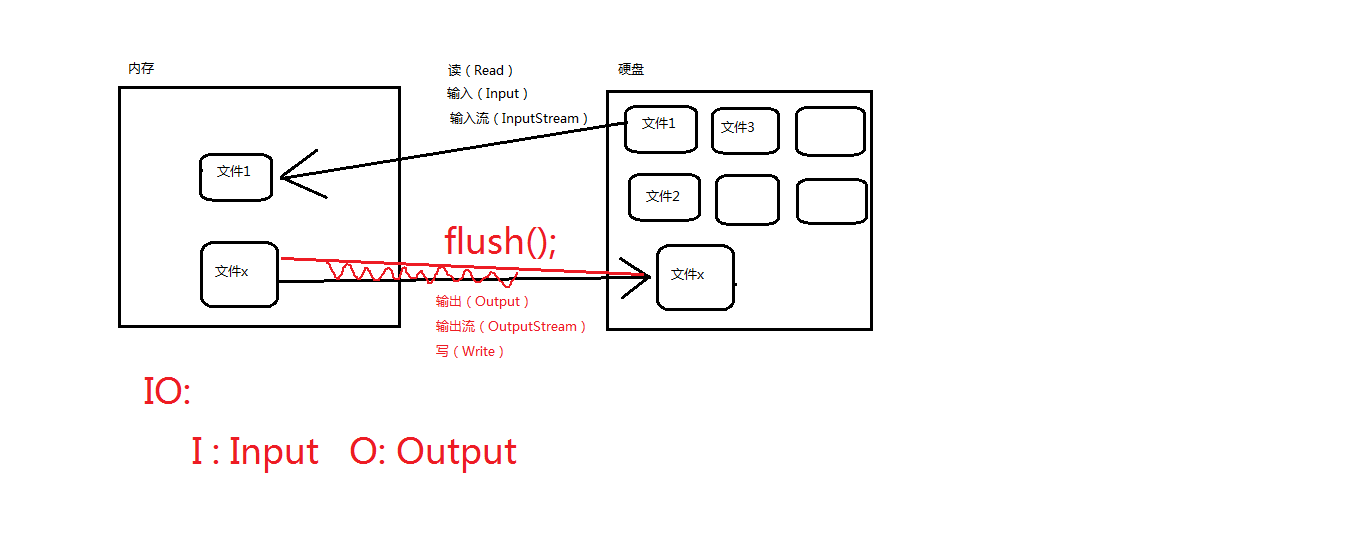\r\n\r\n### IO流分类\r\n有多种分类方式:\r\n一种方式是按照流的方向进行分类:以内存作为参照物,往内存中去,叫做输入(Input)。或者叫做读(Read)。从内存中出来,叫做输出(Output)。或者叫做写(Write)。\r\n\r\n另一种方式是按照读取数据方式不同进行分类:有的流是按照字节的方式读取数据,一次读取1个字节byte,等同于一次读取8个二进制位。这种流是万能的,什么类型的文件都可以读取。包括:文本文件,图片,声音文件,视频文件等....\r\n\r\n假设文件file1.txt,采用字节流的话是这样读的:\r\na中国bc张三fe\r\n第一次读:一个字节,正好读到'a'\r\n第二次读:一个字节,正好读到'中'字符的一半。\r\n第三次读:一个字节,正好读到'中'字符的另外一半。\r\n\r\n有的流是按照字符的方式读取数据的,一次读取一个字符,这种流是为了方便读取普通文本文件而存在的,这种流不能读取:图片、声音、视频等文件。只能读取纯文本文件,连word文件都无法读取。\r\n\r\n假设文件file1.txt,采用字符流的话是这样读的:\r\n\t\t\t\t\ta中国bc张三fe\r\n\t\t\t\t\t第一次读:'a'字符('a'字符在windows系统中占用1个字节。)\r\n\t\t\t\t\t第二次读:'中'字符('中'字符在windows系统中占用2个字节。)\r\n\r\n**综上所述:流的分类**\r\n\t\t**输入流、输出流**\r\n\t\t**字节流、字符流**\r\n\r\n### IO流学习方式\r\nJava中的IO流都已经写好了,我们程序员不需要关心,我们最主要还是掌握,在java中已经提供了哪些流,每个流的特点是什么,每个流对象上的常用方法有哪些?\r\n\r\njava中所有的流都是在:java.io.*;下。\r\n\r\njava中主要还是研究:\r\n怎么new流对象。\r\n调用流对象的哪个方法是读,哪个方法是写。\r\n\r\n### IO流的四大家族\r\n**四大家族的首领:**\r\njava.io.InputStream 字节输入流\r\njava.io.OutputStream 字节输出流\r\n\r\njava.io.Reader\t\t字符输入流\r\njava.io.Writer\t\t字符输出流\r\n\r\n四大家族的首领都是抽象类\u003csup\u003e[1]\u003c/sup\u003e。(abstract class)\r\n\r\n**注意:在java中只要“类名”以Stream结尾的都是字节流。以“Reader/Writer”结尾的都是字符流。**\r\n\r\n所有的流都实现了java.io.Closeable接口,都是可关闭的,都有close()方法。流毕竟是一个管道,这个是内存和硬盘之间的通道,用完之后一定要关闭,不然会耗费(占用)很多资源。养成好习惯,用完流一定要关闭。\r\n\r\n所有的输出流都实现了:java.io.Flushable接口,都是可刷新的,都有flush()方法。养成一个好习惯,输出流在最终输出之后,一定要记得flush()刷新一下。这个刷新表示将通道/管道当中剩余未输出的数据强行输出完(清空管道!)刷新的作用就是清空管道。\r\n\r\n**注意:如果没有flush()可能会导致丢失数据。**\r\n\r\n### java.io包下需要掌握的流有16个\r\n\r\n**文件专属:**\r\n\t\tjava.io.FileInputStream(掌握)\r\n\t\tjava.io.FileOutputStream(掌握)\r\n\t\tjava.io.FileReader\r\n\t\tjava.io.FileWriter\r\n\r\n**转换流:(将字节流转换成字符流)**\r\n\t\tjava.io.InputStreamReader\r\n\t\tjava.io.OutputStreamWriter\r\n\r\n**缓冲流专属:**\r\n\t\tjava.io.BufferedReader\r\n\t\tjava.io.BufferedWriter\r\n\t\tjava.io.BufferedInputStream\r\n\t\tjava.io.BufferedOutputStream\r\n\r\n**数据流专属:**\r\n\t\tjava.io.DataInputStream\r\n\t\tjava.io.DataOutputStream\r\n\r\n**标准输出流:**\r\n\t\tjava.io.PrintWriter\r\n\t\tjava.io.PrintStream(掌握)\r\n\r\n**对象专属流:**\r\n\t\tjava.io.ObjectInputStream(掌握)\r\n\t\tjava.io.ObjectOutputStream(掌握)\r\n\r\n### java.io.FileInputStream\r\n1、文件字节输入流,万能的,任何类型的文件都可以采用这个流来读。\r\n\r\n2、字节的方式,完成输入的操作,完成读的操作(硬盘---\u003e 内存)\r\n\r\n具体演示如下,我们新建一个.txt文件,将文件拓展名去掉,用记事本打开,里面输入abcdef。\r\n\r\n\r\n\r\n提取文件路径\r\n\r\n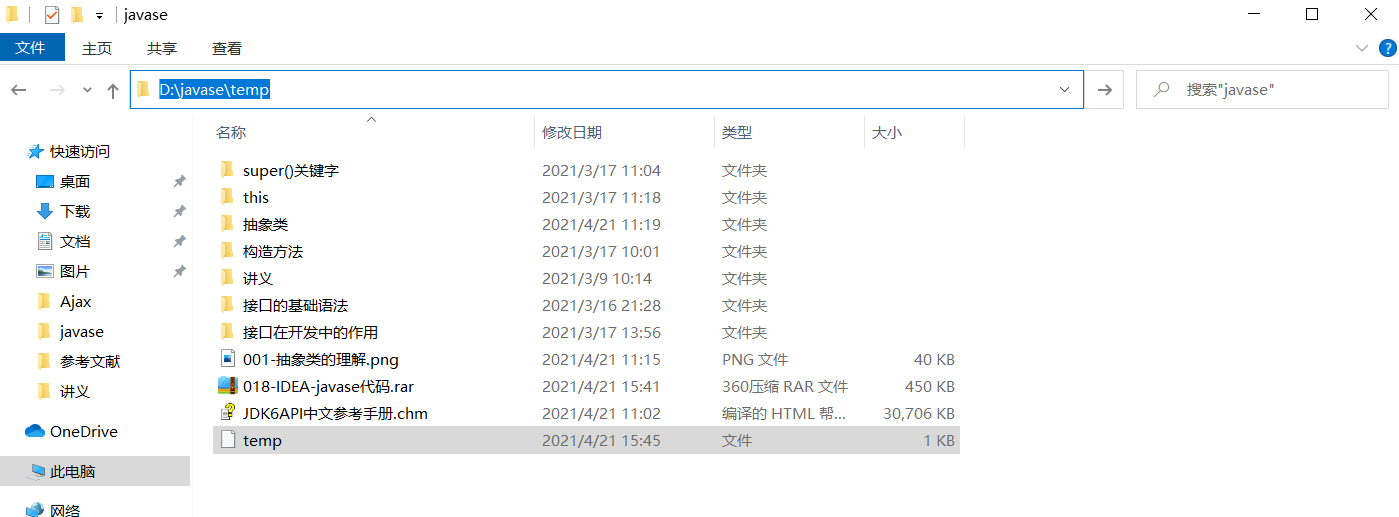\r\n\r\n我们通过代码来具体看看\r\n\r\n```java\r\npackage com.bipowernode.java.io;\r\n\r\nimport java.io.FileInputStream;\r\nimport java.io.FileNotFoundException;\r\nimport java.io.IOException;\r\n\r\n/*\r\njava.io.FileInputStream:\r\n 1、文件字节输入流,万能的,任何类型的文件都可以采用这个流来读。\r\n 2、字节的方式,完成输入的操作,完成读的操作(硬盘---\u003e 内存)\r\n */\r\npublic class FileInputStreamTest01 {\r\n public static void main(String[] args) {\r\n FileInputStream fis = null;\r\n //创建文件字节输入流对象\r\n //文件路径:D:\\javase\\temp (IDEA会自动把\\变成\\\\,因为java中\\表示转义)\r\n try {\r\n FileInputStream fis = new FileInputStream(\"D:\\\\javase\\\\temp\"); //Alt+回车可以处理异常\r\n \r\n //开始读\r\n int readData = fis.read();\r\n\r\n System.out.println(\"readData\");\r\n } catch (FileNotFoundException e) {\r\n e.printStackTrace();\r\n } catch (IOException e) {\r\n e.printStackTrace();\r\n } finally {\r\n //再finally语句块当中确保流一定关闭\r\n if (fis != null){ //避免空指针异常\r\n //关闭流的前提是流不是空。流是null就没必要关闭。\r\n try {\r\n fis.close();\r\n } catch (IOException e) {\r\n e.printStackTrace();\r\n }\r\n }\r\n }\r\n }\r\n}\r\n```\r\n\r\n**注意:其中,finally语句块可参考\u003csup\u003e[2]\u003c/sup\u003e**\r\n **异常处理IDEA快捷键为Alt+Enter\u003csup\u003e[3]\u003c/sup\u003e**\r\n\r\n运行该代码,得到以下结果\r\n\r\n\r\n\r\n我们多调用几次read方法\r\n\r\n```java\r\npackage com.bipowernode.java.io;\r\n\r\nimport java.io.FileInputStream;\r\nimport java.io.FileNotFoundException;\r\nimport java.io.IOException;\r\n\r\n/*\r\njava.io.FileInputStream:\r\n 1、文件字节输入流,万能的,任何类型的文件都可以采用这个流来读。\r\n 2、字节的方式,完成输入的操作,完成读的操作(硬盘---\u003e 内存)\r\n */\r\npublic class FileInputStreamTest01 {\r\n public static void main(String[] args) {\r\n FileInputStream fis = null;\r\n //创建文件字节输入流对象\r\n //文件路径:D:\\javase\\temp (IDEA会自动把\\变成\\\\,因为java中\\表示转义)\r\n try {\r\n fis = new FileInputStream(\"D:\\\\javase\\\\temp\"); //Alt+回车可以处理异常\r\n\r\n //开始读\r\n int readData = fis.read();\r\n System.out.println(readData);//97\r\n\r\n readData = fis.read();\r\n System.out.println(readData);//98\r\n\r\n readData = fis.read();\r\n System.out.println(readData);//99\r\n\r\n readData = fis.read();\r\n System.out.println(readData);//100\r\n\r\n readData = fis.read();\r\n System.out.println(readData);//101\r\n\r\n readData = fis.read();\r\n System.out.println(readData);//102\r\n\r\n readData = fis.read();\r\n System.out.println(readData);//-1\r\n\r\n } catch (FileNotFoundException e) {\r\n e.printStackTrace();\r\n } catch (IOException e) {\r\n e.printStackTrace();\r\n } finally {\r\n //再finally语句块当中确保流一定关闭\r\n if (fis != null){ //避免空指针异常\r\n //关闭流的前提是流不是空。流是null就没必要关闭。\r\n try {\r\n fis.close();\r\n } catch (IOException e) {\r\n e.printStackTrace();\r\n }\r\n }\r\n }\r\n }\r\n}\r\n```\r\n\r\n得到以下结果\r\n\r\n\r\n\r\n我们用循环对以上程序进行改进\r\n\r\n```java\r\npackage com.bipowernode.java.io;\r\n\r\nimport java.io.FileInputStream;\r\nimport java.io.FileNotFoundException;\r\nimport java.io.IOException;\r\n\r\n/*\r\n 对第一个程序改进\r\n */\r\npublic class FileInputStreamTest02 {\r\n public static void main(String[] args) {\r\n FileInputStream fis = null;\r\n try {\r\n fis = new FileInputStream(\"D:/javase/temp\");\r\n\r\n while (true){\r\n int readData = fis.read();\r\n if(readData == -1){\r\n break;\r\n }\r\n System.out.println(readData);\r\n }\r\n } catch (FileNotFoundException e) {\r\n e.printStackTrace();\r\n } catch (IOException e) {\r\n e.printStackTrace();\r\n } finally {\r\n if (fis != null){\r\n try {\r\n fis.close();\r\n } catch (IOException e) {\r\n e.printStackTrace();\r\n }\r\n }\r\n }\r\n }\r\n}\r\n```\r\n\r\n**注意:文件路径中的\\\\也可以用/代替**\r\n得到以下结果\r\n\r\n\r\n\r\n我们继续改进该程序\r\n对while循环进行改进\r\n\r\n```java\r\npackage com.bipowernode.java.io;\r\n\r\nimport java.io.FileInputStream;\r\nimport java.io.FileNotFoundException;\r\nimport java.io.IOException;\r\n\r\n/*\r\n 对第一个程序改进\r\n */\r\npublic class FileInputStreamTest02 {\r\n public static void main(String[] args) {\r\n FileInputStream fis = null;\r\n try {\r\n fis = new FileInputStream(\"D:/javase/temp\");\r\n\r\n int readData = 0;\r\n while ((readData = fis.read()) != -1){\r\n System.out.println(readData);\r\n }\r\n } catch (FileNotFoundException e) {\r\n e.printStackTrace();\r\n } catch (IOException e) {\r\n e.printStackTrace();\r\n } finally {\r\n if (fis != null){\r\n try {\r\n fis.close();\r\n } catch (IOException e) {\r\n e.printStackTrace();\r\n }\r\n }\r\n }\r\n }\r\n}\r\n```\r\n\r\n**我们分析这个程序的缺点:**\r\n**一次读取一个字节byte,这样内存和硬盘交互太频繁,基本上时间/资源都耗费在交互上面了。能不能一次读取多个字节呢?**\r\n\r\n我们先来看一下相对路径的问题\r\n例如:先随便写一个文件名tempfile\r\n\r\n```java\r\npackage com.bipowernode.java.io;\r\n\r\nimport java.io.FileInputStream;\r\nimport java.io.FileNotFoundException;\r\nimport java.io.IOException;\r\n\r\npublic class FileInputStreamTest03 {\r\n public static void main(String[] args) {\r\n FileInputStream fis = null;\r\n try {\r\n fis = new FileInputStream(\"tempfile\");\r\n } catch (FileNotFoundException e) {\r\n e.printStackTrace();\r\n }finally {\r\n if (fis != null){\r\n try {\r\n fis.close();\r\n } catch (IOException e) {\r\n e.printStackTrace();\r\n }\r\n }\r\n }\r\n }\r\n}\r\n```\r\n\r\n得到以下结果\r\n\r\n\r\n\r\n这样显然不行\r\n\r\n那我们在src下建立一个文件会怎样\r\n\r\n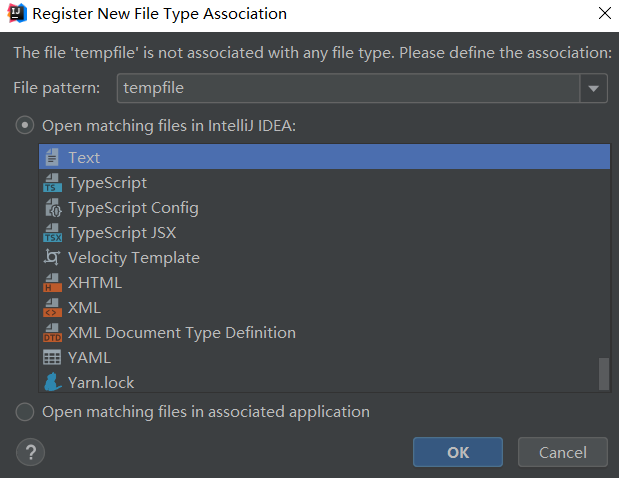\r\n\r\n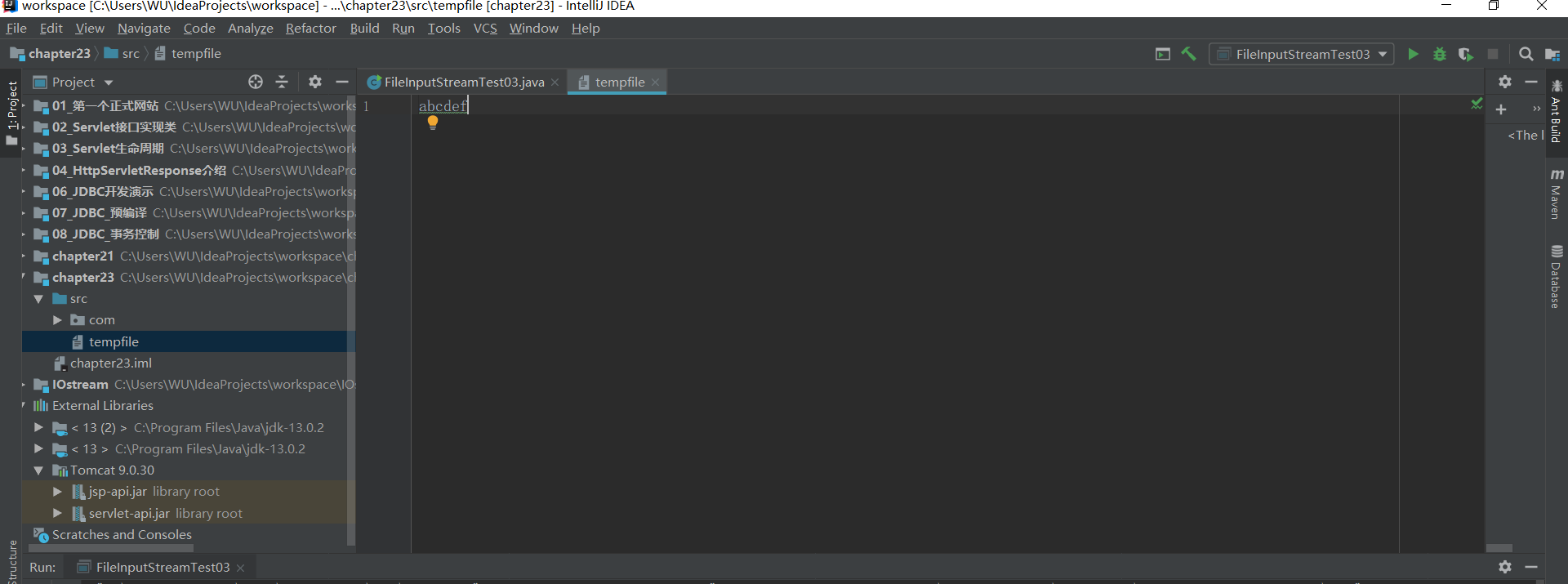\r\n\r\n执行得到以下结果\r\n\r\n\r\n\r\n依然是找不到指定文件\r\n\r\n我们在模块下建立也是不行的\r\n\r\n那将文件放在工程下呢?\r\n\r\n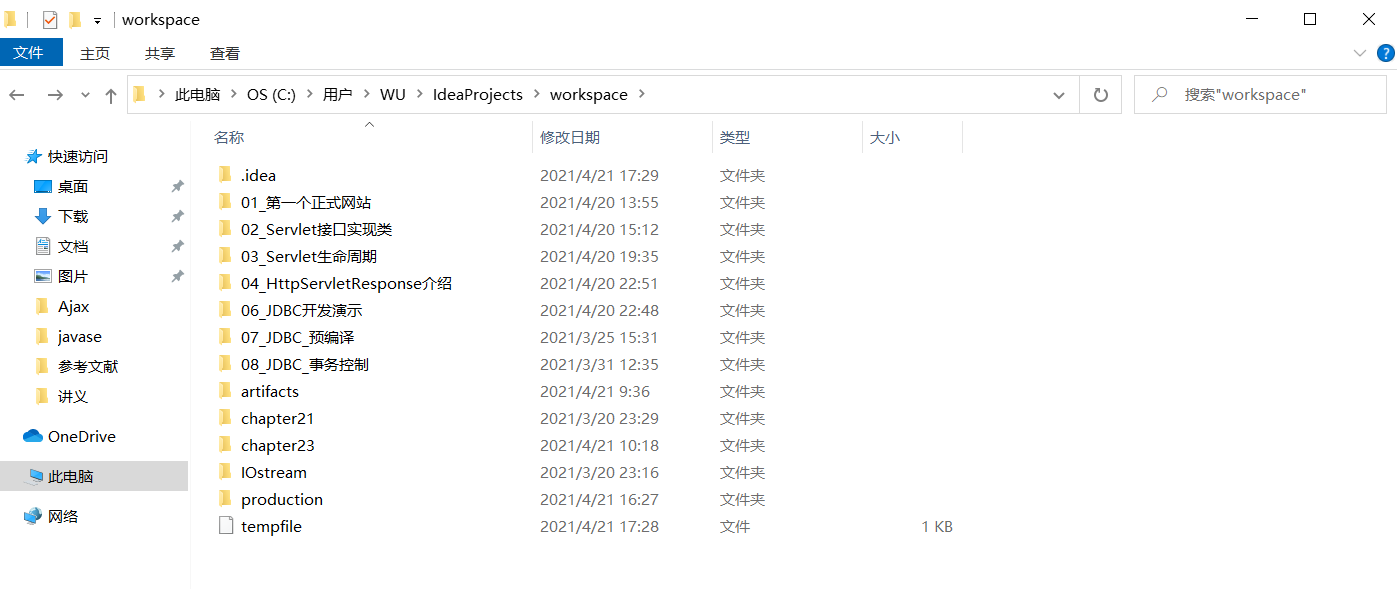\r\n\r\n执行后发现可以了\r\n\r\n那么如何访问在chapter23下的文件呢?\r\n\r\n**chapter23/tempfile2**\r\n\r\n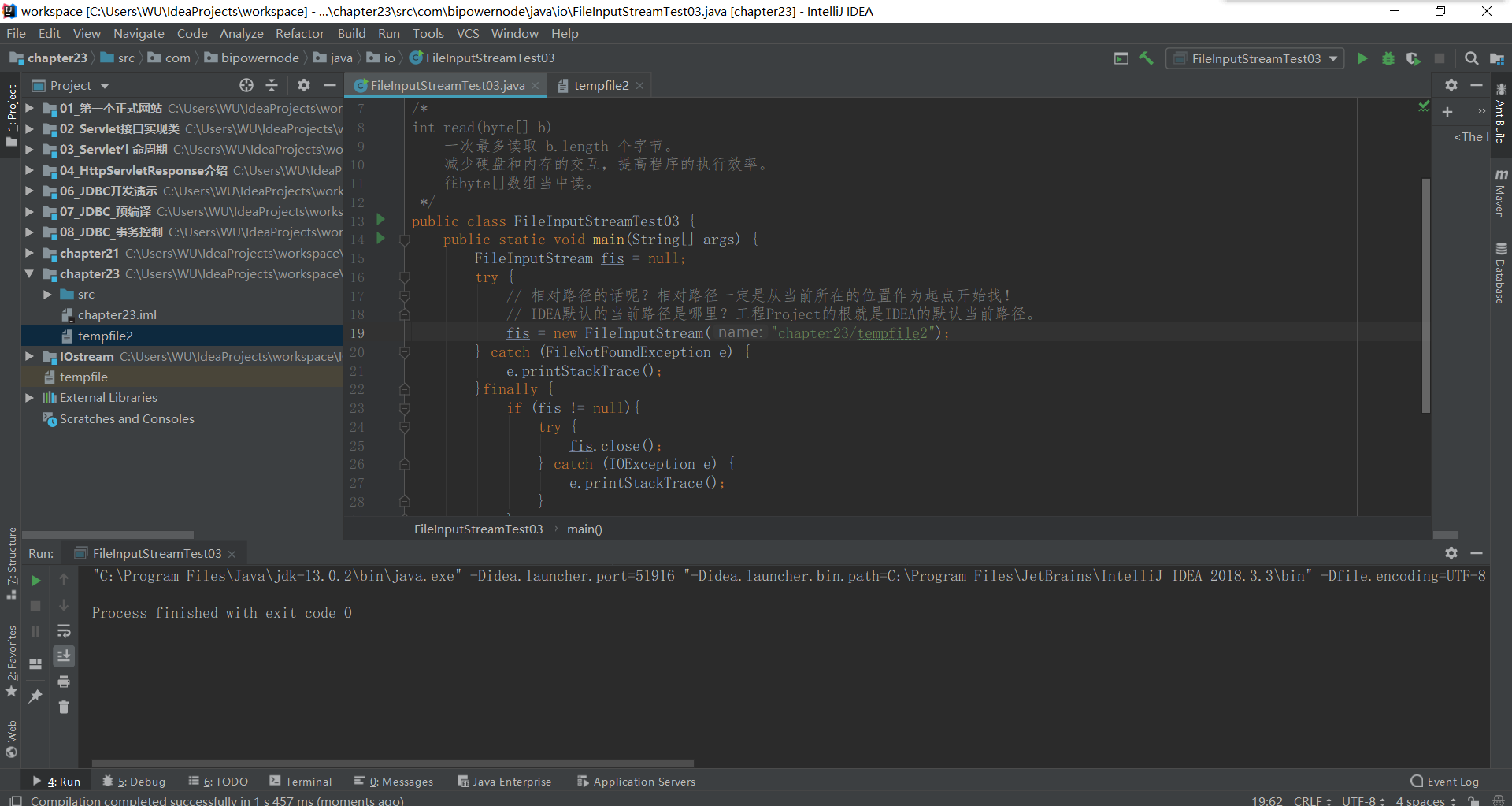\r\n\r\n**看看往byte数组中读**\r\n\r\n```java\r\nimport java.io.FileInputStream;\r\nimport java.io.FileNotFoundException;\r\nimport java.io.IOException;\r\n\r\n/*\r\nint read(byte[] b)\r\n 一次最多读取 b.length 个字节。\r\n 减少硬盘和内存的交互,提高程序的执行效率。\r\n 往byte[]数组当中读。\r\n */\r\npublic class FileInputStreamTest03 {\r\n public static void main(String[] args) {\r\n FileInputStream fis = null;\r\n try {\r\n fis = new FileInputStream(\"chapter23/tempfile2\");\r\n // 开始读,采用byte数组,一次读取多个字节。最多读取“数组.length”个字节。\r\n byte[] bytes = new byte[4]; // 准备一个4个长度的byte数组,一次最多读取4个字节。\r\n // 这个方法的返回值是:读取到的字节数量。(不是字节本身)\r\n int readCount = fis.read(bytes);\r\n System.out.println(readCount); // 第一次读到了4个字节。\r\n //将字节数组全部转换为字符串\r\n System.out.println(new String(bytes));//abcd\r\n\r\n readCount = fis.read(bytes);\r\n System.out.println(readCount);//2\r\n\r\n readCount = fis.read(bytes);//一个字节都没读到\r\n System.out.println(readCount);//-1\r\n } catch (FileNotFoundException e) {\r\n e.printStackTrace();\r\n } catch (IOException e) {\r\n e.printStackTrace();\r\n } finally {\r\n if (fis != null){\r\n try {\r\n fis.close();\r\n } catch (IOException e) {\r\n e.printStackTrace();\r\n }\r\n }\r\n }\r\n }\r\n}\r\n```\r\n[1] 抽象类[https://github.com/xxf-wbw/JavaSE/issues/2](url)\r\n[2]finally语句块[https://github.com/xxf-wbw/JavaSE/issues/3](url)\r\n[3]IDEA异常处理快捷键[https://www.cnblogs.com/lijun6/p/10622089.html](url)","author":{"url":"https://github.com/FiveColors","@type":"Person","name":"FiveColors"},"datePublished":"2021-04-21T03:06:39.000Z","interactionStatistic":{"@type":"InteractionCounter","interactionType":"https://schema.org/CommentAction","userInteractionCount":0},"url":"https://github.com/1/JavaSE/issues/1"}| route-pattern | /_view_fragments/issues/show/:user_id/:repository/:id/issue_layout(.:format) |
| route-controller | voltron_issues_fragments |
| route-action | issue_layout |
| fetch-nonce | v2:83936505-c84f-a26c-25af-a6140bbe1340 |
| current-catalog-service-hash | 81bb79d38c15960b92d99bca9288a9108c7a47b18f2423d0f6438c5b7bcd2114 |
| request-id | AC3C:3DEC57:53C6A99:75DC3A1:6A571CA6 |
| html-safe-nonce | 68bcd5132c8969bd324684dac6c59dde1e6291b4de955c98d427468605423805 |
| visitor-payload | eyJyZWZlcnJlciI6IiIsInJlcXVlc3RfaWQiOiJBQzNDOjNERUM1Nzo1M0M2QTk5Ojc1REMzQTE6NkE1NzFDQTYiLCJ2aXNpdG9yX2lkIjoiNjY2OTg4ODYwMjQ4MTU2NDgzOCIsInJlZ2lvbl9lZGdlIjoiaWFkIiwicmVnaW9uX3JlbmRlciI6ImlhZCJ9 |
| visitor-hmac | 7c834e4f93b7de7e867c36f6b58d220fd5214e7e2a6c2b5aafd6df3a549683e1 |
| hovercard-subject-tag | issue:863405379 |
| github-keyboard-shortcuts | repository,issues,copilot |
| google-site-verification | Apib7-x98H0j5cPqHWwSMm6dNU4GmODRoqxLiDzdx9I |
| octolytics-url | https://collector.github.com/github/collect |
| analytics-location | / |
| fb:app_id | 1401488693436528 |
| apple-itunes-app | app-id=1477376905, app-argument=https://github.com/_view_fragments/issues/show/FiveColors/JavaSE/1/issue_layout |
| twitter:image | https://opengraph.githubassets.com/5bb3d637f06d211768d97d168311d5871c235017fd624be9a6aed97916b52daf/FiveColors/JavaSE/issues/1 |
| twitter:card | summary_large_image |
| og:image | https://opengraph.githubassets.com/5bb3d637f06d211768d97d168311d5871c235017fd624be9a6aed97916b52daf/FiveColors/JavaSE/issues/1 |
| og:image:alt | IO流 IO流概述 IO流就是文件的输入和输出 I : Input O : Output 通过IO可以完成硬盘文件的读和写。 IO流分类 有多种分类方式: 一种方式是按照流的方向进行分类:以内存作为参照物,往内存中去,叫做输入(Input)。或者叫做读(Read)。从内存中出来,叫做输出(Output)。或者叫做写(Write)。 另一种方式是按照读取数据方式不同进行分类:有的流是按照字节的... |
| og:image:width | 1200 |
| og:image:height | 600 |
| og:site_name | GitHub |
| og:type | object |
| og:author:username | FiveColors |
| hostname | github.com |
| expected-hostname | github.com |
| None | 4e7a7296a3830877cf21a6ad2a972c9e618a48915e03966cf0c53eb08e5aad98 |
| turbo-cache-control | no-preview |
| go-import | github.com/FiveColors/JavaSE git https://github.com/FiveColors/JavaSE.git |
| octolytics-dimension-user_id | 56142279 |
| octolytics-dimension-user_login | FiveColors |
| octolytics-dimension-repository_id | 360006615 |
| octolytics-dimension-repository_nwo | FiveColors/JavaSE |
| octolytics-dimension-repository_public | true |
| octolytics-dimension-repository_is_fork | false |
| octolytics-dimension-repository_network_root_id | 360006615 |
| octolytics-dimension-repository_network_root_nwo | FiveColors/JavaSE |
| turbo-body-classes | logged-out env-production page-responsive |
| disable-turbo | false |
| browser-stats-url | https://api.github.com/_private/browser/stats |
| browser-errors-url | https://api.github.com/_private/browser/errors |
| release | 2576d1f0198cf1588faf2edf27f1ed120903be10 |
| ui-target | full |
| theme-color | #1e2327 |
| color-scheme | light dark |
Links:
Viewport: width=device-width


